PowerProtect: Failed to configure syslog forwarding with error authentication mode 'x509/anon' not supported
Summary: PowerProtect Data Manager-failed to configure syslog forwarding with error authentication mode 'x509/anon' not supported.
This article applies to
This article does not apply to
This article is not tied to any specific product.
Not all product versions are identified in this article.
Symptoms
Syslog forwarding is not working over TLS while working fine over UDP.
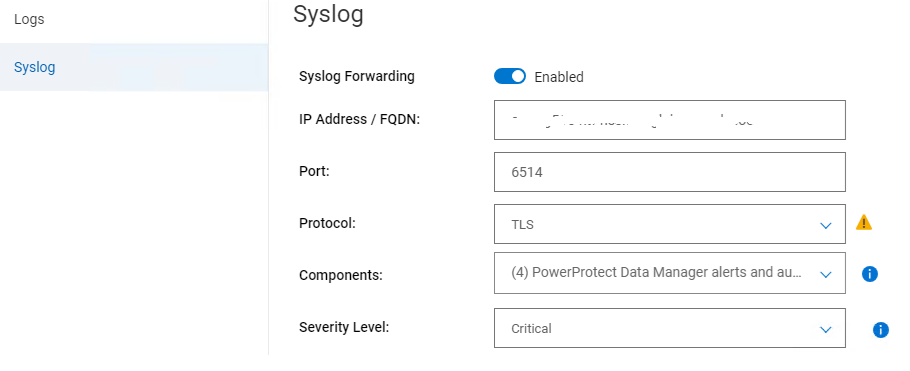
From /var/log/message, we can see below key error:
From /var/log/message, we can see below key error:
2024-06-20T16:16:47.330297+10:00 xxx rsyslogd: error: authentication mode 'x509/anon' not supported by gtls netstream driver
Cause
The authentication mode is not set correctly.
Resolution
1. In the file /usr/local/brs/lib/logmgr/config/syslog-tls.properties, ensure that the syslog.tls.streamDriverAuthMode is anon.
Ensure the StreamDriverAuthMode is "anon"
syslog.tls.streamDriverAuthMode=anon2. In PowerProtect Data Manager syslog, the configuration file (named <uuid>.conf ) under /etc/rsyslog.d.
Ensure the StreamDriverAuthMode is "anon"
 Port="6514"
                Protocol="TCP"
                StreamDriver="gtls"
                StreamDriverMode="1"
                StreamDriverAuthMode="anon"
Affected Products
PowerProtect Data Manager, PowerProtect SoftwareArticle Properties
Article Number: 000226290
Article Type: Solution
Last Modified: 19 Aug 2024
Version: 2
Find answers to your questions from other Dell users
Support Services
Check if your device is covered by Support Services.