ECS: IAM kullanıcısı urn:ecs:iam::ns_name:user/user_name liste grupları iznine sahip değil
Summary: 3.8.x.x sürümüne yükseltmenin ardından, IAM kullanıcıları grupları listeleyemediklerini fark ettiler ve bunu yapmak için izinlerinin olmadığını belirten bir hata aldılar. Ancak bu işlevsellik 3.8.x.x sürümünden önce çalışıyordu. ...
This article applies to
This article does not apply to
This article is not tied to any specific product.
Not all product versions are identified in this article.
Symptoms
Uygulama günlüklerinde şunlar gösteriliyor:
com.amazonaws.services.s3.model.Amazon.S3.Exception: Access Denied (Service: Amazon S3; Status Code: 403; Error Code: AccessDenied; Request ID xxxxxxxx:xxxxxxxxxxx:xxx:xxx; S3 Extended Request ID: null)ECS dataheadsvc-access.log:
169.254.1.1 dataheadsvc-access.log 2024-07-13 08:25:39,993 0a0a0721:190aa2853bc:399:b26 10.1.2.100:9021 10.10.10.100:59871 urn:ecs:iam::ns_name:user/user_name S3%20Browser%209.5.5%20https://s3browser.com GET ns_name - - - HTTP/1.1 403 22 - 123 9 - - - - 'x-amz-date: Sat, 13 Jul 2024 08:25:39 GMT' 'Connection: Keep-Alive'
169.254.1.1 dataheadsvc-access.log 2024-07-13 08:25:39,993 0a0a0721:190aa2853bc:399:b26 10.1.2.100:9021 10.10.10.100:59871 urn:ecs:iam::ns_name:user/user_name S3%20Browser%209.5.5%20https://s3browser.com GET ns_name - - - HTTP/1.1 403 22 - 123 9 - - - - 'x-amz-date: Sat, 13 Jul 2024 08:25:39 GMT' 'Connection: Keep-Alive'
169.254.1.1 dataheadsvc.log 2024-07-13T08:25:39,990 [qtp439631166-1477-0a0a0721:190aa2853bc:399:b26-s3-10.10.10.100] ERROR  PolicyEvaluator.java (line 184) No policies explicitly allow the operation. rp UNKNOWN pb ALLOW sp ALLOW ip UNKNOWN
169.254.1.1 dataheadsvc.log 2024-07-13T08:25:39,991 [qtp439631166-1477-0a0a0721:190aa2853bc:399:b26-s3-10.10.10.100] ERROR  S3Service.java (line 537) iam user urn:ecs:iam::ns_name:user/user_name don't have list buckets permission
Cause
Bu değişiklik kasıtlıydı. Artık 3.8 sürümünde, ListAllMyBuckets eylemi için kullanıcıya bağlı IAM politikasında bir kaynağın * olması gerektiği AWS standartlarıyla daha uyumludur ve bu eylem için herhangi bir klasör politikası desteklenmemektedir.
Resolution
Bu KBA'nın uygulamanın karşılaştığı 403 hatası için geçerli olup olmadığını doğrulamak için aşağıdaki adımları kontrol edin.
Son 1 saat içinde 403 hatasıyla karşılaşan istek kimliğini toplamak için aşağıdaki komutu kullanın:
Example:
:
Example:
Örnekte gösterildiği gibi Hata mesajı görüyorsanız, sorunu çözmek için aşağıdaki adımları izleyin.
ECS kullanıcı arayüzüne bağlanıp "Identity and Access Management (S3)" içerisindeki "Policies" bölümüne gidip değiştirilmesi gereken politikayı bulun. Permissions" altında, "Visual Editor" veya "JSON" öğesini seçebilirsiniz.
Görsel Düzenleyici:
ADD ADDITIONAL PERMISSION" öğesine tıklayın ve aşağıdaki gibi girip ardından "KAYDET" öğesine tıklayın:
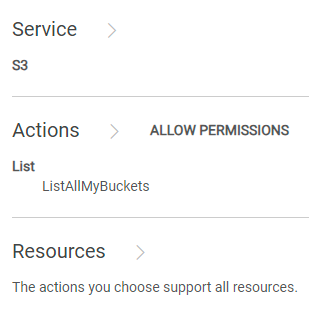
KBA izlendiği halde sorunlar devam ediyorsa Dell EMC Destek yardım hattına başvurun ve yardım için bir servis isteği oluşturun. Bkz. KBA 226898.
Son 1 saat içinde 403 hatasıyla karşılaşan istek kimliğini toplamak için aşağıdaki komutu kullanın:
svc_request summary -t GET -s 403 -start 1h
Example:
admin@ecs01node:~> svc_request summary -t GET -s 403 -start 1h
svc_request v1.2.6 (svc_tools v2.17.0)                 Started 2024-07-13 08:57:43


Time range:                    2024-07-13 07:57:43 - 2024-07-13 08:57:43
Running against node(s):        all
Status Code:                   403
Request Type:                  GET

                                                                                                                       Resp                  Bucket/
                                                                                                           Size        Time                  Object/
Node            Time             Request ID                       Prot  Type   MPU  Client IP       Status (bytes)     (ms)     Namespace    Options
10.1.2.3        07-13 08:25:39   0a0a0721:190aa2853bc:399:b26     s3    GET    -    10.10.7.100     403    123         22       ai_ns        /
10.1.2.3        07-13 08:26:06   0a0a0721:190aa2853bc:456:9c      s3    GET    -    10.10.7.100     403    122         2        ai_ns        /
10.1.2.3        07-13 08:26:18   0a0a0721:190aa2853bc:453:5       s3    GET    -    10.10.7.100     403    121         2        ai_ns        /
10.1.2.3        07-13 08:26:46   0a0a0721:190aa2853bc:446:297     s3    GET    -    10.10.7.100     403    123         2        ai_ns        /
10.1.2.3        07-13 08:27:41   0a0a0721:190aa2853bc:459:ab      s3    GET    -    10.10.7.100     403    122         6        ai_ns        /
10.1.2.3        07-13 08:27:55   0a0a0721:190aa2853bc:45b:1       s3    GET    -    10.10.7.100     403    121         1        ai_ns        /
10.1.2.3        07-13 08:28:30   0a0a0721:190aa2853bc:30c:7a4     s3    GET    -    10.10.7.100     403    123         1        ai_ns        /
10.1.2.3        07-13 08:33:00   0a0a0721:190aa2853bc:451:2b6     s3    GET    -    10.10.7.100     403    123         6        ai_ns        /
10.1.2.3        07-13 08:33:10   0a0a0721:190aa2853bc:461:1       s3    GET    -    10.10.7.100     403    121         6        icrc_pn      /
10.1.2.3        07-13 08:33:18   0a0a0721:190aa2853bc:460:c       s3    GET    -    10.10.7.100     403    121         1        icrc_pn      /
10.1.2.3        07-13 08:34:04   0a0a0721:190aa2853bc:45c:ac      s3    GET    -    10.10.7.100     403    122         1        icrc_pn      /
10.1.2.3        07-13 08:34:33   0a0a0721:190aa2853bc:464:1b      s3    GET    -    10.10.7.100     403    122         2        ai_ns        /
10.1.2.3        07-13 08:34:43   0a0a0721:190aa2853bc:2e4:d3a     s3    GET    -    10.10.7.100     403    123         2        ai_ns        /
10.1.2.3        07-13 08:34:57   0a0a0721:190aa2853bc:468:1       s3    GET    -    10.10.7.100     403    121         2        ai_ns        /
10.1.2.3        07-13 08:35:08   0a0a0721:190aa2853bc:46a:1       s3    GET    -    10.10.7.100     403    121         2        icrc_pn      /
10.1.2.3        07-13 08:37:58   0a0a0721:190aa2853bc:464:39      s3    GET    -    10.10.7.100     403    122         6        icrc_pn      /
10.1.2.3        07-13 08:38:06   0a0a0721:190aa2853bc:451:2d4     s3    GET    -    10.10.7.100     403    123         2        icrc_pn      /
10.1.2.3        07-13 08:38:34   0a0a0721:190aa2853bc:43d:656     s3    GET    -    10.10.7.100     403    123         2        icrc_pn      /
10.1.2.3        07-13 08:39:01   0a0a0721:190aa2853bc:4ec:29      s3    GET    -    10.10.7.100     403    122         1        icrc_pn      /
10.1.2.3        07-13 08:39:15   0a0a0721:190aa2853bc:4ec:2b      s3    GET    -    10.10.7.100     403    122         2        icrc_pn      /
10.1.2.3        07-13 08:39:15   0a0a0721:190aa2853bc:43d:673     s3    GET    -    10.10.7.100     403    123         1        icrc_pn      /
10.1.2.3        07-13 08:39:53   0a0a0721:190aa2853bc:446:2e8     s3    GET    -    10.10.7.100     403    123         1        icrc_pn      /
10.1.2.3        07-13 08:40:25   0a0a0721:190aa2853bc:446:2ec     s3    GET    -    10.10.7.100     403    123         2        icrc_pn      /
10.1.2.3        07-13 08:41:10   0a0a0721:190aa2853bc:4ec:63      s3    GET    -    10.10.7.100     403    122         1        icrc_pn      /
10.1.2.3        07-13 08:41:17   0a0a0721:190aa2853bc:4ec:65      s3    GET    -    10.10.7.100     403    122         1        icrc_pn      /
10.1.2.3        07-13 08:49:21   0a0a0721:190aa2853bc:2e4:d84     s3    GET    -    10.10.7.100     403    123         16       icrc_pn      /
10.1.2.3        07-13 08:49:26   0a0a0721:190aa2853bc:2e4:d86     s3    GET    -    10.10.7.100     403    123         4        icrc_pn      /
10.1.2.3        07-13 08:49:33   0a0a0721:190aa2853bc:4ee:3f6     s3    GET    -    10.10.7.100     403    123         1        icrc_pn      /
10.1.2.4        07-13 08:10:29   0a0a0722:190a9ee8298:12:35c      s3    GET    -    10.10.31.8      403    122         10       datas_ns     /
10.1.2.7        07-13 08:00:40   0a0a0725:190aab7d88f:1f:105      s3    GET    -    10.10.31.8      403    122         29       icrc_pn      /

admin@ecs01node:~>
Son adımdan toplanan istek kimliklerinden biri için Grep komutu
:
svc_log -f "0a0a0721:190aa281234:399:b26" -sr all -n all -sn -sf -start 1h
Example:
admin@ecsnode01:~> svc_log -f "0a0a0721:190aa281234:399:b26" -sr all -n all -sn -sf -start 1h
svc_log v1.0.33 (svc_tools v2.17.0)                 Started 2024-07-13 09:02:42

Running on nodes:                        <All nodes>
Time range:                              2024-07-13 08:02:42 - 2024-07-13 09:02:42
Filter string(s):                        '0a0a0721:190aa281234:399:b26'
Service(s) to search:                    zk-fabric,cm,am,metering,resourcesvc,nvmeengine,casaccess,vnest,upgrade,ecsportalsvc,blobsvc,coordinatorsvc,authsvc,atlas,rm,eventsvc,dataheadsvc,stat,dm,accesslog,zk-object,objcontrolsvc,ssm,nginx,nvmetargetviewer,messages-object,dtsm,provisionsvc,lifecycle,dataheadsvc-access,georeceiver,sr,transformsvc,dtquery,storageserver,datahead-cas-access
Show filename(s):                        True
Show nodename(s):                        True
Log type(s) to search for each service:  <Main Logs>
Show nodename(s):                        True

169.254.1.1 dataheadsvc-access.log 2024-07-13 08:25:39,993 0a0a0721:190aa281234:399:b26 10.1.2.3:9021 10.10.10.100:59871 urn:ecs:iam::ns_name:user/user_name S3%20Browser%209.5.5%20https://s3browser.com GET ns_name - - - HTTP/1.1 403 22 - 123 9 - - - - 'x-amz-date: Sat, 13 Jul 2024 08:25:39 GMT' 'Connection: Keep-Alive'
169.254.1.1 dataheadsvc-access.log 2024-07-13 08:25:39,993 0a0a0721:190aa281234:399:b26 10.1.2.3:9021 10.10.10.100:59871 urn:ecs:iam::ns_name:user/user_name S3%20Browser%209.5.5%20https://s3browser.com GET ns_name - - - HTTP/1.1 403 22 - 123 9 - - - - 'x-amz-date: Sat, 13 Jul 2024 08:25:39 GMT' 'Connection: Keep-Alive'
169.254.1.1 dataheadsvc.log 2024-07-13T08:25:39,990 [qtp439631166-1477-0a0a0721:190aa281234:399:b26-s3-10.10.10.100] ERROR  PolicyEvaluator.java (line 184) No policies explicitly allow the operation. rp UNKNOWN pb ALLOW sp ALLOW ip UNKNOWN
169.254.1.1 dataheadsvc.log 2024-07-13T08:25:39,991 [qtp439631166-1477-0a0a0721:190aa281234:399:b26-s3-10.10.10.100] ERROR  S3Service.java (line 537) iam user urn:ecs:iam::ns_name:user/user_name don't have list buckets permission

admin@ecsnode01:~>
Örnekte gösterildiği gibi Hata mesajı görüyorsanız, sorunu çözmek için aşağıdaki adımları izleyin.
ECS kullanıcı arayüzüne bağlanıp "Identity and Access Management (S3)" içerisindeki "Policies" bölümüne gidip değiştirilmesi gereken politikayı bulun. Permissions" altında, "Visual Editor" veya "JSON" öğesini seçebilirsiniz.
Görsel Düzenleyici:
ADD ADDITIONAL PERMISSION" öğesine tıklayın ve aşağıdaki gibi girip ardından "KAYDET" öğesine tıklayın:
AWS standartlarına göre ListAllMyBuckets eylemi, diğer IAM kullanıcıları tarafından oluşturulan tüm klasörleri listeleme olanağı sağlar. Bu nedenle, ListAllMyBuckets eylemi için tüm kaynaklara erişim izni veren görsel düzenleyicinin yaklaşımı da uyumludur.
Temel olarak, aşağıda belirtilen üç yöntemin tümü, tüm kovalara erişim izni veren aynı hedefe ulaşır.
JSON:Politikanın mevcut bildirimine aşağıdakini ekleyin.
   {
      "Sid": "VisualEditor1",
      "Effect": "Allow",
      "Action": [
        "s3:ListAllMyBuckets"
      ],
      "Resource": []
    }
 {
      "Action": "s3:ListAllMyBuckets",
      "Resource": [
        "arn:aws:s3:::*",
        "arn:aws:s3:::*/*"
      ],
      "Effect": "Allow",
      "Sid": "VisualEditor1"
    }
   {
      "Action": [
        "s3:ListAllMyBuckets"
      ],
      "Resource": "*",
      "Effect": "Allow",
      "Sid": "VisualEditor1"
    }
KBA izlendiği halde sorunlar devam ediyorsa Dell EMC Destek yardım hattına başvurun ve yardım için bir servis isteği oluşturun. Bkz. KBA 226898.
Affected Products
ECSProducts
ECS Appliance, ECS Appliance Hardware Series, ECS Software, Elastic Cloud StorageArticle Properties
Article Number: 000226898
Article Type: Solution
Last Modified: 15 Aug 2024
Version: 2
Find answers to your questions from other Dell users
Support Services
Check if your device is covered by Support Services.