ECS:IAM 用户 urn:ecs:iam::ns_name:user/user_name 没有列出存储桶权限
Summary: 升级到版本 3.8.x.x 后,IAM 用户发现自己无法列出存储区,并收到一条错误消息,指示缺少执行此操作的权限。但是,此功能在 3.8.x.x 版本之前已运行。
This article applies to
This article does not apply to
This article is not tied to any specific product.
Not all product versions are identified in this article.
Symptoms
应用程序日志显示:
com.amazonaws.services.s3.model.Amazon.S3.Exception: Access Denied (Service: Amazon S3; Status Code: 403; Error Code: AccessDenied; Request ID xxxxxxxx:xxxxxxxxxxx:xxx:xxx; S3 Extended Request ID: null)ECS dataheadsvc-access.log:
169.254.1.1 dataheadsvc-access.log 2024-07-13 08:25:39,993 0a0a0721:190aa2853bc:399:b26 10.1.2.100:9021 10.10.10.100:59871 urn:ecs:iam::ns_name:user/user_name S3%20Browser%209.5.5%20https://s3browser.com GET ns_name - - - HTTP/1.1 403 22 - 123 9 - - - - 'x-amz-date: Sat, 13 Jul 2024 08:25:39 GMT' 'Connection: Keep-Alive'
169.254.1.1 dataheadsvc-access.log 2024-07-13 08:25:39,993 0a0a0721:190aa2853bc:399:b26 10.1.2.100:9021 10.10.10.100:59871 urn:ecs:iam::ns_name:user/user_name S3%20Browser%209.5.5%20https://s3browser.com GET ns_name - - - HTTP/1.1 403 22 - 123 9 - - - - 'x-amz-date: Sat, 13 Jul 2024 08:25:39 GMT' 'Connection: Keep-Alive'
169.254.1.1 dataheadsvc.log 2024-07-13T08:25:39,990 [qtp439631166-1477-0a0a0721:190aa2853bc:399:b26-s3-10.10.10.100] ERROR  PolicyEvaluator.java (line 184) No policies explicitly allow the operation. rp UNKNOWN pb ALLOW sp ALLOW ip UNKNOWN
169.254.1.1 dataheadsvc.log 2024-07-13T08:25:39,991 [qtp439631166-1477-0a0a0721:190aa2853bc:399:b26-s3-10.10.10.100] ERROR  S3Service.java (line 537) iam user urn:ecs:iam::ns_name:user/user_name don't have list buckets permission
Cause
这种修改是故意的。现在,在 3.8 中,它更符合 AWS 标准,对于 ListAllMyBuckets 操作,资源必须在 IAM 策略中 * 附加到用户,此操作不支持存储桶策略。
Resolution
检查以下步骤以验证此 KBA 是否适用于应用程序面临的 403 错误。
使用以下命令收集请求 ID 在过去 1 小时内遇到 403 错误的情况:
示例:
Command:
示例:
如果您看到示例中所示的错误消息,请按照以下步骤解决问题。
连接到 ECS UI 并导航到“身份和访问管理 (S3)”中的“策略”部分,找到必须修改的策略。在“Permissions”下,您可以选择“Visual Editor”或“JSON”。
可视化编辑器:
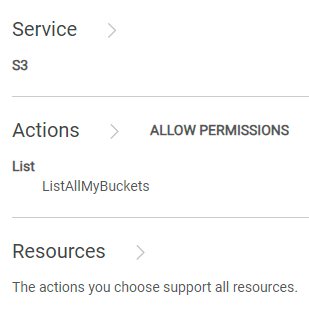
单击“ADD ADDITIONAL PERMISSION”,输入以下内容,然后单击“SAVE”:
如果遵循 KBA 后问题仍然存在,请联系 Dell EMC 支持热线并创建服务请求以获得帮助。请参阅 KBA 226898。
使用以下命令收集请求 ID 在过去 1 小时内遇到 403 错误的情况:
svc_request summary -t GET -s 403 -start 1h
示例:
admin@ecs01node:~> svc_request summary -t GET -s 403 -start 1h
svc_request v1.2.6 (svc_tools v2.17.0)                 Started 2024-07-13 08:57:43


Time range:                    2024-07-13 07:57:43 - 2024-07-13 08:57:43
Running against node(s):        all
Status Code:                   403
Request Type:                  GET

                                                                                                                       Resp                  Bucket/
                                                                                                           Size        Time                  Object/
Node            Time             Request ID                       Prot  Type   MPU  Client IP       Status (bytes)     (ms)     Namespace    Options
10.1.2.3        07-13 08:25:39   0a0a0721:190aa2853bc:399:b26     s3    GET    -    10.10.7.100     403    123         22       ai_ns        /
10.1.2.3        07-13 08:26:06   0a0a0721:190aa2853bc:456:9c      s3    GET    -    10.10.7.100     403    122         2        ai_ns        /
10.1.2.3        07-13 08:26:18   0a0a0721:190aa2853bc:453:5       s3    GET    -    10.10.7.100     403    121         2        ai_ns        /
10.1.2.3        07-13 08:26:46   0a0a0721:190aa2853bc:446:297     s3    GET    -    10.10.7.100     403    123         2        ai_ns        /
10.1.2.3        07-13 08:27:41   0a0a0721:190aa2853bc:459:ab      s3    GET    -    10.10.7.100     403    122         6        ai_ns        /
10.1.2.3        07-13 08:27:55   0a0a0721:190aa2853bc:45b:1       s3    GET    -    10.10.7.100     403    121         1        ai_ns        /
10.1.2.3        07-13 08:28:30   0a0a0721:190aa2853bc:30c:7a4     s3    GET    -    10.10.7.100     403    123         1        ai_ns        /
10.1.2.3        07-13 08:33:00   0a0a0721:190aa2853bc:451:2b6     s3    GET    -    10.10.7.100     403    123         6        ai_ns        /
10.1.2.3        07-13 08:33:10   0a0a0721:190aa2853bc:461:1       s3    GET    -    10.10.7.100     403    121         6        icrc_pn      /
10.1.2.3        07-13 08:33:18   0a0a0721:190aa2853bc:460:c       s3    GET    -    10.10.7.100     403    121         1        icrc_pn      /
10.1.2.3        07-13 08:34:04   0a0a0721:190aa2853bc:45c:ac      s3    GET    -    10.10.7.100     403    122         1        icrc_pn      /
10.1.2.3        07-13 08:34:33   0a0a0721:190aa2853bc:464:1b      s3    GET    -    10.10.7.100     403    122         2        ai_ns        /
10.1.2.3        07-13 08:34:43   0a0a0721:190aa2853bc:2e4:d3a     s3    GET    -    10.10.7.100     403    123         2        ai_ns        /
10.1.2.3        07-13 08:34:57   0a0a0721:190aa2853bc:468:1       s3    GET    -    10.10.7.100     403    121         2        ai_ns        /
10.1.2.3        07-13 08:35:08   0a0a0721:190aa2853bc:46a:1       s3    GET    -    10.10.7.100     403    121         2        icrc_pn      /
10.1.2.3        07-13 08:37:58   0a0a0721:190aa2853bc:464:39      s3    GET    -    10.10.7.100     403    122         6        icrc_pn      /
10.1.2.3        07-13 08:38:06   0a0a0721:190aa2853bc:451:2d4     s3    GET    -    10.10.7.100     403    123         2        icrc_pn      /
10.1.2.3        07-13 08:38:34   0a0a0721:190aa2853bc:43d:656     s3    GET    -    10.10.7.100     403    123         2        icrc_pn      /
10.1.2.3        07-13 08:39:01   0a0a0721:190aa2853bc:4ec:29      s3    GET    -    10.10.7.100     403    122         1        icrc_pn      /
10.1.2.3        07-13 08:39:15   0a0a0721:190aa2853bc:4ec:2b      s3    GET    -    10.10.7.100     403    122         2        icrc_pn      /
10.1.2.3        07-13 08:39:15   0a0a0721:190aa2853bc:43d:673     s3    GET    -    10.10.7.100     403    123         1        icrc_pn      /
10.1.2.3        07-13 08:39:53   0a0a0721:190aa2853bc:446:2e8     s3    GET    -    10.10.7.100     403    123         1        icrc_pn      /
10.1.2.3        07-13 08:40:25   0a0a0721:190aa2853bc:446:2ec     s3    GET    -    10.10.7.100     403    123         2        icrc_pn      /
10.1.2.3        07-13 08:41:10   0a0a0721:190aa2853bc:4ec:63      s3    GET    -    10.10.7.100     403    122         1        icrc_pn      /
10.1.2.3        07-13 08:41:17   0a0a0721:190aa2853bc:4ec:65      s3    GET    -    10.10.7.100     403    122         1        icrc_pn      /
10.1.2.3        07-13 08:49:21   0a0a0721:190aa2853bc:2e4:d84     s3    GET    -    10.10.7.100     403    123         16       icrc_pn      /
10.1.2.3        07-13 08:49:26   0a0a0721:190aa2853bc:2e4:d86     s3    GET    -    10.10.7.100     403    123         4        icrc_pn      /
10.1.2.3        07-13 08:49:33   0a0a0721:190aa2853bc:4ee:3f6     s3    GET    -    10.10.7.100     403    123         1        icrc_pn      /
10.1.2.4        07-13 08:10:29   0a0a0722:190a9ee8298:12:35c      s3    GET    -    10.10.31.8      403    122         10       datas_ns     /
10.1.2.7        07-13 08:00:40   0a0a0725:190aab7d88f:1f:105      s3    GET    -    10.10.31.8      403    122         29       icrc_pn      /

admin@ecs01node:~>
Grep 从上一步收集的请求 ID 之一:
Command:
svc_log -f "0a0a0721:190aa281234:399:b26" -sr all -n all -sn -sf -start 1h
示例:
admin@ecsnode01:~> svc_log -f "0a0a0721:190aa281234:399:b26" -sr all -n all -sn -sf -start 1h
svc_log v1.0.33 (svc_tools v2.17.0)                 Started 2024-07-13 09:02:42

Running on nodes:                        <All nodes>
Time range:                              2024-07-13 08:02:42 - 2024-07-13 09:02:42
Filter string(s):                        '0a0a0721:190aa281234:399:b26'
Service(s) to search:                    zk-fabric,cm,am,metering,resourcesvc,nvmeengine,casaccess,vnest,upgrade,ecsportalsvc,blobsvc,coordinatorsvc,authsvc,atlas,rm,eventsvc,dataheadsvc,stat,dm,accesslog,zk-object,objcontrolsvc,ssm,nginx,nvmetargetviewer,messages-object,dtsm,provisionsvc,lifecycle,dataheadsvc-access,georeceiver,sr,transformsvc,dtquery,storageserver,datahead-cas-access
Show filename(s):                        True
Show nodename(s):                        True
Log type(s) to search for each service:  <Main Logs>
Show nodename(s):                        True

169.254.1.1 dataheadsvc-access.log 2024-07-13 08:25:39,993 0a0a0721:190aa281234:399:b26 10.1.2.3:9021 10.10.10.100:59871 urn:ecs:iam::ns_name:user/user_name S3%20Browser%209.5.5%20https://s3browser.com GET ns_name - - - HTTP/1.1 403 22 - 123 9 - - - - 'x-amz-date: Sat, 13 Jul 2024 08:25:39 GMT' 'Connection: Keep-Alive'
169.254.1.1 dataheadsvc-access.log 2024-07-13 08:25:39,993 0a0a0721:190aa281234:399:b26 10.1.2.3:9021 10.10.10.100:59871 urn:ecs:iam::ns_name:user/user_name S3%20Browser%209.5.5%20https://s3browser.com GET ns_name - - - HTTP/1.1 403 22 - 123 9 - - - - 'x-amz-date: Sat, 13 Jul 2024 08:25:39 GMT' 'Connection: Keep-Alive'
169.254.1.1 dataheadsvc.log 2024-07-13T08:25:39,990 [qtp439631166-1477-0a0a0721:190aa281234:399:b26-s3-10.10.10.100] ERROR  PolicyEvaluator.java (line 184) No policies explicitly allow the operation. rp UNKNOWN pb ALLOW sp ALLOW ip UNKNOWN
169.254.1.1 dataheadsvc.log 2024-07-13T08:25:39,991 [qtp439631166-1477-0a0a0721:190aa281234:399:b26-s3-10.10.10.100] ERROR  S3Service.java (line 537) iam user urn:ecs:iam::ns_name:user/user_name don't have list buckets permission

admin@ecsnode01:~>
如果您看到示例中所示的错误消息,请按照以下步骤解决问题。
连接到 ECS UI 并导航到“身份和访问管理 (S3)”中的“策略”部分,找到必须修改的策略。在“Permissions”下,您可以选择“Visual Editor”或“JSON”。
可视化编辑器:
单击“ADD ADDITIONAL PERMISSION”,输入以下内容,然后单击“SAVE”:
根据 AWS 标准, ListAllMyBuckets 操作提供了列出其他 IAM 用户创建的所有存储桶的功能。因此,可视编辑器授予对 ListAllMyBuckets 操作的所有资源的访问权限的方法也是合规的。
从本质上讲,下面提到的所有三种方法都实现了相同的目标,即授予对所有存储桶的访问权限。
JSON:将以下内容附加到策略的现有声明中。
   {
      "Sid": "VisualEditor1",
      "Effect": "Allow",
      "Action": [
        "s3:ListAllMyBuckets"
      ],
      "Resource": []
    }
 {
      "Action": "s3:ListAllMyBuckets",
      "Resource": [
        "arn:aws:s3:::*",
        "arn:aws:s3:::*/*"
      ],
      "Effect": "Allow",
      "Sid": "VisualEditor1"
    }
   {
      "Action": [
        "s3:ListAllMyBuckets"
      ],
      "Resource": "*",
      "Effect": "Allow",
      "Sid": "VisualEditor1"
    }
如果遵循 KBA 后问题仍然存在,请联系 Dell EMC 支持热线并创建服务请求以获得帮助。请参阅 KBA 226898。
Affected Products
ECSProducts
ECS Appliance, ECS Appliance Hardware Series, ECS Software, Elastic Cloud StorageArticle Properties
Article Number: 000226898
Article Type: Solution
Last Modified: 15 Aug 2024
Version: 2
Find answers to your questions from other Dell users
Support Services
Check if your device is covered by Support Services.