ECS: L'utente IAM urn:ecs:iam::ns_name:user/user_name non dispone dell'autorizzazione per i bucket dell'elenco
Summary: Dopo l'aggiornamento alla versione 3.8.x.x, gli utenti IAM non sono riusciti a elencare i bucket e hanno ricevuto un errore che indicava la mancanza dell'autorizzazione per farlo. Questa funzionalità, tuttavia, era operativa prima della versione 3.8.x.x. ...
This article applies to
This article does not apply to
This article is not tied to any specific product.
Not all product versions are identified in this article.
Symptoms
I registri delle applicazioni mostrano:
com.amazonaws.services.s3.model.Amazon.S3.Exception: Access Denied (Service: Amazon S3; Status Code: 403; Error Code: AccessDenied; Request ID xxxxxxxx:xxxxxxxxxxx:xxx:xxx; S3 Extended Request ID: null)ECS dataheadsvc-access.log:
169.254.1.1 dataheadsvc-access.log 2024-07-13 08:25:39,993 0a0a0721:190aa2853bc:399:b26 10.1.2.100:9021 10.10.10.100:59871 urn:ecs:iam::ns_name:user/user_name S3%20Browser%209.5.5%20https://s3browser.com GET ns_name - - - HTTP/1.1 403 22 - 123 9 - - - - 'x-amz-date: Sat, 13 Jul 2024 08:25:39 GMT' 'Connection: Keep-Alive'
169.254.1.1 dataheadsvc-access.log 2024-07-13 08:25:39,993 0a0a0721:190aa2853bc:399:b26 10.1.2.100:9021 10.10.10.100:59871 urn:ecs:iam::ns_name:user/user_name S3%20Browser%209.5.5%20https://s3browser.com GET ns_name - - - HTTP/1.1 403 22 - 123 9 - - - - 'x-amz-date: Sat, 13 Jul 2024 08:25:39 GMT' 'Connection: Keep-Alive'
169.254.1.1 dataheadsvc.log 2024-07-13T08:25:39,990 [qtp439631166-1477-0a0a0721:190aa2853bc:399:b26-s3-10.10.10.100] ERROR  PolicyEvaluator.java (line 184) No policies explicitly allow the operation. rp UNKNOWN pb ALLOW sp ALLOW ip UNKNOWN
169.254.1.1 dataheadsvc.log 2024-07-13T08:25:39,991 [qtp439631166-1477-0a0a0721:190aa2853bc:399:b26-s3-10.10.10.100] ERROR  S3Service.java (line 537) iam user urn:ecs:iam::ns_name:user/user_name don't have list buckets permission
Cause
Questa modifica è stata intenzionale. Ora, nella versione 3.8, è più conforme agli standard AWS in cui, per l'operazione ListAllMyBuckets , una risorsa deve essere * nella policy IAM collegata all'utente, non è supportata alcuna policy di bucket per questa operazione.
Resolution
Controllare la procedura riportata di seguito per verificare se questo KBA si applica all'errore 403 riscontrato dall'applicazione.
Utilizzare il comando riportato di seguito per raccogliere gli ID richiesta che hanno riscontrato l'errore 403 nell'ultima 1 ora:
Esempio:
comando:
Esempio:
Se viene visualizzato il messaggio di errore come mostrato nell'esempio, attenersi alla procedura riportata di seguito per risolvere il problema.
Connettersi all'interfaccia utente di ECS e passare alla sezione "Policies" all'interno di "Identity and Access Management (S3)" e individuare la policy che deve essere modificata. In "Permissions", puoi selezionare "Visual Editor" o "JSON".
Editor visuale:
Cliccare su "ADD ADDITIONAL PERMISSION" e immettere come segue, quindi cliccare su "SAVE":
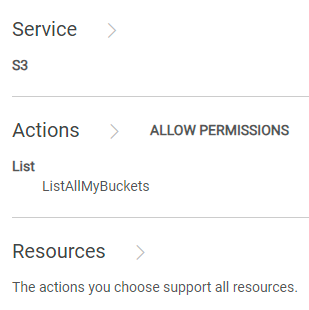
Se si segue l'articolo della KB e il problema persiste, contattare la hotline del supporto Dell EMC e creare una Service Request per l'assistenza. Vedere l'articolo della KB 226898.
Utilizzare il comando riportato di seguito per raccogliere gli ID richiesta che hanno riscontrato l'errore 403 nell'ultima 1 ora:
svc_request summary -t GET -s 403 -start 1h
Esempio:
admin@ecs01node:~> svc_request summary -t GET -s 403 -start 1h
svc_request v1.2.6 (svc_tools v2.17.0)                 Started 2024-07-13 08:57:43


Time range:                    2024-07-13 07:57:43 - 2024-07-13 08:57:43
Running against node(s):        all
Status Code:                   403
Request Type:                  GET

                                                                                                                       Resp                  Bucket/
                                                                                                           Size        Time                  Object/
Node            Time             Request ID                       Prot  Type   MPU  Client IP       Status (bytes)     (ms)     Namespace    Options
10.1.2.3        07-13 08:25:39   0a0a0721:190aa2853bc:399:b26     s3    GET    -    10.10.7.100     403    123         22       ai_ns        /
10.1.2.3        07-13 08:26:06   0a0a0721:190aa2853bc:456:9c      s3    GET    -    10.10.7.100     403    122         2        ai_ns        /
10.1.2.3        07-13 08:26:18   0a0a0721:190aa2853bc:453:5       s3    GET    -    10.10.7.100     403    121         2        ai_ns        /
10.1.2.3        07-13 08:26:46   0a0a0721:190aa2853bc:446:297     s3    GET    -    10.10.7.100     403    123         2        ai_ns        /
10.1.2.3        07-13 08:27:41   0a0a0721:190aa2853bc:459:ab      s3    GET    -    10.10.7.100     403    122         6        ai_ns        /
10.1.2.3        07-13 08:27:55   0a0a0721:190aa2853bc:45b:1       s3    GET    -    10.10.7.100     403    121         1        ai_ns        /
10.1.2.3        07-13 08:28:30   0a0a0721:190aa2853bc:30c:7a4     s3    GET    -    10.10.7.100     403    123         1        ai_ns        /
10.1.2.3        07-13 08:33:00   0a0a0721:190aa2853bc:451:2b6     s3    GET    -    10.10.7.100     403    123         6        ai_ns        /
10.1.2.3        07-13 08:33:10   0a0a0721:190aa2853bc:461:1       s3    GET    -    10.10.7.100     403    121         6        icrc_pn      /
10.1.2.3        07-13 08:33:18   0a0a0721:190aa2853bc:460:c       s3    GET    -    10.10.7.100     403    121         1        icrc_pn      /
10.1.2.3        07-13 08:34:04   0a0a0721:190aa2853bc:45c:ac      s3    GET    -    10.10.7.100     403    122         1        icrc_pn      /
10.1.2.3        07-13 08:34:33   0a0a0721:190aa2853bc:464:1b      s3    GET    -    10.10.7.100     403    122         2        ai_ns        /
10.1.2.3        07-13 08:34:43   0a0a0721:190aa2853bc:2e4:d3a     s3    GET    -    10.10.7.100     403    123         2        ai_ns        /
10.1.2.3        07-13 08:34:57   0a0a0721:190aa2853bc:468:1       s3    GET    -    10.10.7.100     403    121         2        ai_ns        /
10.1.2.3        07-13 08:35:08   0a0a0721:190aa2853bc:46a:1       s3    GET    -    10.10.7.100     403    121         2        icrc_pn      /
10.1.2.3        07-13 08:37:58   0a0a0721:190aa2853bc:464:39      s3    GET    -    10.10.7.100     403    122         6        icrc_pn      /
10.1.2.3        07-13 08:38:06   0a0a0721:190aa2853bc:451:2d4     s3    GET    -    10.10.7.100     403    123         2        icrc_pn      /
10.1.2.3        07-13 08:38:34   0a0a0721:190aa2853bc:43d:656     s3    GET    -    10.10.7.100     403    123         2        icrc_pn      /
10.1.2.3        07-13 08:39:01   0a0a0721:190aa2853bc:4ec:29      s3    GET    -    10.10.7.100     403    122         1        icrc_pn      /
10.1.2.3        07-13 08:39:15   0a0a0721:190aa2853bc:4ec:2b      s3    GET    -    10.10.7.100     403    122         2        icrc_pn      /
10.1.2.3        07-13 08:39:15   0a0a0721:190aa2853bc:43d:673     s3    GET    -    10.10.7.100     403    123         1        icrc_pn      /
10.1.2.3        07-13 08:39:53   0a0a0721:190aa2853bc:446:2e8     s3    GET    -    10.10.7.100     403    123         1        icrc_pn      /
10.1.2.3        07-13 08:40:25   0a0a0721:190aa2853bc:446:2ec     s3    GET    -    10.10.7.100     403    123         2        icrc_pn      /
10.1.2.3        07-13 08:41:10   0a0a0721:190aa2853bc:4ec:63      s3    GET    -    10.10.7.100     403    122         1        icrc_pn      /
10.1.2.3        07-13 08:41:17   0a0a0721:190aa2853bc:4ec:65      s3    GET    -    10.10.7.100     403    122         1        icrc_pn      /
10.1.2.3        07-13 08:49:21   0a0a0721:190aa2853bc:2e4:d84     s3    GET    -    10.10.7.100     403    123         16       icrc_pn      /
10.1.2.3        07-13 08:49:26   0a0a0721:190aa2853bc:2e4:d86     s3    GET    -    10.10.7.100     403    123         4        icrc_pn      /
10.1.2.3        07-13 08:49:33   0a0a0721:190aa2853bc:4ee:3f6     s3    GET    -    10.10.7.100     403    123         1        icrc_pn      /
10.1.2.4        07-13 08:10:29   0a0a0722:190a9ee8298:12:35c      s3    GET    -    10.10.31.8      403    122         10       datas_ns     /
10.1.2.7        07-13 08:00:40   0a0a0725:190aab7d88f:1f:105      s3    GET    -    10.10.31.8      403    122         29       icrc_pn      /

admin@ecs01node:~>
Grep per uno degli ID richiesta raccolti dall'ultimo passaggio:
comando:
svc_log -f "0a0a0721:190aa281234:399:b26" -sr all -n all -sn -sf -start 1h
Esempio:
admin@ecsnode01:~> svc_log -f "0a0a0721:190aa281234:399:b26" -sr all -n all -sn -sf -start 1h
svc_log v1.0.33 (svc_tools v2.17.0)                 Started 2024-07-13 09:02:42

Running on nodes:                        <All nodes>
Time range:                              2024-07-13 08:02:42 - 2024-07-13 09:02:42
Filter string(s):                        '0a0a0721:190aa281234:399:b26'
Service(s) to search:                    zk-fabric,cm,am,metering,resourcesvc,nvmeengine,casaccess,vnest,upgrade,ecsportalsvc,blobsvc,coordinatorsvc,authsvc,atlas,rm,eventsvc,dataheadsvc,stat,dm,accesslog,zk-object,objcontrolsvc,ssm,nginx,nvmetargetviewer,messages-object,dtsm,provisionsvc,lifecycle,dataheadsvc-access,georeceiver,sr,transformsvc,dtquery,storageserver,datahead-cas-access
Show filename(s):                        True
Show nodename(s):                        True
Log type(s) to search for each service:  <Main Logs>
Show nodename(s):                        True

169.254.1.1 dataheadsvc-access.log 2024-07-13 08:25:39,993 0a0a0721:190aa281234:399:b26 10.1.2.3:9021 10.10.10.100:59871 urn:ecs:iam::ns_name:user/user_name S3%20Browser%209.5.5%20https://s3browser.com GET ns_name - - - HTTP/1.1 403 22 - 123 9 - - - - 'x-amz-date: Sat, 13 Jul 2024 08:25:39 GMT' 'Connection: Keep-Alive'
169.254.1.1 dataheadsvc-access.log 2024-07-13 08:25:39,993 0a0a0721:190aa281234:399:b26 10.1.2.3:9021 10.10.10.100:59871 urn:ecs:iam::ns_name:user/user_name S3%20Browser%209.5.5%20https://s3browser.com GET ns_name - - - HTTP/1.1 403 22 - 123 9 - - - - 'x-amz-date: Sat, 13 Jul 2024 08:25:39 GMT' 'Connection: Keep-Alive'
169.254.1.1 dataheadsvc.log 2024-07-13T08:25:39,990 [qtp439631166-1477-0a0a0721:190aa281234:399:b26-s3-10.10.10.100] ERROR  PolicyEvaluator.java (line 184) No policies explicitly allow the operation. rp UNKNOWN pb ALLOW sp ALLOW ip UNKNOWN
169.254.1.1 dataheadsvc.log 2024-07-13T08:25:39,991 [qtp439631166-1477-0a0a0721:190aa281234:399:b26-s3-10.10.10.100] ERROR  S3Service.java (line 537) iam user urn:ecs:iam::ns_name:user/user_name don't have list buckets permission

admin@ecsnode01:~>
Se viene visualizzato il messaggio di errore come mostrato nell'esempio, attenersi alla procedura riportata di seguito per risolvere il problema.
Connettersi all'interfaccia utente di ECS e passare alla sezione "Policies" all'interno di "Identity and Access Management (S3)" e individuare la policy che deve essere modificata. In "Permissions", puoi selezionare "Visual Editor" o "JSON".
Editor visuale:
Cliccare su "ADD ADDITIONAL PERMISSION" e immettere come segue, quindi cliccare su "SAVE":
In base agli standard AWS, l'operazione ListAllMyBuckets consente di elencare tutti i bucket creati da altri utenti IAM. Pertanto, anche l'approccio dell'editor visivo, che concede l'accesso a tutte le risorse per l'azione ListAllMyBuckets, è conforme.
In sostanza, tutti e tre i metodi menzionati di seguito raggiungono lo stesso obiettivo, ovvero concedere l'accesso a tutti i bucket.
JSON:Aggiungere quanto segue all'istruzione esistente della policy.
   {
      "Sid": "VisualEditor1",
      "Effect": "Allow",
      "Action": [
        "s3:ListAllMyBuckets"
      ],
      "Resource": []
    }
 {
      "Action": "s3:ListAllMyBuckets",
      "Resource": [
        "arn:aws:s3:::*",
        "arn:aws:s3:::*/*"
      ],
      "Effect": "Allow",
      "Sid": "VisualEditor1"
    }
   {
      "Action": [
        "s3:ListAllMyBuckets"
      ],
      "Resource": "*",
      "Effect": "Allow",
      "Sid": "VisualEditor1"
    }
Se si segue l'articolo della KB e il problema persiste, contattare la hotline del supporto Dell EMC e creare una Service Request per l'assistenza. Vedere l'articolo della KB 226898.
Affected Products
ECSProducts
ECS Appliance, ECS Appliance Hardware Series, ECS Software, Elastic Cloud StorageArticle Properties
Article Number: 000226898
Article Type: Solution
Last Modified: 15 Aug 2024
Version: 2
Find answers to your questions from other Dell users
Support Services
Check if your device is covered by Support Services.