What are the Windows Events Associated to Security Score Results
Summary: This article provides Windows event log examples after the security assessment is complete for Dell Trusted Device.
This article applies to
This article does not apply to
This article is not tied to any specific product.
Not all product versions are identified in this article.
Instructions
Affected Products:
- Dell Trusted Device
Affected Platforms:
- OptiPlex
- Latitude
- Precision Workstations
- XPS
Table of Contents:
Windows Events associated to Security Score Results
Windows Events Details
In the section below, some relevant Windows event log examples are shown:
- Security Score
- BIOS Verification
- Indicators of Attack
- ME Verification
Security Score
The Security Score Plugin generates an event each time the Security Score Assessment is refreshed. Security Score Assessment events written to the Dell application event log have a source named Trusted Device | Security Assessment.
Events
The following are examples of events generated for Security Score Assessments.
Result: PASSED (example)
Event ID: 13
Level: Informational
Dell Trusted Device has completed a security scan of the system with service tag xxxxxxx at 9/28/2020 2:56:08 PM.
Result: PASSED

Score: 100

Risk Areas Scanned:
(Passed: 7, Warning: 0, Fail: 0)
- Antivirus solution detected and enabled: PASS
- BIOS Admin Password set: PASS
- BIOS Verification: PASS
- Disk Encryption: PASS
- Firewall solution detected and enabled: PASS
- Indicators of Attack detected: PASS
- TPM enabled: PASS
Result: PASSED, with warnings (example)
Event ID: 14
Level: Warning
Dell Trusted Device has completed a security scan of the system with service tag xxxxxxx at 9/28/2020 2:56:08 PM.
Result: PASSED, with warnings

Score: 100

Risk Areas Scanned:
(Passed: 6, Warning: 1, Fail: 0)
- Antivirus solution detected and enabled: PASS
- BIOS Admin Password set: PASS
- BIOS Verification: PASS
- Disk Encryption: WARNING
- Firewall solution detected and enabled: PASS
- Indicators of Attack detected: PASS
- TPM enabled: PASS
Result: Fail (example).
Event ID: 15
Level: Error
Dell Trusted Device has completed a security scan of the system with service tag xxxxxxx at 9/28/2020 5:05:22 PM.
Result: FAILED

Score: 71

Risk Areas Scanned:
(Passed: 4, Warning: 1, Fail: 2)
- Antivirus solution detected and enabled: PASS
- BIOS Admin Password set: PASS
- BIOS Verification: PASS
- Disk Encryption: WARNING
- Firewall solution detected and enabled: PASS
- Indicators of Attack detected: FAIL
- TPM enabled: FAIL
BIOS Verification
If BIOS Verification completes and succeeds, an info-level entry is written to the Dell Applications event log describing the result. If BIOS Verification processing cannot be completed for any reason, an error-level (or warning-level) entry is written to the Windows System event log describing the failure. An entry written to the Windows System event log has a source named Dell Trusted Device | Intel BIOS Verification.
Events
Event ID 4 indicates the below error types:
Verification Failed
BIOS Verification failed and have a Fail evaluation.
Event ID: 4
Level: Error

BIOS Verification : 1 (Failed Result)
[Displays the complete Json Payload.]
Detect Tampering:
BIOS Verification failed and have a tampering detected error
Event ID: 4
Level: Error
BIOS Verification : 2 (Tampered Result)
[Displays the complete Json Payload.]
Event ID 2 indicates the below Error types:
Driver Error
BIOS Verification failed and have a driver error.
Event ID: 2
Level: Error
BIOS Verification : 8 (Driver Error).
See log file for more information
Network Connection Error
BIOS Verification failed and have a network connection error
Event ID: 2
Level: Error
BIOS Verification : 13 (Network Connectivity Error)
See log file for more information
Platform Unsupported
BIOS Verification failed and have a platform unsupported error
Event ID: 2
Level: Error
BIOS Verification : 11 (Platform Not Currently Supported)
See log file for more information
Unknown Error
BIOS Verification failed and have an unknown error
Event ID: 2
Level: Error

BIOS Verification : 3 (Unknown Error).
See log file for more information
Internal Server Error
BIOS Verification failed and have an internal error
Event ID: 2
Level: Error
BIOS Verification : 6 (Internal Error).
See log file for more information
Invalid Bios Data Error
BIOS Verification failed and have an invalid bios data error
Event ID: 2
Level: Error
BIOS Verification : 9 (Invalid BIOS Data Error).
See log file for more information
Indicators of Attack
Events generated by the Indicators of Attack (IoA) Plugin are intended to report state changes in the IoA Threat Chains.
- IoA events written to the Windows System event log have a source named Dell Trusted Device | BIOS Events and IoA.
- IoA events written to the Dell application event log have a source named Trusted Device | BIOS Events and IoA.
Events
The IoA plug-in generates the following events. These can have slightly variable content, such as <<Attack Type>> and <<Relevant Attribute Changes>>, depending on the threat chain involved. The variable content is replaced with actual content when the event is written.
Current Event ID definitions are tied to the current state of the threat:
- 10 indicates that the chain criteria have not been met.
- 11 indicates that the chain criteria have met the level for a partial attack.
- 12 indicates that the chain criteria have been fully met.
Partial Attack Detected
When a partial attack is detected, the following event is written:
Event ID: 11
Level: Warning
A partial Indicator of Attack was detected (Category: <<Attack Type>>) based on the following events:
<<Relevant Attribute Changes>>
Partial Attack Escalates Into Full Attack:
When a partial attack escalates to a full attack, the following event is written:
Event ID: 12
Level: Error
A partial Indicator of Attack has escalated (Category: <<Attack Type>>) based on the following events:
<<Relevant Attribute Changes>>
Partial Attack Cleared
When a partial attack is cleared, the following event is written:
Event ID: 10
Level: Information
A partial Indicator of Attack has been cleared (Category: <<Attack Type>>).
Full Attack
When a threat chain goes from clear to detecting a full attack, the following event is written:
Event ID: 12
Level: Error
An Indicator of Attack was detected (Category: <<Attack Type>>) based on the following events:
<<Relevant Attribute Changes>>
Full Attack Reduced to Partial Attack
When a full attack is reduced to a partial attack, the following event is written:
Event ID: 11
Level: Warning
An Indicator of Attack has been reduced (Category: <<Attack Type>>) based on the following events:
<<Relevant Attribute Changes>>
Full Attack Cleared
When a full attack is cleared, the following event is written:
Event ID: 10
Level: Information
An Indicator of Attack has been cleared (Category: <<Attack Type>>).
ME Verification
ME Verification handles the ME verification process. If ME Verification completes and succeeds, an info-level entry is written to the Dell Applications event log describing the result. If ME Verification processing cannot be completed for any reason, an error-level (or warning-level) entry is written to both the Windows System event log, and the Dell Applications event log describing the failure:
- An entry written to the Windows System event log has a source named Dell Trusted Device | Intel ME Verification.
- An entry written to the Dell application event log has a source named Trusted Device | Intel ME Verification.
Events
The ME Verification Plugin generates the following events:
Current Event ID definitions are tied to the logging level:
- 18 indicates that it is an Information entry type.
- 19 indicates that it is a Warning entry type.
- 20 indicates that it is an Error entry type.
Verification Succeeded
ME Verification succeeded and have a Pass evaluation
Event ID: 18
Level: Information
Dell Trusted Device has completed an Intel ME Verification scan of the system with service tag G1CCLQ2 at 4/28/2021 2:56:08 PM.
Result: PASSED
Verification Failed
ME Verification failed and have a Fail evaluation
Event ID: 20
Level: Error
Dell Trusted Device has completed an Intel ME Verification scan of the system with service tag G1CCLQ2 at 4/28/2021 2:56:08 PM.
Result: FAILED
Driver Error
ME Verification failed and have a driver error
Event ID: 20
Level: Error
Dell Trusted Device has completed an Intel ME Verification scan of the system with service tag G1CCLQ2 at 4/28/2021 2:56:08 PM.
Result:Error. A driver error has occurred
Network Connection Error
ME Verification failed and have a network connection error
Event ID: 20
Level: Error
Dell Trusted Device has completed an Intel ME Verification scan of the system with service tag G1CCLQ2 at 4/28/2021 2:56:08 PM.
Result:Error. A network connection error occurred
Platform Unsupported
ME Verification failed and have a platform unsupported error
Event ID: 20
Level: Error
Dell Trusted Device has completed an Intel ME Verification scan of the system with service tag G1CCLQ2 at 4/28/2021 2:56:08 PM.
Result:Error. Platform not currently supported
Server Internal Error
Event ID: 20
Level: Error
Dell Trusted Device has completed an Intel ME Verification scan of the system with service tag G1CCLQ2 at 4/28/2021 2:56:08 PM.
Result:Error. An internal error occurred within the server
Detect Tampering:
ME Verification failed and have a tampering detected error
Event ID: 20
Level: Error
Dell Trusted Device has completed an Intel ME Verification scan of the system with service tag G1CCLQ2 at 4/28/2021 2:56:08 PM.
Result:Error. Tampering has been detected
Unknown Error
ME Verification failed and have an unknown error
Event ID: 20
Level: Error
Dell Trusted Device has completed an Intel ME Verification scan of the system with service tag G1CCLQ2 at 4/28/2021 2:56:08 PM.
Result:Error. An unknown error has occurred
Invalid Parameter
ME Verification issues a warning about invalid parameter
Event ID: 19
Level: Warning
Dell Trusted Device has completed an Intel ME Verification scan of the system with service tag G1CCLQ2 at 4/28/2021 2:56:08 PM.
Result:Warning. The parameter is invalid
BIOS Attributes used in IoAs
Note:
- The screenshots are examples and may not directly reflect the exact BIOS attribute for a specific platform.
- This chart is dynamic, as additional IoAs are created.
| IoAs | BIOS Screenshot |
|---|---|
| SecureBoot |  |
| AttemptLegacyBoot |  |
| Bootlist | 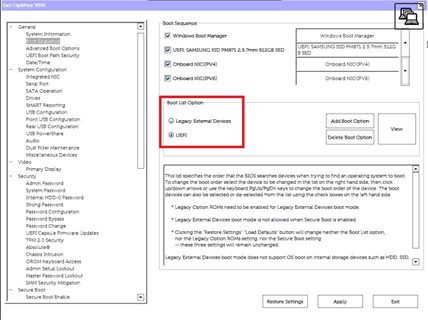 |
| UEFIBootPathSecurity | 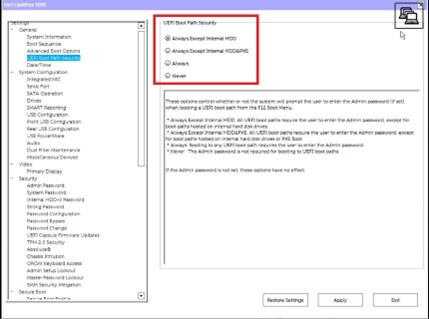 |
| AutoOSThresholdRecovery |  |
| AllowBiosDowngrade |  |
| CapsuleFirmwareUpdate |  |
| BiosAutoRecovery | 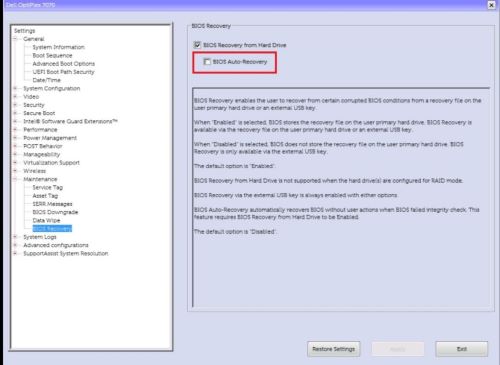 |
| TPMActivation |  |
| TPM | 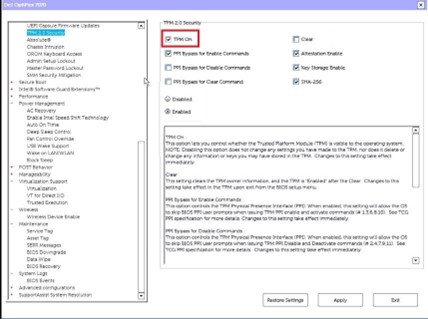 |
| TPMClear | 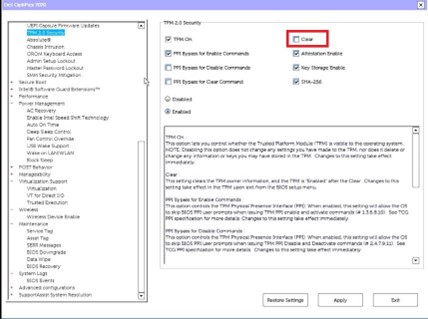 |
| TPMPpiClearOverride |  |
| AutoOn |  |
| WakeOnLan |  |
| RemoteWipeInternalDrives |  |
| USBWake | 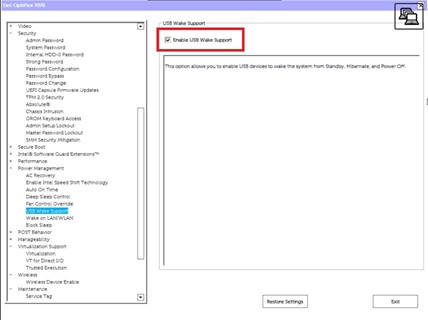 |
| WakeOnDock | 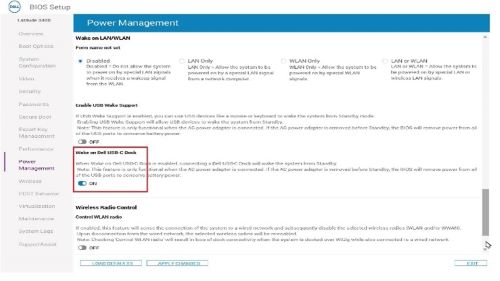 |
| TPMRemoteActivation | TBD |
| AdminPwMinLen |  |
| PwdMinLen | TBD |
| StrongPassword |  |
| AdminSetupLockout |  |
| BIOSAdminPwd | TBD |
| ClearBIOSLog | TBD |
| ClearPowerLog | TBD |
| ClearThermalLog | TBD |
| ClearChassisIntrusionWarning |  |
| ClearDellRMTLog | TBD |
| ChassisIntrusionReporting |  |
| ChassisIntrusion | N/A |
| Microphone | 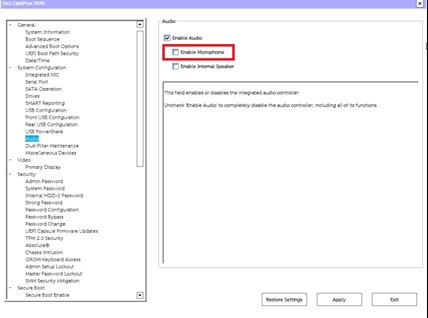 |
To contact support, reference Dell Data Security International Support Phone Numbers.
Go to TechDirect to generate a technical support request online.
For additional insights and resources, join the Dell Security Community Forum.
Additional Information
Affected Products
OptiPlex, XPS, Latitude, XPS, XPS Tablets, Fixed Workstations, Mobile Workstations, Dell Trusted DeviceArticle Properties
Article Number: 000233967
Article Type: How To
Last Modified: 09 Oct 2024
Version: 2
Find answers to your questions from other Dell users
Support Services
Check if your device is covered by Support Services.