PowerProtect: alert notification email address configuration Email format is invalid
Summary: Using PowerProtect Data Manager 19.18.0-x to configure email alerts. When adding multiple email addresses, separated by a comma, the error "Email format is invalid" appears.
This article applies to
This article does not apply to
This article is not tied to any specific product.
Not all product versions are identified in this article.
Symptoms
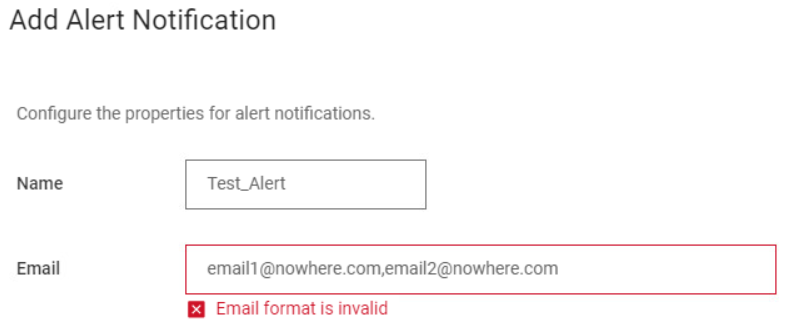
In PowerProtect Data Manager version 19.18.0-x when trying to enter multiple email addresses in the alert notification configuration screen, the error "Email format is invalid" is shown:
Cause
This is a known issue in PowerProtect 19.18.0-x (PPDMESC-8325).
Resolution
The issue has been resolved in the PowerProtect Data Manager release 19.19.0-15. Install the latest PowerProtect Data Manager release to resolve the symptom. If required, contact Dell Support for assistance or any further questions. The newest available releases are available on the PowerProtect Data Manager Drivers & Downloads page.
Workaround:
Create an email alias containing the required addresses on the email server so a single email address can be entered into the alert configuration.
Article Properties
Article Number: 000259481
Article Type: Solution
Last Modified: 04 Sept 2025
Version: 3
Find answers to your questions from other Dell users
Support Services
Check if your device is covered by Support Services.