PowerStore: Authentication method error when connecting over SSH
Summary: This article provides a solution to a problem encountered when establishing SSH connections to PowerStore nodes.
This article applies to
This article does not apply to
This article is not tied to any specific product.
Not all product versions are identified in this article.
Symptoms
When connecting to a PowerStore node using SSH, you may encounter one of the errors below:
- No supported authentication methods available (server sent: publickey,gssapi-keyex,gssapi-with-mic)
- Permission denied (publickey,gssapi-keyex,gssapi-with-mic)
Example:
Cause
This is expected behavior when logging in with any user other than service.
Resolution
Log in using the service user.
Any other username will yield the error above.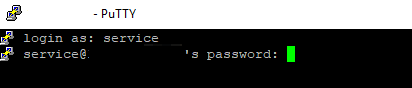
Additional Information
Notes:
Another common error when trying to login over ssh is: Network error: Connection timed out:
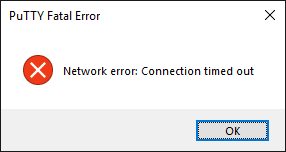
This may happen if ssh is disabled for the PowerStore (disabled by default).
Enabling ssh from the PowerStore Manager can be done from Settings > Security > SSH Management
- The service user password would have been defined during initialization of the system.
- If you can not remember this password, try the same password as the admin user. Otherwise contact the person who initialized the system or reset the service password from the PowerStore Manager (GUI) under Settings > Support > Service Account
Another common error when trying to login over ssh is: Network error: Connection timed out:
This may happen if ssh is disabled for the PowerStore (disabled by default).
Enabling ssh from the PowerStore Manager can be done from Settings > Security > SSH Management
Affected Products
PowerStore, PowerStore 1000X, PowerStore 1000T, PowerStore Expansion Enclosure, PowerStore 3000X, PowerStore 3000T, PowerStore Rack, PowerStore 5000X, PowerStore 5000T, PowerStore 7000X, PowerStore 7000T, PowerStore 9000X, PowerStore 9000TArticle Properties
Article Number: 000132163
Article Type: Solution
Last Modified: 13 May 2025
Version: 6
Find answers to your questions from other Dell users
Support Services
Check if your device is covered by Support Services.