PowerFlex 3.X: SVM NICs may be incorrectly assigned during SVM conversion
Summary: During an SVM conversion process, SVM NICs may be assigned incorrectly.
Symptoms
A user cannot upgrade or convert the Primary MDM (last MDM) during an SVM conversion, as the subnets cannot communicate.
The NICs were incorrectly ordered after an SVM conversion: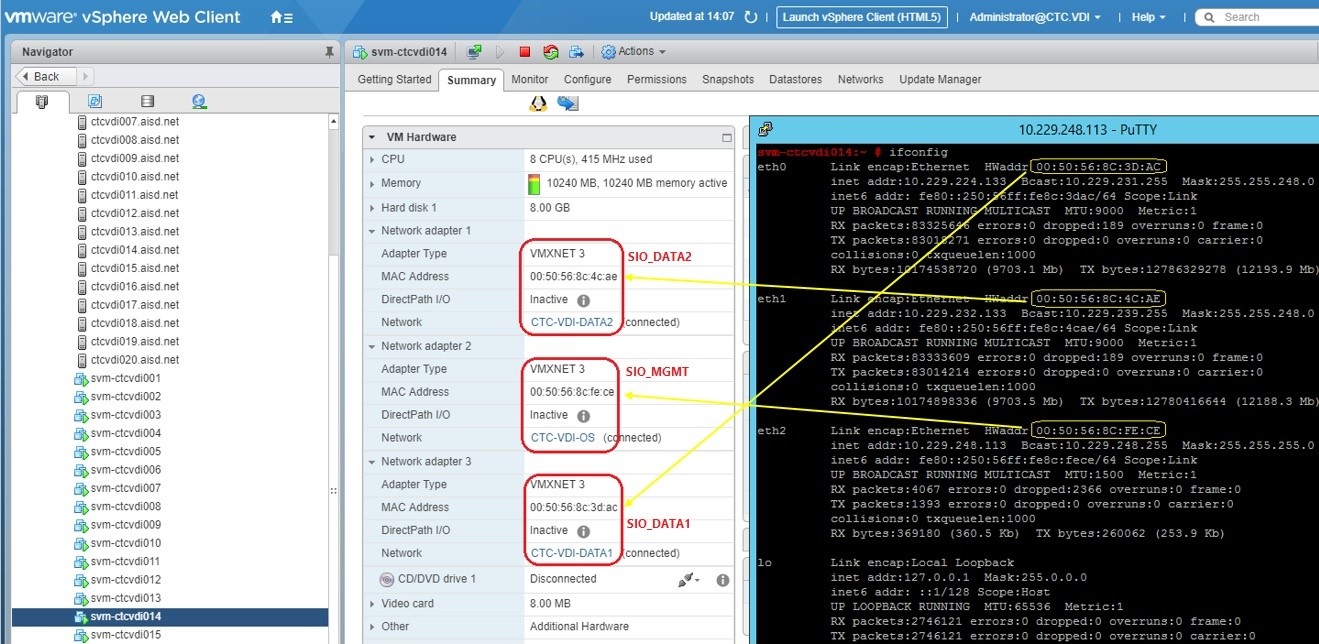
There are two possible scenarios:
Scenario #1 - Primary DATA NICs switched NICs on different subnets (not routable):
When looking at the query_cluster output we can see that the IP Addresses of the Primary MDM are in the opposite order of the Secondaries:
Primary MDM:
    Name: Secondary_MDM2, ID: 0x6a3e3168772f4322
        IP Addresses: 10.128.8.62, 10.128.0.62, Management IP Addresses: 10.63.193.162, Port: 9011, Virtual IP interfaces: eth1, eth2
Secondary MDMs:
    Name: Secondary_MDM1, ID: 0x3faea7c32806b951
        IP Addresses: 10.128.0.61, 10.128.8.61, Management IP Addresses: 10.63.193.161, Port: 9011, Virtual IP interfaces: eth1, eth2
    Name: Primary_MDM, ID: 0x02d885dd7c5fc180
        IP Addresses: 10.128.0.60, 10.128.8.60, Management IP Addresses: 10.63.193.160, Port: 9011, Virtual IP interfaces: eth1, eth2
Primary MDM interface output, which may vary per Operating System (OS), shows that the eth1 is on the 10.128.0.x subnet, and eth2 is on the 10.128.8.x subnet, in the same order as the Secondaries:
eth0: flags=4163<UP,BROADCAST,RUNNING,MULTICAST>  mtu 1500
        inet 10.63.193.162  netmask 255.255.255.128  broadcast 10.63.193.255
eth1: flags=4163<UP,BROADCAST,RUNNING,MULTICAST>  mtu 9000
        inet 10.128.0.62  netmask 255.255.248.0  broadcast 10.128.7.255
eth2: flags=4163<UP,BROADCAST,RUNNING,MULTICAST>  mtu 9000
        inet 10.128.8.62  netmask 255.255.248.0  broadcast 10.128.15.255
Scenario #2 - Primary MGMT and DATA IPs switched NICs:
Primary MDM interface output, which may vary per OS, shows that eth0 holds MGMT IP and eth[1|2] holds the DATA1 and DATA2 IPs:
eth0      Link encap:Ethernet  HWaddr 00:50:56:91:97:CD
          inet addr:10.202.5.13  Bcast:10.202.5.255  Mask:255.255.255.0
eth1      Link encap:Ethernet  HWaddr 00:50:56:91:3A:FB
          inet addr:192.168.152.28  Bcast:192.168.159.255  Mask:255.255.248.0
eth2      Link encap:Ethernet  HWaddr 00:50:56:91:4E:57
          inet addr:192.168.160.28  Bcast:192.168.167.255  Mask:255.255.248.0
Secondary MDM interfaces output, which may vary per OS, shows that eth0 holds the DATA1 IP and eth[1|2] holds the DATA2 and MGMT IPs:
eth0: flags=4163<UP,BROADCAST,RUNNING,MULTICAST>  mtu 9000
        inet 192.168.152.27  netmask 255.255.248.0  broadcast 192.168.159.255
eth1: flags=4163<UP,BROADCAST,RUNNING,MULTICAST>  mtu 9000
        inet 192.168.160.27  netmask 255.255.248.0  broadcast 192.168.167.255
eth2: flags=4163<UP,BROADCAST,RUNNING,MULTICAST>  mtu 1500
        inet 10.202.5.12  netmask 255.255.255.0  broadcast 10.202.5.255
When looking at the query_cluster output, each node is expecting to use eth1 and eth2 for VIPs:
Master MDM:
    Name: agent-svm-de1801vmwesx002, ID: 0x52cd360827eb8e63
        IPs: 192.168.152.28, 192.168.160.28, Management IPs: 10.202.5.13, Port: 9011, Virtual IP interfaces: eth1, eth2
        Version: 2.6.11000
Slave MDMs:
    Name: agent-svm-de1801vmwesx001, ID: 0x361d56fd178799e0
        IPs: 192.168.160.27, 192.168.152.27, Management IPs: 10.202.5.12, Port: 9011, Virtual IP interfaces: eth1, eth2
        Status: Normal, Version: 2.6.11000
Impact
Since the subnets cannot communicate, if there is a panic or failover, it might result in a DU.
Cause
This issue may occur if the template is modified before running the upgrade/conversion procedure.
Resolution
Determine the correct alignment, and change the NICs to match it. PowerFlex typically defaults to:
ETH0=sio_mgmt
ETH1=sio_data1
ETH2=sio_datat2
Steps for eth[0|1|2] changes:
- Put the cluster into single mode (we must remove and re-add with the proper order of IPs)
- Edit the /etc/sysconfig/network-scripts/ifcfg-eth* scripts on Secondary MDM to match the current Primary MDM order (MGMT on eth0, DATA1 on eth1, DATA2 on eth2)
- Put SDS that resides on the current Secondary MDM into Maintenance Mode (MM), as we are changing the IPs with a reboot
- Reboot the SVM that was placed into MM
- Verify upon reconnecting to this node that the IPs are in the same order as the current Primary MDM as mentioned in step #2
- Ensure that SDS is reconnected and then exit MM
- Remove the Secondary MDM that we just rebooted from the MDM cluster
- Re-add as a standby MDM, making sure the order of IPs in "new_mdm_ip" matches the current Primary (DATA1, DATA2)
- Change back to 3-node/5-node mode
- Verify that the cluster is healthy and in-sync
- Switch MDM ownership
- Once the switch MDM ownership is successful, move on with the last remaining node for SVM upgrade/conversion
Impacted Versions
VxFlex OS 3.0.x
Fixed In Version
VxFlex OS 3.0.1.5
PowerFlex 3.5.1.3
PowerFlex 3.6.0.327
PowerFlex 4.0.0.1003