Dell Data Securityサーバー コンソールで、Dell Encryptionエージェントが異なるホスト名を報告する
Summary: この記事では、インベントリーでWindowsクライアントの間違ったホスト名を報告する問題を修正するための手順について説明します。
This article applies to
This article does not apply to
This article is not tied to any specific product.
Not all product versions are identified in this article.
Symptoms
対象製品:
- Dell Encryption
- Dell Endpoint Security Suite Enterprise
対象オペレーティング システム:
- Windows
Cause
Dell Data Security製品で、hostsファイルに現在のホスト名以前の異なるホスト名があると、サーバーへのインベントリー アップロードの際に間違ったホスト名が報告されることがあります。
Resolution
- C:\Windows\System32\drivers\etcにあるhostsファイルを編集します。
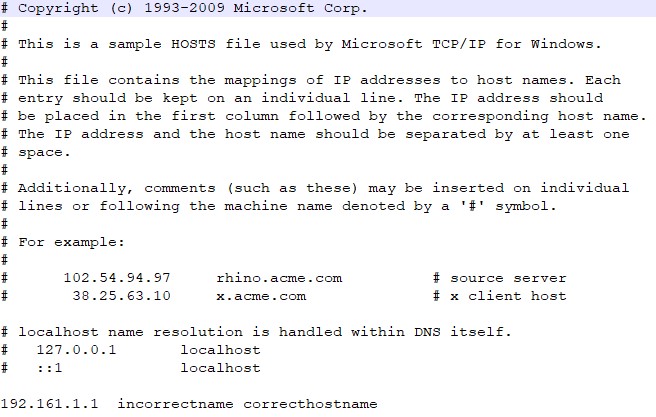
- 現在のホスト名がhostsファイルの最初のエントリーになるように順序を変更します。

注:現在のホスト名の後になる必要のある他のエイリアスをhostsファイル内に指定することもできます。
- 終了したら、 File>Saveをクリックします。
- ホスト名は、次回のインベントリーのアップロード時にサーバー内で変更されます。
サポートに問い合わせるには、「Dell Data Securityのインターナショナル サポート電話番号」を参照してください。
TechDirectにアクセスして、テクニカル サポート リクエストをオンラインで生成します。
さらに詳しい情報やリソースについては、「デル セキュリティ コミュニティー フォーラム」に参加してください。
Additional Information
Videos
Affected Products
Dell Encryption, Dell Endpoint Security Suite EnterpriseArticle Properties
Article Number: 000187320
Article Type: Solution
Last Modified: 20 May 2024
Version: 4
Find answers to your questions from other Dell users
Support Services
Check if your device is covered by Support Services.