VNXe: How to replace a SFP Module.(User Correctable)
Summary: This document describes how to replace a faulted SFP module contained within an Input/Output module in a VNXe3200 storage system. Certain installed I/O module contain SFP transceiver modules in their ports to provide connectivity for approved cables. The SFP modules are accessible from the rear of the enclosure. ...
This article applies to
This article does not apply to
This article is not tied to any specific product.
Not all product versions are identified in this article.
Instructions
Replacing the faulted hardware component
Take the following actions to remove the faulted hardware part and install the replacement hardware part into the system.
Summary of tasks for replacing an SFP module
To replace a faulted SFP module you must complete the tasks below in the order in which they appear. This document provides instructions for completing each task.
Identifying the faulted SFP module
The SFP modules are visibly contained in certain Input/Output (personality) modules installed at the rear of the disk-processor enclosure.
An I/O module contains SFP modules installed in the labeled ports; e0, e1, e2, e3.


Verifying the operation of a part
Verify that the new part is recognized by your system, and operating correctly using the procedure that follows.
Procedure
Take the following actions to remove the faulted hardware part and install the replacement hardware part into the system.
Summary of tasks for replacing an SFP module
To replace a faulted SFP module you must complete the tasks below in the order in which they appear. This document provides instructions for completing each task.
- Locating the faulted SFP module
- Remove the SFP module
- Unpack the new SFP module
- Install the SFP module
- Verify the operation of the new SFP module
Identifying the faulted SFP module
The SFP modules are visibly contained in certain Input/Output (personality) modules installed at the rear of the disk-processor enclosure.
An I/O module contains SFP modules installed in the labeled ports; e0, e1, e2, e3.
Example: Fibre Channel I/O module and labeled ports
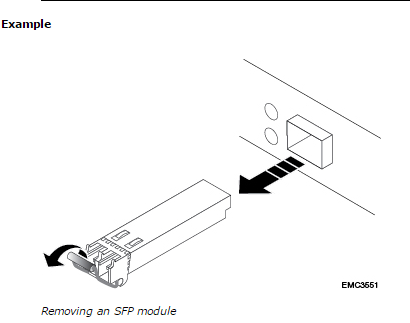
Removing an SFP module
Procedure
- If a cable is connected to the SFP, disconnect the cable.
- Gently pull down on the spring release latch.
- While still holding onto the latch, gently pull out the SFP module.
Caution
Do not remove the IO module. Removing the IO module causes the storage processor to reboot immediately.
Unpacking a part
Procedure
- Wear ESD gloves or attach an ESD wristband to your wrist and the enclosure in which you are installing the part.
- Unpack the part and place it on a static-free surface.
- If the part is a replacement for a faulted part, save the packing material to return the faulted part.
Installing an SFP module
Procedure
- If you are replacing a failed SFP module, verify that the replacement SFP module has the same part number as the failed SFP module.
- The part number is on a label attached to the SFP module.
- Push the spring release latch up and slide the new SFP module into the port until it is securely connected.
- If you are replacing a failed SFP, reconnect the cable to the replacement SFP module.
Verifying the operation of a part
Verify that the new part is recognized by your system, and operating correctly using the procedure that follows.
Procedure
- In Unisphere™, select System > System Health.
- Select the part in the System Component list or the graphical view:
Note
To verify the status of a part contained within the storage processor, like a battery backup unit, for example, you must locate the part in the System Component list.
To verify the status of a part contained within the storage processor, like a battery backup unit, for example, you must locate the part in the System Component list.
- In the System Component list, the part should be marked with a status OK icon:
- In the graphical view, the part should be highlighted green.
If the system health monitor shows the part as faulted, contact your service provider.
Returning a faulted part
We appreciate the return of defective material within 5 business days (for US returns). For International customers, please return defective material within 5-10 business days. All instructions and material required to return your defective part were supplied with your good part shipment.
Procedure
Returning a faulted part
We appreciate the return of defective material within 5 business days (for US returns). For International customers, please return defective material within 5-10 business days. All instructions and material required to return your defective part were supplied with your good part shipment.
Procedure
- Package the faulted part in the shipping box that contained the replacement part, and seal the box.
- Ship the failed part to your service provider as described in the instructions that were included with the replacement part.
- [Optional] For more information about returning customer-replaceable parts, from Unisphere, click Support > Need more Help? > Customer Replaceable Parts > Return a Customer Replaceable Part to enter the EMC Online Support website.
Affected Products
VNXe3200Products
VNXe2 Series, VNXe3200Article Properties
Article Number: 000022500
Article Type: How To
Last Modified: 07 Nov 2025
Version: 3
Find answers to your questions from other Dell users
Support Services
Check if your device is covered by Support Services.