A Non-Standard Ubuntu Log In Screen Shows After Restore Image Process Completes
Summary: When a user clicks Restore Dell Hybrid Client, on a computer running Ubuntu 20.04 with Dell Client Agent - Enabler (DCA), the device is imaged and return a screen with a login for bremen instead of the standard Ubuntu login screen. ...
This article applies to
This article does not apply to
This article is not tied to any specific product.
Not all product versions are identified in this article.
Symptoms
Affected Products:
- All products shipping with Ubuntu 20.04 with DCA Enabler configuration
User clicks the Restore Dell Hybrid Client button and after imaging that they are presented with a user login for bremen.

Figure 1: (English Only) Dell Recovery Screen

Figure 2: (English Only) User log in for bremen
Note: This is not the factory shipped state, and the correct behavior would be for the user to be presented with the standard Ubuntu login screen.
Cause
This happens because the Dell Recovery Tool follows the workflow assuming the presence of Dell Hybrid Client binaries on a DCA Enabler device. The same workflow issue causes the button Restore Dell Hybrid Client to show up which is not correct.
Resolution
To resolve this, the following two options are available.
Option 1
- On the log In screen for the user
bremen, login with passwordbremen - Go to the Dell Recovery option.
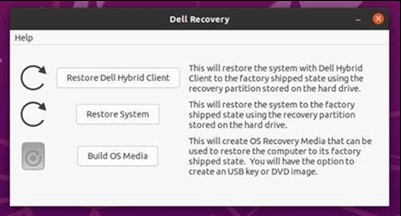
Figure 3: (English Only) Dell Recovery Screen
- Click the Restore System button. This restores the operating system to a factory state.
Option 2
- Restart the device, press the ESC key while the computer is booting, and it brings up the GRUB screen.
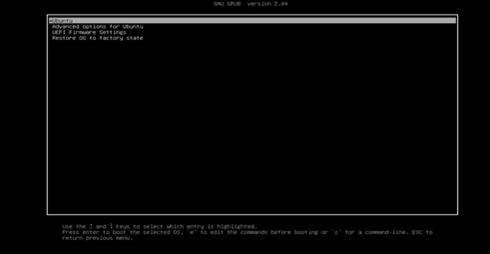
Figure 4 (English Only) GRUB screen
- Use the arrow keys to go to the last option, Restore OS to factory state, and press Enter.
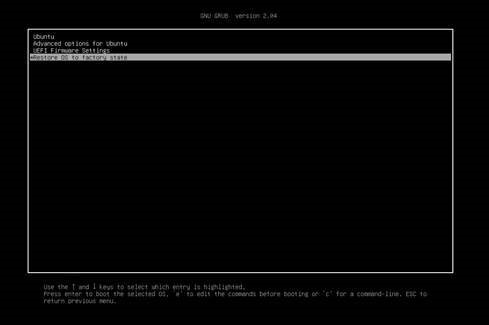
Figure 5: (English Only) Restore operating system to factory state
- The computer starts the process to restore Ubuntu to factory state.
Affected Products
Dell Hybrid ClientArticle Properties
Article Number: 000195375
Article Type: Solution
Last Modified: 30 Sept 2024
Version: 6
Find answers to your questions from other Dell users
Support Services
Check if your device is covered by Support Services.