Dell APEX Cloud Platform for Microsoft Azure: Node add or repair failed due to the node management vLAN is different with the cluster
Summary: Node add or repair may fail at provisioning OS if the cluster's management network using a tagged VLAN. Customer must manually configure the node management VLAN according to their network environment. This issue impacts the Dell APEX Cloud Platform (ACP) for Microsoft Azure release 01.03.xx.xx and 01.04.xx.xx. ...
This article applies to
This article does not apply to
This article is not tied to any specific product.
Not all product versions are identified in this article.
Symptoms
Node add or repair failed with Error: provisioning the os failed.
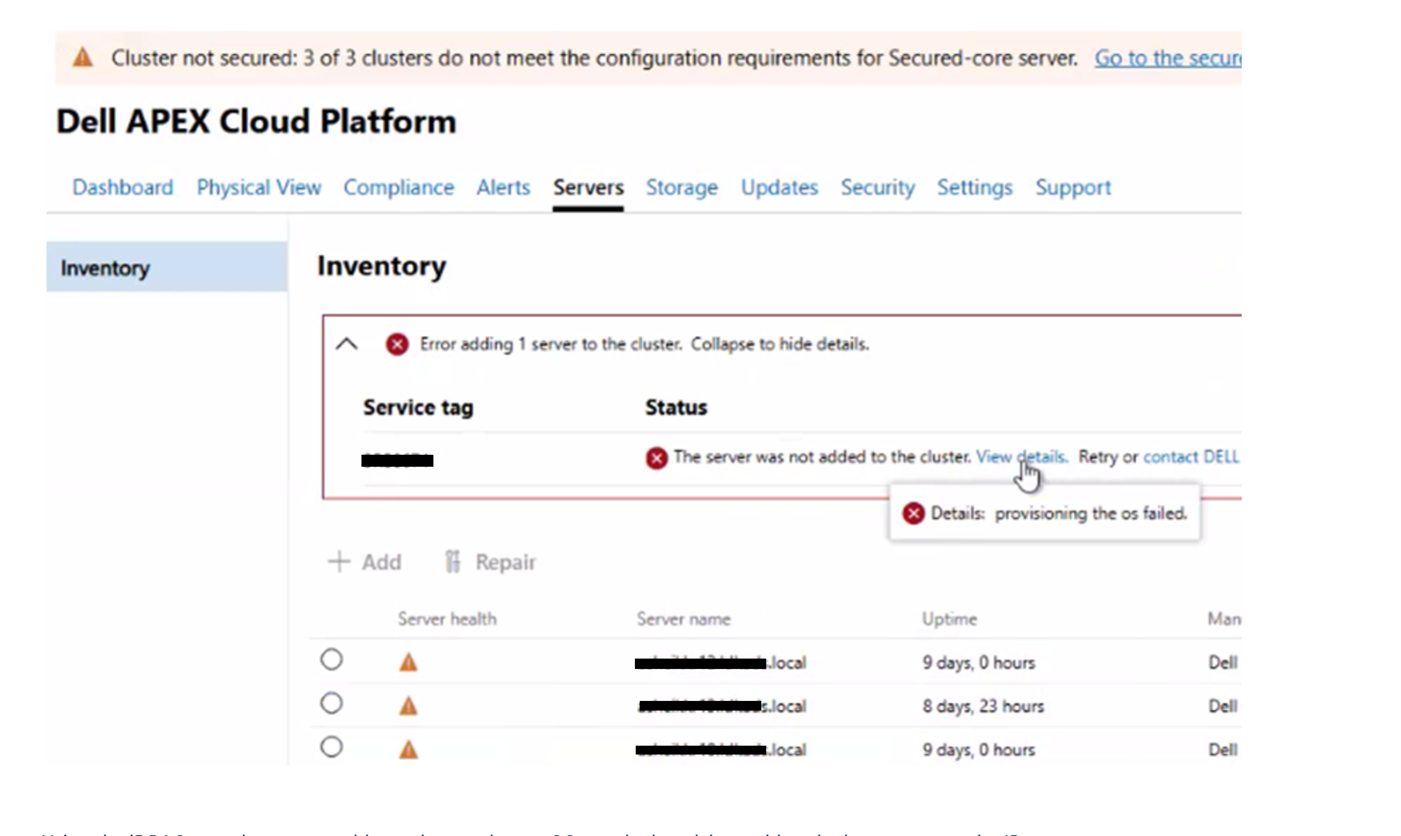
Check the short term.log file on the ACP manager, you see error "no route to host", for example:
"2025-02-20 05:50:57,623" microservice.wfservice "2025-02-20T05:50:56.700818715Z stdout F INFO [wfengine] bootstrap_os_provision_False____24e838bd_cdad_49_d8fed5fc7a running"
"2025-02-20 05:50:57,623" microservice.wfservice "2025-02-20T05:50:56.701353106Z stdout F INFO [wfengine] start execute rest step(Method=POST, URL=http://api-gateway:8080/rest/apex-cp/internal/az-day2-app/v1/bootstrap/provision, params={'host': {'ip': 'fe80::xxxxxxxx%eth1', 'user': 'root', '****** 'Iface6': 'eth1'}, 'sn': 'xxxxxxx', 'target_ip': 'xx.xx.xx.xx', 'start_second_time': 1740030654}, headers=OrderedDict([('Content-Type', 'application/json')])) under pull mode"
"2025-02-20 05:50:57,790" microservice.mcp-bootstrap-installer-az "2025-02-20T05:50:56.961338153Z stderr F 2025-02-20 05:50:56^[[36m [INFO] <18235>^[[0m client.go RunCommand() (480):  - stdout: "
"2025-02-20 05:50:57,790" microservice.mcp-bootstrap-installer-az "2025-02-20T05:50:56.961353853Z stderr F /mnt/payload/factory/DELL_APEX_CLOUD_PLATFORM_MICROSOFT_AZURE-10.2411.1.10-28917030_GI/DELL_APEX_CLOUD_PLATFORM_FOUNDATION_MICROSOFT_AZURE_10.2411.1.10-28906084_EN-US.iso"
............................

2025-02-20T05:53:32.538652557Z stderr F 2025-02-20 05:53:32^[[31m [ERROR] <41092>^[[0m client.go RunCommand() (446): run command setup ssh connection failed: dial tcp xx.xx.xx.xx:22: connect: no route to host
2025-02-20T05:53:32.538669757Z stderr F 2025-02-20 05:53:32^[[31m [ERROR] <41092>^[[0m host_gateway_impl.go GetProvisionStatus() (48): Failed get host info, error: dial tcp xx.xx.xx.xx:22: connect: no route to host
Cause
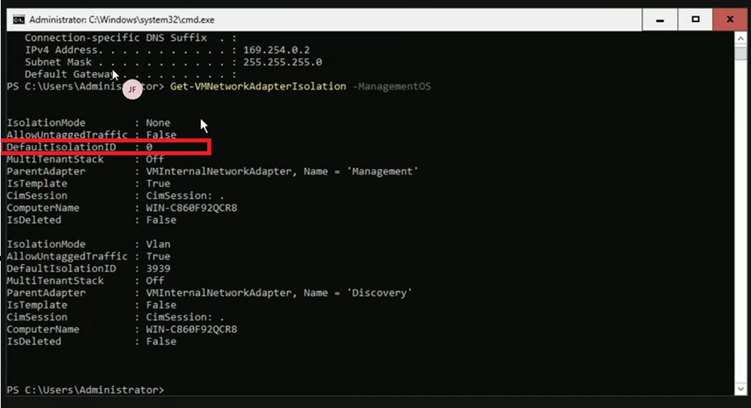
After OS provisioning, by default node add or repair sets the node management vLAN to 0. If the cluster has set a different management vLAN during Day1, the node add or repair fails.
Resolution
Manually configure the node management vLAN.
1. Log in to the node, run the following command to check if the management vLAN is 0.
Get-VMNetworkAdapterIsolation -ManagementOSFor example:
2. Run the following command to configure the node management vLAN. Replace <cluster management vlan id> according to your network environment.
Set-VMNetworkAdapterIsolation -ManagementOS -VMNetworkAdapterName Management -IsolationMode Vlan -AllowUntaggedTraffic $true -DefaultIsolationID <cluster management vlan id>
3. Click Retry on the Dell ACP WAC extension UI.
Affected Products
APEX Cloud Platform for Microsoft AzureArticle Properties
Article Number: 000289877
Article Type: Solution
Last Modified: 27 Feb 2025
Version: 2
Find answers to your questions from other Dell users
Support Services
Check if your device is covered by Support Services.