NetWorker: Azure-VM-Snapshot-Backup schlägt fehl "nsrazure_save: Befehl nicht gefunden"
Summary: NetWorker ist für die Durchführung von Azure Virtual Machine (VM)-Snapshot-Backups konfiguriert. Die Backup-Policy schlägt fehl und meldet "nsrazure_save: Befehl nicht gefunden"
Symptoms
NetWorker-Azure-VM-Backups (Azure Virtual Machine) schlagen fehl.
Die Backupprotokolle melden:
139545 1763882807 5 1 23 1811937024 6033 0 CLIENT_NAME nsrexecd 32 Unable to spawn process '%s': %s 2 23 13 nsrazure_save 24 25 No such file or directory
nsrazure_save: Command not found
Protokollspeicherort auf dem NetWorker-Server:
- Linux: /nsr/logs/policy/POLICY-NAME/WORKFLOW-NAME/ACTION-NAME_JOBID/JOBID.log
- Windows (Standardeinstellung): C:\Programme\EMC NetWorker\nsr\logs\policy\POLICY-NAME\WORKFLOW-NAME\ACTION-NAME_JOBID\JOBID.log
Cause
Auf dem Client, der für die Azure-VM-Backups verwendet wird, ist die NetWorker Extended Client-Software nicht installiert.
Resolution
Der Befehl nsrazure_save ist bei der Installation der NetWorker Extended Client-Software enthalten. Diese Anforderung ist im Dell NetWorker und Azure VM Snapshot Integration Guide dokumentiert: Support für NetWorker | Handbücher und Dokumente
Das Extended Client-Paket ist in den NetWorker-Installationspaketen enthalten, die von folgendem Link heruntergeladen werden können: Support für NetWorker | Treiber und Downloads
Für Linux-Hosts:
[root@nsr linux_x86_64]# ls -l | grep lgtoxtd
-rw-r--r--. 1 root games  74111264 Sep  3 08:36 lgtoxtdclnt-19.12.0.3-1.x86_64.rpm
-rw-r--r--. 1 root games  40050174 Sep  3 04:59 lgtoxtdclnt_19.12.0.3_amd64.deb
Führen Sie für SLES-, Red Hat- oder Oracle-basierte Systeme Folgendes aus: sudo rpm -ivh lgtoxtdclnt-version.rpm
Führen Sie für Ubuntu- oder Debian-basierte Systeme Folgendes aus: sudo dpkg -i lgtoxtdclnt_version.deb
Für Windows-Hosts:
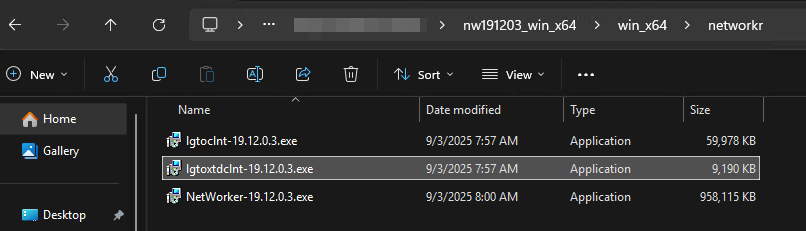
Klicken Sie mit der rechten Maustaste auf lgtoxtdclnt und klicken Sie auf Als Administrator ausführen.
Das NetWorker-Installationshandbuch enthält zusätzliche betriebssystemspezifische Installationsanweisungen.