VxRail: Initial Configuration with External vCenter 7.0 Update 2 Fails with Error: Failed to Add Host to VDS VMware HCIA Distributed Switch
Summary: This article describes an issue where an initial configuration or first run of VxRail may fail when using an External vCenter 7.0 Update 2.
This article applies to
This article does not apply to
This article is not tied to any specific product.
Not all product versions are identified in this article.
Symptoms
When attempting to do an initial configuration (or First Run) of VxRail versions 4.7.300 - 4.7.411 or 7.0.000 - 7.0.101 with External vCenter 7.0 Update 2 you may experience the following:
- The Dell Technologies VxRail Deployment Wizard UI displays the message "
VxRail Cluster Configured Failed"at the "Host Add into VDS" step - The following error is displayed in the Dell EMC VxRail Deployment Wizard UI:
Failed to add host xxx to VDS VMware HCIA Distributed Switch yyy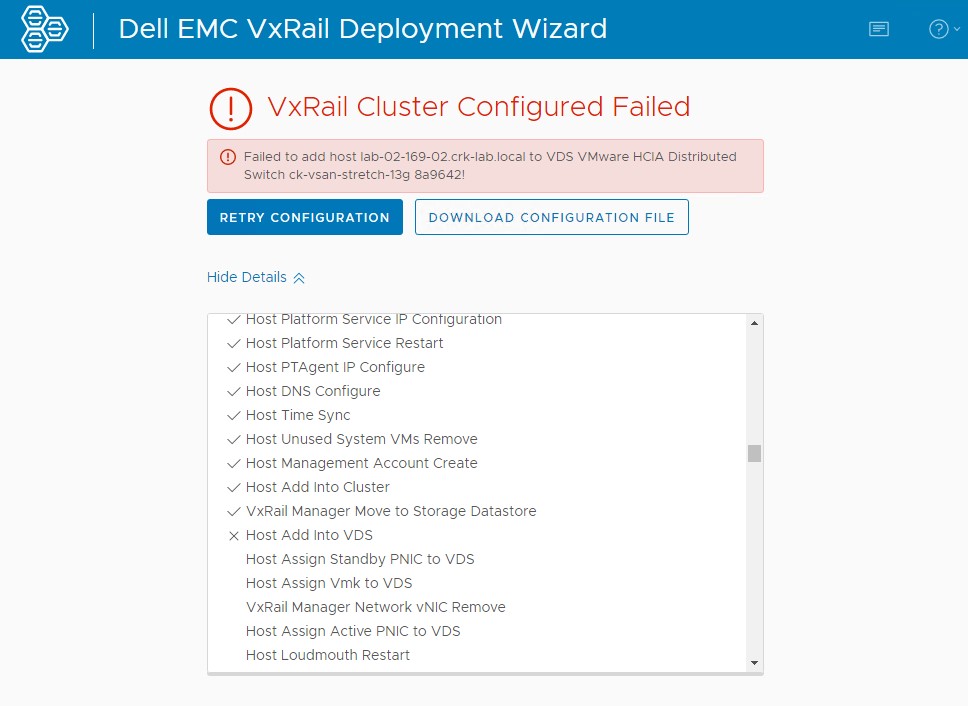
- vCenter UI is showing the following error while performing a "Reconfigure vSphere Distributed Switch" task:
The operation is not supported on the object. Host xxx is not compatible with the VDS version 7.0.2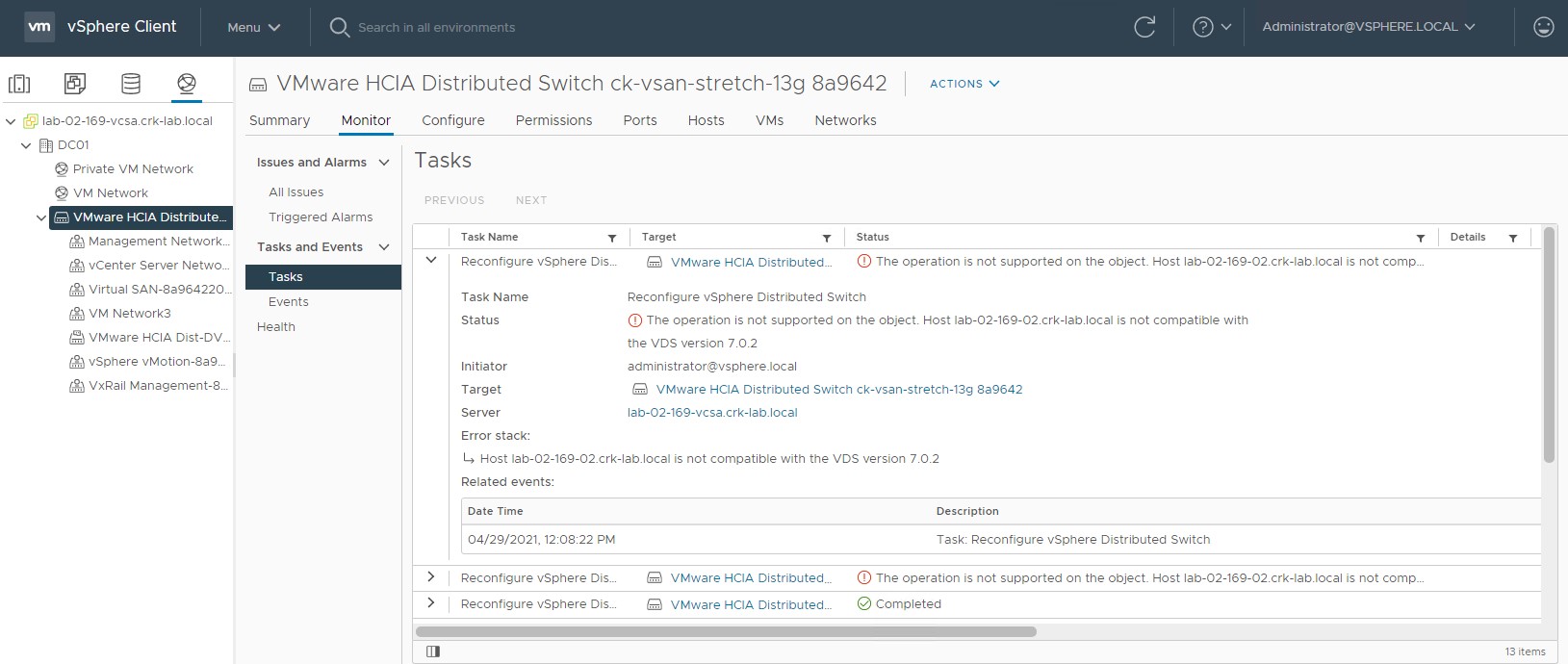
- In VxRail Manager in the /var/log/microservice_log/dayone.log log file, you may see an error similar to:
2021-04-29-11:08:23 microservice.do-network "do_common.exceptions.OperationException: OperationException: {""message"": ""Add host lab-02-169-02.crk-lab.local to vds VMware HCIA Distributed Switch ck-vsan-stretch-13g 8a9642 did not complete successfully: (vmodl.fault.NotSupported) {\n dynamicType = ,\n dynamicProperty = (vmodl.DynamicProperty) [],\n msg = 'The operation is not supported on the object.',\n faultCause = ,\n faultMessage = (vmodl.LocalizableMessage) [\n (vmodl.LocalizableMessage) {\n dynamicType = ,\n dynamicProperty = (vmodl.DynamicProperty) [],\n key = 'com.vmware.vim.vpxd.dvs.notSupportedHostVersion.label',\n arg = (vmodl.KeyAnyValue) [\n (vmodl.KeyAnyValue) {\n dynamicType = ,\n dynamicProperty = (vmodl.DynamicProperty) [],\n key = 'host',\n value = 'xxxxxxx.xxxxx.local'\n },\n (vmodl.KeyAnyValue) {\n dynamicType = ,\n dynamicProperty = (vmodl.DynamicProperty) [],\n key = 'version',\n value = '7.0.2'\n }\n ],\n message = 'Host lab-02-169-02.crk-lab.local is not compatible with the VDS version 7.0.2'\n }\n ]\n}"", ""bundle"": """", ""prefix"": ""do_common.exceptions.OperationException"", ""key"": """", ""field"": """", ""error_code"": ""0"", ""exit_code"": ""-1"", ""params"": []}"
Cause
vCenter 7.0 Update 2 introduces a new vDS version 7.0.2.
The build of ESXi that ships with:
During initial configuration the VxRail Deployment Wizard in VxRail Manager:
The build of ESXi that ships with:
- VxRail 4.7.300 - 4.7.411 supports a maximum vDS version of 6.6.0.
- VxRail 7.0.000 - 7.0.101 supports a maximum vDS version of 7.0.0.
During initial configuration the VxRail Deployment Wizard in VxRail Manager:
- Creates a new vDS using the latest version available with that build of vCenter which is vDS version 7.0.2
- Attempts to add or register the VxRail hosts to the new vDS
- This step fails as those builds of ESXi (which support a maximum vDS version or 6.6.0 or 7.0.0) cannot be added to a vDS version 7.0.2
Resolution
This issue has been resolved in VxRail versions 4.7.510 and 7.0.130.
The fixes ensure that the vDS version created at initial configuration will be suitable for the build of ESXi that ships with that VxRail release:
To work around the issue:
The fixes ensure that the vDS version created at initial configuration will be suitable for the build of ESXi that ships with that VxRail release:
- For VxRail 4.7.510 and later, the vDS version will be 6.6.0
- For VxRail 7.130 and later, the vDS version will be 7.0.0
Workaround
VxRail Engineering has created a script attached to this article which may be used on VxRail Manager to modify the vDS version after the error has occurred during deployment.To work around the issue:
- Make sure you are at the part where the deployment has failed with the error in the screenshot above and no other attempts have been made to correct the issue. If not, the script may break the process.
- Upload the attached python script to VxRail Manager.
- Run the script as root:
python vds_redeploy_7_0_010.py -a "VCENTER-IP-OR-FQDN" -u "VCENTER-ADMIN-USER" -p VCENTER-ADMIN-USER-PASSWORD -n "VDS-SWITCH-NAME-FROM-VCENTER-UI" -v 7.0.0

Where:
-a = vCenter IP or FQDN
-u = vCenter administrator user
-p = Password
-u = vDS which is currently at version 7.0.2 that we are trying to add the hosts too, name will likely include spaces so enclose in double quotes
-v = vDS version to set the switch too, in this case we need to change it from a 7.0.2 vDS to a 7.0.0 vDS to allow us to add pre-7.0u2 hosts to it

Example:
python vds_redeploy_7_0_010.py -a "172.16.10.201" -u "administrator@vsphere.local" -p Password123! -n "VMware HCIA Distributed Switch ck-vsan-stretch-13g 8a9642" -v 7.0.0
Go back to initial configuration / deployment web UI and click "TRY AGAIN".
Affected Products
VxRail SoftwareProducts
VxRail, VxRail Appliance Family, VxRail Appliance SeriesAttachments
Article Properties
Article Number: 000185996
Article Type: Solution
Last Modified: 03 Jul 2025
Version: 13
Find answers to your questions from other Dell users
Support Services
Check if your device is covered by Support Services.