PowerFlex: Journal Capacity Modify Button is Greyed Out
Summary: Attempting to modify a storage pool's journal capacity shows a greyed‑out button; the issue stems from a UI flaw that only enables the control after replication traffic refreshes the pool view. ...
This article applies to
This article does not apply to
This article is not tied to any specific product.
Not all product versions are identified in this article.
Symptoms
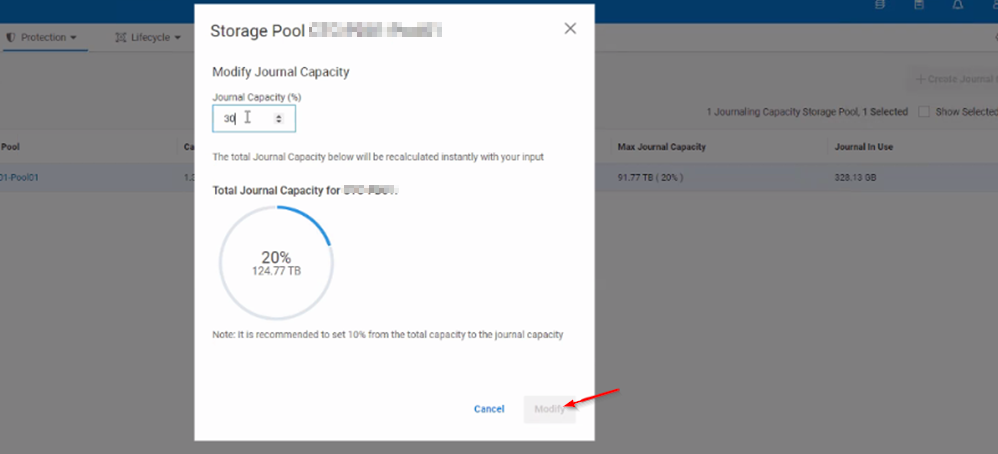
When trying to increase or decrease the Journal Capacity of a Storage Pool (SP), the button remains unclickable and greyed out.
Cause
When replication traffic runs and storage pool details refresh, the button becomes clickable.
Resolution
To work around the issue, the user can run replication traffic in the background, make the required changes to the Journal Capacity, and click on Modify.
Alternatively, the Journal Capacity can be changed manually by running an SCLI command on the Primary MDM:
scli --set_replication_journal_capacity --protection_domain_name <PD> --storage_pool_name <POOL> --replication_journal_capacity_max_ratio <value>
Affected Products
PowerFlex rack RCM SoftwareArticle Properties
Article Number: 000264751
Article Type: Solution
Last Modified: 15 May 2026
Version: 4
Find answers to your questions from other Dell users
Support Services
Check if your device is covered by Support Services.