SC 존 이름 또는 노드 IP 주소를 사용하여 oneFS webui에 액세스할 때 비정상적인 동작
Summary: 클러스터의 http 설정으로 인해 oneFS webui를 열 때 아래와 같은 증상이 나타납니다.
This article applies to
This article does not apply to
This article is not tied to any specific product.
Not all product versions are identified in this article.
Symptoms
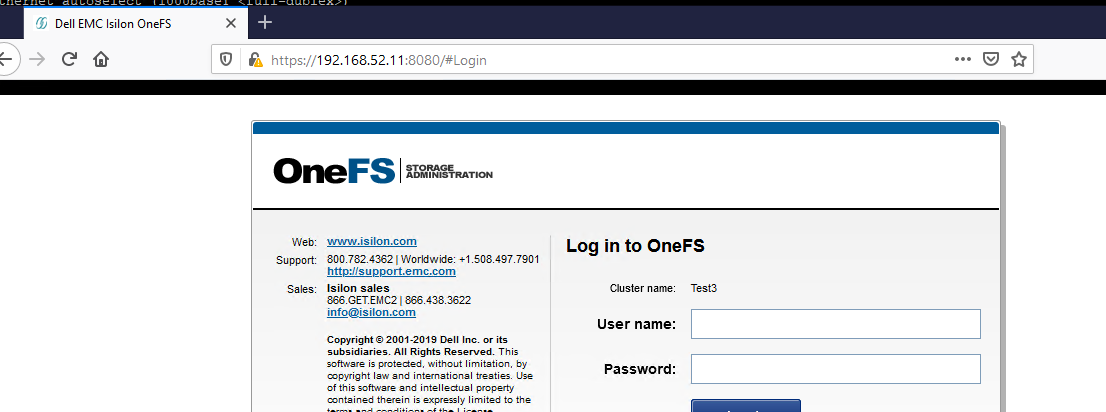
포트 8080을 지정하지 않고 브라우저에 SmartConnect 존 이름 또는 노드 IP 주소를 입력하면 다음 페이지가 나타납니다.

OneFS WebUI에 액세스하려면 이 페이지에서 'Isilon Administration'을 클릭하거나 포트 8080을 지정해야 합니다.
그러면 webUI에 대한 액세스가 정상적으로 작동해야 합니다.
Cause
이 동작은 클러스터의 http 서비스 설정 때문입니다.
여기에 표시된 변경 사항으로 인해 위에서 설명한 동작이 발생합니다.
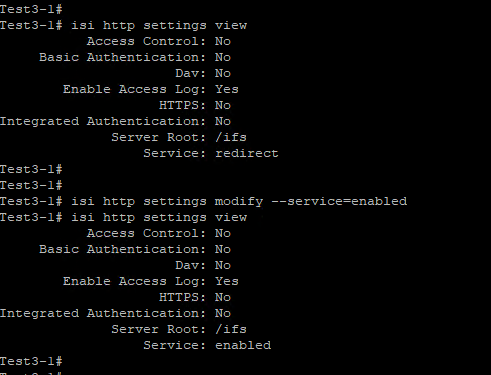
여기에 표시된 변경 사항으로 인해 위에서 설명한 동작이 발생합니다.
Resolution
이 문제를 해결하려면 http 설정을 기본값인 redirect:isi http settings modify --service=redirect로 되돌려야 합니다.
Affected Products
PowerScale OneFSArticle Properties
Article Number: 000180120
Article Type: Solution
Last Modified: 07 Jul 2025
Version: 4
Find answers to your questions from other Dell users
Support Services
Check if your device is covered by Support Services.