PowerStore:在连接 iSCSI 的 ESXi 主机上创建新数据存储失败,并显示错误“无法更改主机配置。无法更新磁盘分区”
Summary: 在连接了 iSCSI 的 ESXi 主机上创建包含 PowerStore 卷的新数据存储区可能会失败,并显示错误“Cannot change the host configuration.无法更新磁盘分区...”
This article applies to
This article does not apply to
This article is not tied to any specific product.
Not all product versions are identified in this article.
Symptoms
在连接了 iSCSI 的 ESXi 主机上创建新数据存储失败,并显示错误“Cannot change the host configuration.无法更新 ...“
所有 PowerStore 卷上都会发生这种情况的磁盘分区。
vSphere 显示:
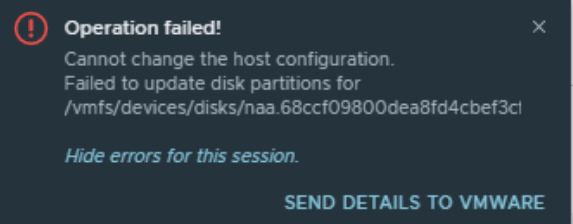
所有 PowerStore 卷上都会发生这种情况的磁盘分区。
vSphere 显示:
Cause
已知会导致此问题的原因是网络配置错误,例如 ESXi 主机、交换机和 PowerStore 之间的 MTU 不匹配。
Resolution
解决此问题的几种方法如下:
使用 VMware 知识库文章测试连接:https://kb.vmware.com/s/article/1003728
- 确保 ESXi 主机、交换机和 PowerStore 都具有适用于建议的 MTU 大小 9000 的有效且一致的 MTU 设置。
- 如果无法做到这一点,请将 ESXi 主机和 PowerStore 存储网络 MTU 更改为默认值 1500(不推荐)。SettingsNetwork > IPsStorage > ,选择相关存储网络,然后选择 Reconfigure。
使用 VMware 知识库文章测试连接:https://kb.vmware.com/s/article/1003728
Affected Products
PowerStoreArticle Properties
Article Number: 000193550
Article Type: Solution
Last Modified: 23 Dec 2021
Version: 2
Find answers to your questions from other Dell users
Support Services
Check if your device is covered by Support Services.