Secure Connect Gateway - Discovered devices shows status as "Failed"
Summary: This article explains a situation when discovering devices status shows Failed and SNMP Monitoring status shows not capable.
This article applies to
This article does not apply to
This article is not tied to any specific product.
Not all product versions are identified in this article.
Symptoms
From the user interface screen, the discovered devices status shows failed state instead of success and monitoring capable shows degraded.

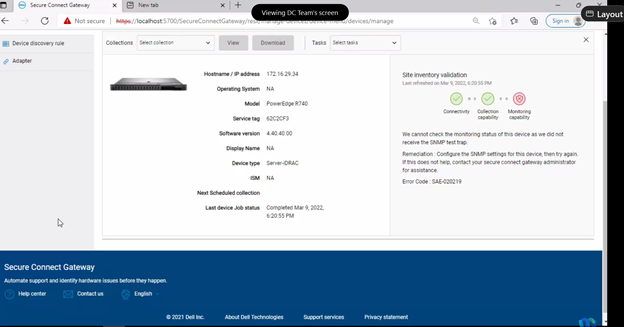
This event is registered in the log as following:
This event is registered in the log as following:
Date,045 [vert.x-eventloop-thread-1] INFO
com.dell.sae.apigateway.handlers.InventoryAPIRequestHandler- 815 - got error message
response from localization for reason:: {"displayMessage":"We cannot check the
monitoring status of this device as we did not receive the SNMP test
trap.","responseAction":"Configure the SNMP settings for this device, then try again. If
this does not help, contact your secure connect gateway administrator for
assistance.","detailedDescription":null}
Cause
The error can be caused for the lack of administrator rights for the logged user on SCG.
Resolution
Follow this step for troubleshooting:
- Verify SNMP settings on iDRAC0.
- Perform the re-inventory validation and, after completion, check the device status.
- Verify the SCG services and check if the user logged into SCG has administrator rights.
- Check the credential's profile for SCG.
Article Properties
Article Number: 000200699
Article Type: Solution
Last Modified: 24 Jul 2024
Version: 2
Find answers to your questions from other Dell users
Support Services
Check if your device is covered by Support Services.