PowerProtect: Email Reports setup is failing with 500: Unexpected character error
Summary: PowerProtect Data Manager Email Reports setup is failing with "500: Unexpected character" error
This article applies to
This article does not apply to
This article is not tied to any specific product.
Not all product versions are identified in this article.
Symptoms
When attempting to send a PowerProtect Email Report, an error similar to the following is viewed: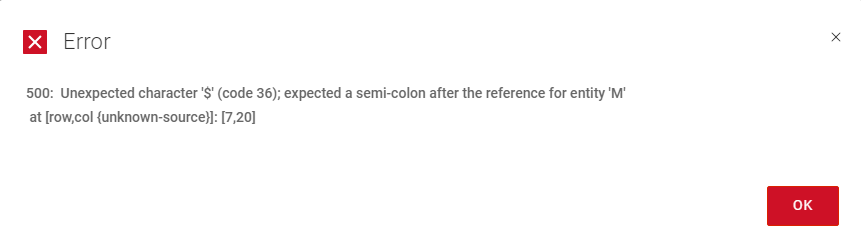
Cause
Within PowerProtect Data Manager, the password used for the Email Configuration contains a special character: $
This configuration can be found in the PPDM UI -> Gear Icon -> Support -> Email Setup
Resolution
To resolve the issue either of the following steps can be taken:
1. Change the password for the account specified under the PowerProtect Email Setup. Then update the password within PowerProtect UI UI -> Gear Icon -> Support -> Email Setup.
2. Remove the username and password as it may not be required in your environment and select SAVE in the Email Setup.
Affected Products
PowerProtect Data ManagerArticle Properties
Article Number: 000221223
Article Type: Solution
Last Modified: 17 Oct 2024
Version: 1
Find answers to your questions from other Dell users
Support Services
Check if your device is covered by Support Services.