PowerEdge: Windows Boot SATA HDD or SDD shows as removeable media
Summary: This article explains why the Windows Boot Drive (hosting the C:\ volume) may show as removeable media in Windows and how to override the behavior when necessary.
This article applies to
This article does not apply to
This article is not tied to any specific product.
Not all product versions are identified in this article.
Symptoms
In the Windows taskbar, the internal SATA disk (HDD or SSD) where the Operating System is installed (C:\) may show as "Removeable Media."
- A corresponding icon is visible in the notification area with the option to "Safely Remove Hardware and Eject Media."
- The internal hard drive is attached to an integrated AHCI enabled SATA port.
- The behavior is observable in Microsoft Windows server and client Operating Systems.
- This may further affect performance and/or reliability in systems that load a Group Policy Object specially configured to treat removable storage.
Cause
The system BIOS firmware is labeling the SATA port to which the Windows boot HDD/SDD is connected as "external," resulting in the built-in Microsoft Operating System's AHCI driver identifying and mounting the drive as "Removable Media."
Resolution
- Ensure that the latest version of BIOS and HDD/SDD firmware are installed. The same applies to Chipset and AHCI drivers specific to the system that exposes the behavior.
- Alternatively, it is possible to override the way the OS inbox AHCI driver surfaces the disk on certain ports by configuring the registry key below:
HKLM\SYSTEM\CurrentControlSet\Services\msahci\Controller0\Channelx\
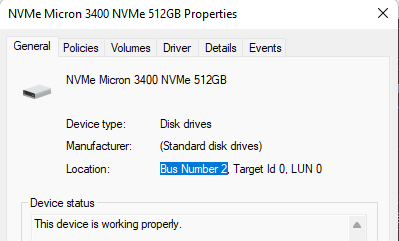
In the path above, the "x" near the end represents the Bus Number on the disk in question. The Bus Number can be obtained by reviewing the disk properties in the device manager (Run DEVMGMT.MSC > Under Disk Drives, identify the SATA device that must be considered "internal" by the native AHCI driver > Right-click it and select Properties) as illustrated below:
To override the way the OS inbox AHCI driver surfaces the disk, in an elevated command line, run the command below:
Reg.exe add “HKLM\SYSTEM\CurrentControlSet\Services\storahci\Parameters\Device” /f /v TreatAsInternalPort /t REG_MULTI_SZ /d x
(In the command above x corresponds to the Bus Number information obtained previously.)
Upon restarting, the disk specified is no longer listed as removable storage.
Upon restarting, the disk specified is no longer listed as removable storage.
Additional Information

Affected Products
Microsoft Windows Server 2016, Microsoft Windows Server 2019, Microsoft Windows Server 2022Products
Modular Infrastructure, Rack Servers, Tower ServersArticle Properties
Article Number: 000221557
Article Type: Solution
Last Modified: 21 Nov 2025
Version: 3
Find answers to your questions from other Dell users
Support Services
Check if your device is covered by Support Services.