NetWorker: How to send Security Audit log messages to the syslog server
Summary: How to send Security Audit log messages to the syslog server.
This article applies to
This article does not apply to
This article is not tied to any specific product.
Not all product versions are identified in this article.
Instructions
Security audit logging
NOTE: Additional information about NetWorker auditing is detailed in the NetWorker version-specific Security Configuration Guide. NetWorker documentation is available through: Support for NetWorker | Manuals & Documents
Default security audit-log location:
- Linux:
/nsr/logs/hostname_sec_audit.raw - Windows (Default):
C:\Program Files\EMC NetWorker\nsr\logs\hostname_sec_audit.raw - NetWorker: How to use nsr_render_log to render .raw log files
Use one of the following options to modify NetWorker Audit Log settings:
- NetWorker Management Console (NMC) -> Server -> Security Audit Log ->
hostname_sec_audit.raw-> File -> Properties
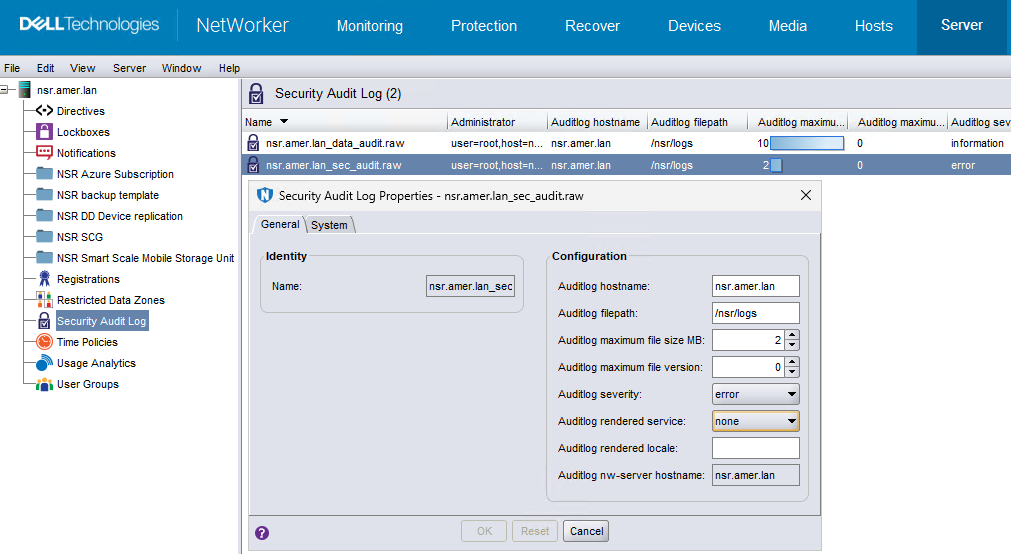
- NetWorker Web User Interface (NWUI) -> Server -> Security Audit Log ->
hostname_sec_audit.raw-> Edit
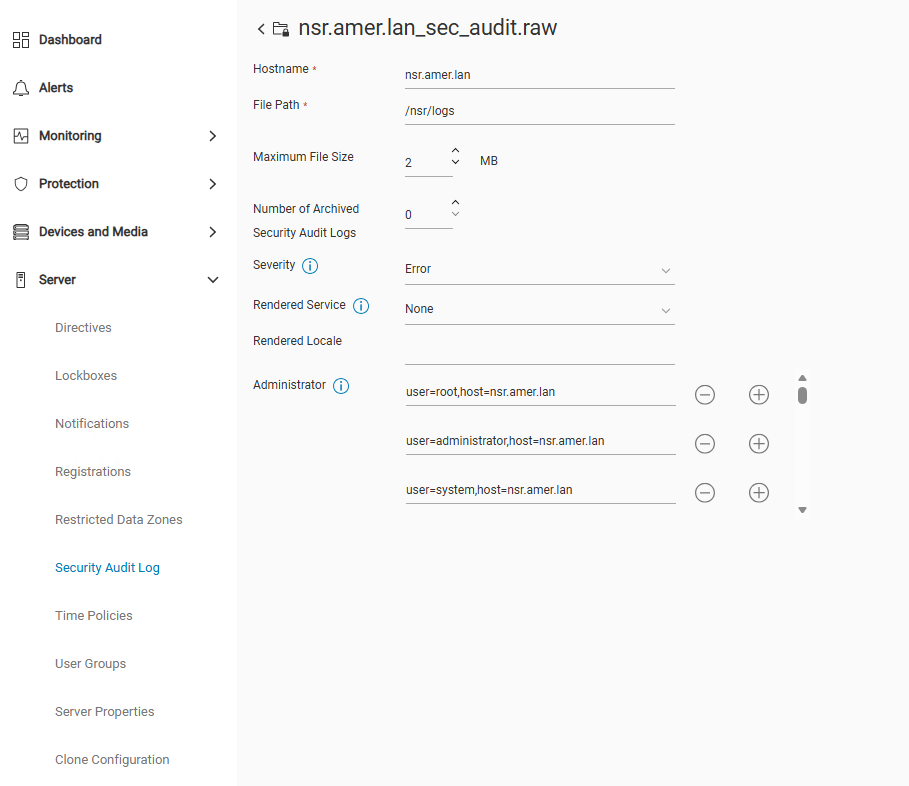
- NetWorker server nsradmin prompt:
- Open an elevated prompt on the NetWorker server, run:
nsradmin - From the
nsradminprompt, run:. type: nsr auditlog - To get the name of the audit log, run:
print - Set the query to the security audit log using the log name from step 3:
. type: nsr auditlog; name: hostname_sec_audit.raw - Use the update command to change audit log settings. The update syntax is:
update setting: new_value - You are prompted to confirm the changes, enter
yorn. - When done, enter
quitto exit thensradminprompt.
Example:
[root@nsr ~]# nsradmin
NetWorker administration program.
Use the "help" command for help, "visual" for full-screen mode.
nsradmin> . type: nsr auditlog; name: nsr.amer.lan_sec_audit.raw
Current query set
nsradmin> update auditlog rendered service: syslog
   auditlog rendered service: syslog;
Update? y
updated resource id 5.0.90.20.0.0.0.0.196.80.99.102.192.168.9.150(2)
nsradmin> quit
Options:
Hostname: Specify the resolvable hostname of the server to which the logs are must be sent. Ensure that you specify the hostname of a client that is defined on the NetWorker serverFile Path: Specify a valid file system path on the audit log server.- (Optional) Change the maxim file size in MB.
- (Optional) Change the maximum number of copies of audit logs to keep after the log has rolled over.
- (Optional) Change the log severity: Information, Error, Notice, Warning, Severe, Critical
- (Optional) Change the Rendered locale. This uses third party logging service to send security audit-log messages:
Option Value None - Default
- Writes unrendered security audit-log messages to the
hostname_sec_audit.rawfile only.
NetWorker: How to use nsr_render_log to render .raw log files
Local - Writes rendered security audit-log messages to the
hostname_sec_audit.logfile. - Writes unrendered security audit-log messages to the
hostname_sec_audit.rawfile.
syslog- Writes rendered security audit-log messages to the Linux syslog.
- Writes unrendered security audit-log messages to the
hostname_sec_audit.rawfile.
eventlog- Writes rendered security audit-log messages to the Windows event log.
- Writes unrendered security audit-log messages to the
hostname_sec_audit.rawfile.
Additional Information
Affected Products
NetWorkerProducts
NetWorkerArticle Properties
Article Number: 000012361
Article Type: How To
Last Modified: 06 Feb 2026
Version: 6
Find answers to your questions from other Dell users
Support Services
Check if your device is covered by Support Services.