VPLEX: Zoning Wan-Com ports on a single engine VPlex Metro
Summary: This KB article outlines how to zone WAN-COM ports on a single engine VPlex Metro.
This article applies to
This article does not apply to
This article is not tied to any specific product.
Not all product versions are identified in this article.
Instructions
The FC Wan Com ports are connected to dual separate backbone fabrics or networks that span two sites.
This allows for data flow between the two VPlex clusters in a Metro configuration without requiring a merged fabric between the two sites.
All A2-FC00 and B2-FC00 ports, or A2-XG00 and B2-XG00 ports, from both clusters connect to one fabric or network and all A2-FC01 and B2-FC01 ports, or A2-XG01 and B2-XG01 ports, connect to the other fabric or network.
This provides a redundant network capability where each director on one cluster communicates with all the directors on the other site even if a fabric or network failure.
The zoning must be fixed such that:
- All [A|B]2-FC00 only see remote [A|B]2-FC00 ports (that is, they are zoned with those ports)
- All [A|B]2-FC01 only see remote [A|B]2-FC01 ports (that is, they are zoned with those ports)
- All [A|B]2-FC02 only see remote [A|B]2-FC02 ports (that is, they are zoned with those ports)
- All [A|B]2-FC03 only see remote [A|B]2-FC03 ports (that is, they are zoned with those ports)
Refer to the "Implementation and Planning Best Practices for EMC VPLEX Technical Notes" for configuring FC WAN COM ports.
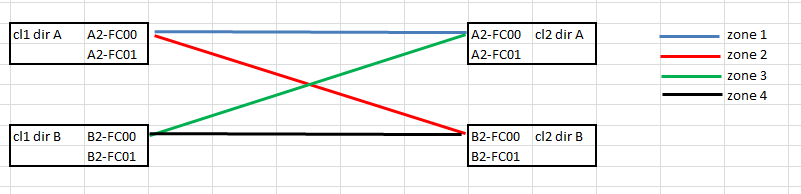
On the first fabric
Zone 1:
Cluster 1 : Dir A : Port A2-FC00
Cluster 2 : Dir A : Port A2-FC00
Zone 2:
Cluster 1 : Dir A : Port A2-FC00
Cluster 2 : Dir B : Port B2-FC00
Zone 3:
Cluster 1 : Dir B : Port B2-FC00
Cluster 2 : Dir A : Port A2-FC00
Zone 4:
Cluster 1 : Dir B : Port B2-FC00
Cluster 2 : Dir B : Port B2-FC00
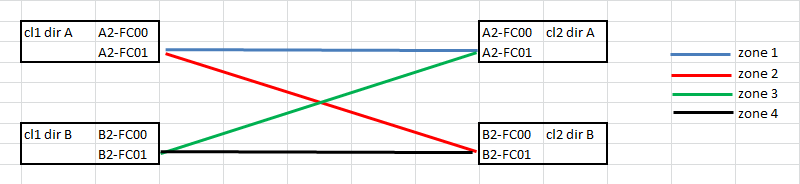
On second fabric
Zone 1:
Cluster 1 : Dir A : Port A2-FC01
Cluster 2 : Dir A : Port A2-FC01
Zone 2:
Cluster 1 : Dir A : Port A2-FC01
Cluster 2 : Dir B : Port B2-FC01
Zone 3:
Cluster 1 : Dir B : Port B2-FC01
Cluster 2 : Dir A : Port A2-FC01
Zone 4:
Cluster 1 : Dir B : Port B2-FC01
Cluster 2 : Dir B : Port B2-FC01
Affected Products
Enterprise StorageArticle Properties
Article Number: 000018930
Article Type: How To
Last Modified: 06 Mar 2026
Version: 4
Find answers to your questions from other Dell users
Support Services
Check if your device is covered by Support Services.