OneFS - permissions required for CloudPools AWS account
Summary: Creating user with minimal permissions in audited environments in which suggested "Admin" account permissions are unacceptable.
This article applies to
This article does not apply to
This article is not tied to any specific product.
Not all product versions are identified in this article.
Instructions
Our best practices suggestions documented for creating an Amazon Web Services account for use by CloudPools suggests giving the following permissions policies:
AmazonS3FullAccess
AdministratorAccess
This is a simple working method of creating an account which allows CloudPools to create data buckets and interact with the data. However, in some environments, account permissions are audited, and Administrator access requires backing documentation surrounding its use. If this is an issue, a user can be created with only the minimally-required access permissions.
See the following article for full instructions for general best practices:
Configuring EMC Isilon CloudPools to tier data to Amazon S3
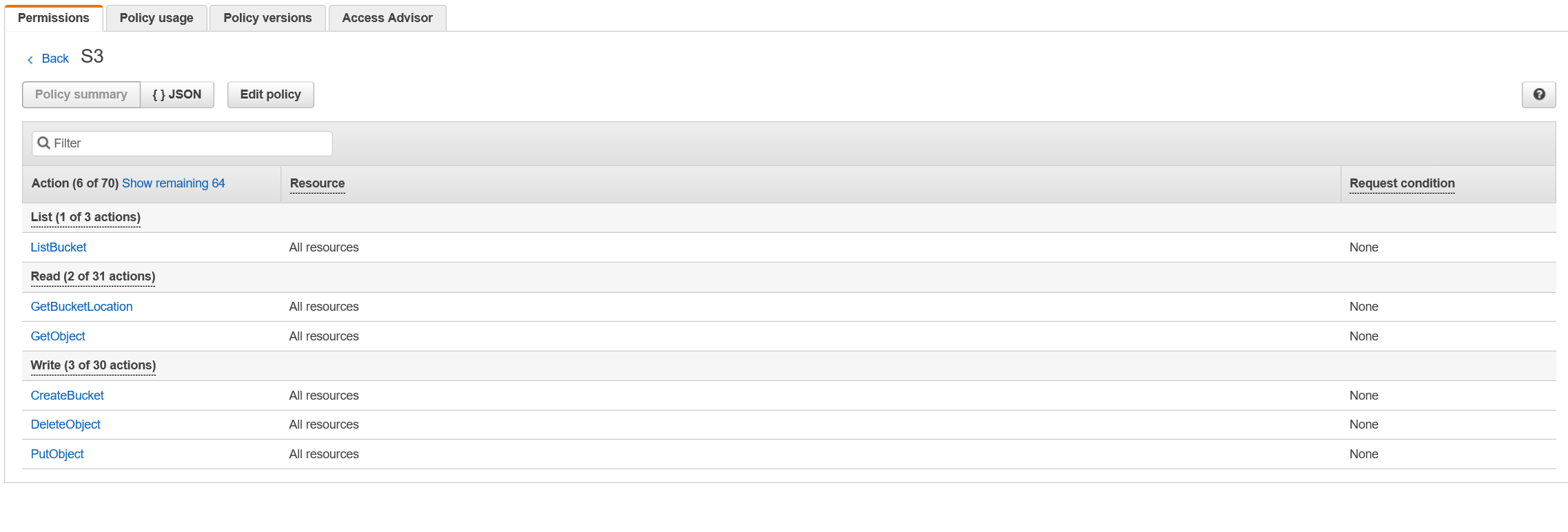
CloudPools requires the user configured to have a policy containing the following permissions:
This needs to be enabled for all resources, which is necessary so that the buckets and object names can be controlled by CloudPools.
AmazonS3FullAccess
AdministratorAccess
This is a simple working method of creating an account which allows CloudPools to create data buckets and interact with the data. However, in some environments, account permissions are audited, and Administrator access requires backing documentation surrounding its use. If this is an issue, a user can be created with only the minimally-required access permissions.
See the following article for full instructions for general best practices:
Configuring EMC Isilon CloudPools to tier data to Amazon S3
CloudPools requires the user configured to have a policy containing the following permissions:
"s3:ListBucket",
"s3:GetBucketLocation",
"s3:GetObject",
"s3:PutObject",
"s3:DeleteObject",
"s3:CreateBucket"
This needs to be enabled for all resources, which is necessary so that the buckets and object names can be controlled by CloudPools.
Affected Products
Isilon X200Products
Isilon X200Article Properties
Article Number: 000019428
Article Type: How To
Last Modified: 29 Mar 2025
Version: 3
Find answers to your questions from other Dell users
Support Services
Check if your device is covered by Support Services.