VxRail: How to create a Thick Provisioned Disk on vSAN
Summary: This article explains how to create thick provisioned disks for a virtual machine in VxRail Virtual Storage Area Network (vSAN) environments.
This article applies to
This article does not apply to
This article is not tied to any specific product.
Not all product versions are identified in this article.
Instructions
In vSAN environments, Virtual Machine Disk (VMDK) files are created as thin provisioned by default. In certain scenarios, it may be necessary to pre-allocate all the VMDK spaces, or thick provision the disks.
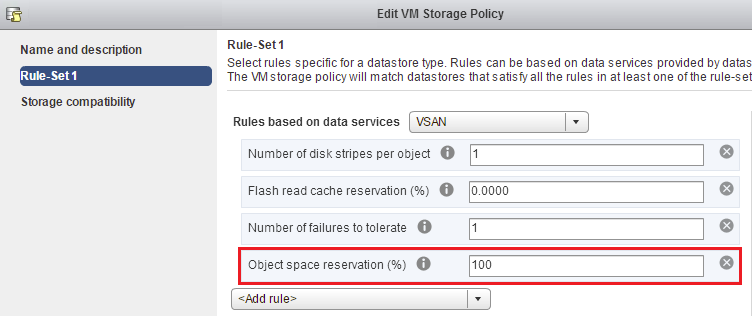
To create thick provisioned disks, use a Storage Policy which has Object Space Reservation (OSR) set to 100% in its Rule-Set. This ensures that the entire disk size is immediately allocated.
Affected Products
VxRail Appliance FamilyProducts
VxRail Appliance Family, VxRail Appliance SeriesArticle Properties
Article Number: 000019566
Article Type: How To
Last Modified: 24 Mar 2026
Version: 5
Find answers to your questions from other Dell users
Support Services
Check if your device is covered by Support Services.