Data Domain:如何关闭电源并打开电源以重新启动 Data Domain

Summary: 使用用户界面或命令行界面安全地关闭和重新启动 Data Domain 的最佳实践

This article applies to This article does not apply to This article is not tied to any specific product. Not all product versions are identified in this article.

Instructions

有时需要关闭或重新启动 Data Domain。目的可以是升级 DDOS、应用解决方法、更改时区、应对灾难情况或其他任何情况。务必遵循正确的步骤进行操作。

要关闭系统或执行系统重新启动,请检查以下各项:

  • 验证系统上的 I/O 是否已停止。
# iostat 5
sysadmin# iostat 5

2019-12-18 18:18:16
INTERVAL: 5 secs
"-" indicates that system is busy and unable to get recent data.
------------------------------------------------------------------------------------------------------------------------------------------------------------------------------------------------------------------------------------------------------------------------------------------------
CPU      |State     |Protocol Aggr                       |CIFS                 |Net                                                                                                                                                        |Disk                |NVRAM          |Repl
aggr aggr|          |                                    |                     |ethMa eth1a eth1b eth1c eth1d eth3a eth3b eth3c eth3d eth4a eth4b eth4c eth4d ethMa eth1a eth1b eth1c eth1d eth3a eth3b eth3c eth3d eth4a eth4b eth4c eth4d|                    |   aggr    aggr|
busy  max|          |        ops/s  load data in data out|ops/s      in     out|   in    in    in    in    in    in    in    in    in    in    in    in    in   out   out   out   out   out   out   out   out   out   out   out   out   out|   read   write busy|   read   write|     in     out
   %    %|CDPVMSFIRL|                  %    MB/s     MB/s|         MB/s    MB/s| MB/s  MB/s  MB/s  MB/s  MB/s  MB/s  MB/s  MB/s  MB/s  MB/s  MB/s  MB/s  MB/s  MB/s  MB/s  MB/s  MB/s  MB/s  MB/s  MB/s  MB/s  MB/s  MB/s  MB/s  MB/s  MB/s|  KiB/s   KiB/s   ms|  KiB/s   KiB/s|   KB/s    KB/s
---- ---- ---------- ------------- ----- ------- -------- ----- ------- ------- ----- ----- ----- ----- ----- ----- ----- ----- ----- ----- ----- ----- ----- ----- ----- ----- ----- ----- ----- ----- ----- ----- ----- ----- ----- ----- ------- ------- ---- ------- ------- ------- -------
   0    0                        0    19       0        0     0       0       0     0     0     0     0     0     0     0     0     0     0     0     0     0     0     0     0     0     0     0     0     0     0     0     0     0     0       0     508  607       -       -       0       0
   0    0                        0    19       0        0     0       0       0     0     0     0     0     0     0     0     0     0     0     0     0     0     0     0     0     0     0     0     0     0     0     0     0     0     0       0     747  758       -       -       0       0
   0    0                        0    19       0        0     0       0       0     0     0     0     0     0     0     0     0     0     0     0     0     0     0     0     0     0     0     0     0     0     0     0     0     0     0       0     576  514       -       -       0       0
   0    0                        0    19       0        0     0       0       0     0     0     0     0     0     0     0     0     0     0     0     0     0     0     0     0     0     0     0     0     0     0     0     0     0     0       0     282  421       -       -       0       0


  • 由于备份或 ddboost 复制会受到影响,因此您不应该在此期间运行任何备份或 ddboost 复制。
# ddboost file-replication show active
sysadmin# ddboost file-replication show active

File-replication active:  There are no file replication operations in progress.

  • 对于高可用性系统,请在 CLI 中运行以下命令,验证高可用性配置的运行状况:
# ha status
  • 对于高可用性系统,如果该系统处于高度可用状态且两个节点均在线,请运行 # ha offline 命令。如果高可用性状态降级,请跳过此步骤。
  1. 关闭 Data Domain 电源。
# system poweroff
sysadmin# system poweroff

system poweroff 命令将关闭系统并关闭电源。
Are you sure? (yes|no) [no]: yes
关闭电源后,您可以根据需要从主机/控制器或扩展盘架拔下电源线。

  1. 开机。
  • 打开所有扩展盘架的电源,然后再打开 Data Domain 控制器的电源。打开所有扩展盘架后,等待大约三分钟。
  • 插入主机/控制器的电源线,对于高可用性系统,请先打开活动节点的电源,然后再打开备用节点的电源。
  • 对于高可用性系统,请运行以下命令,验证高可用性配置的运行状况:# ha status
  • 对于高可用性系统,如果其中一个节点显示为离线状态,请在该节点上运行 # ha online 命令以还原高可用性配置。
  1. 使用用户界面重新启动 Data Domain。
    1. 依次选择 MaintenanceSystemReboot System
    2. 单击确定以确认。

Data Domain Enterprise Manager
图 1:Data Domain Enterprise Manager

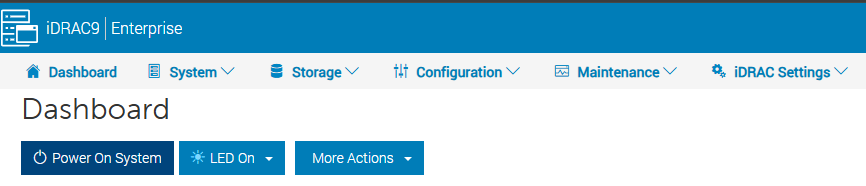
  1. 使用 iDRAC 重新启动 DD3300 或关闭其电源。

通过以下过程使用 iDRAC,可关闭然后再重新打开 DD3300 的电源:

  1. 登录到 iDRAC 
提醒:

集成远程访问控制器界面
图 2:集成远程访问控制器界面

  1. 登录后,可以执行各种正常关机操作,例如:
    • 关闭系统电源
    • 非屏蔽中断
    • 热重新启动
    • 冷重新启动

用于任何系统的完整重新启动过程通常需要 30 分钟至 1 小时。

Additional Information

  • 请勿使用机箱电源开关关闭系统电源。这样做可防止使用 IPMI 进行远程电源控制。请改为使用 # system poweroff 命令。此 system poweroff 命令将关闭系统并关闭电源。
  • IMPI 远程系统断电功能不会对 DD OS 执行有序关机。仅在 system poweroff 命令不成功时才使用此功能。
  • 重新启动后,如果系统启动时间超过 1 小时,请联系您的支持团队。

Affected Products

Data Domain
Article Properties
Article Number: 000019772
Article Type: How To
Last Modified: 19 Jul 2023
Version:  6
Find answers to your questions from other Dell users
Support Services
Check if your device is covered by Support Services.