VNX:Unisphere Manager GUIを使用してコマンド ライン インターフェイス(CLI)を起動する方法。(ユーザー修正可能)(英語)」
Summary: UnisphereからCLIにアクセスする方法の手順。
This article applies to
This article does not apply to
This article is not tied to any specific product.
Not all product versions are identified in this article.
Instructions
UnisphereでCLIにアクセスする方法
1。Unisphereにログインします。
2.[システム]タブを選択します
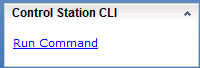
3。右下のパネルにあるControl Station CLIに移動します
4.そのすぐ下にある[コマンドの実行]を選択します
5.コマンドを入力するためのコマンド ページが開きます。

1。Unisphereにログインします。
2.[システム]タブを選択します
3。右下のパネルにあるControl Station CLIに移動します
4.そのすぐ下にある[コマンドの実行]を選択します
5.コマンドを入力するためのコマンド ページが開きます。
Affected Products
VNX/VNXeProducts
VNX/VNXeArticle Properties
Article Number: 000022420
Article Type: How To
Last Modified: 24 Sep 2024
Version: 3
Find answers to your questions from other Dell users
Support Services
Check if your device is covered by Support Services.