VNX: Slik går du inn i Command Line Interface (CLI) via Unisphere Manager GUI. (Kan rettes opp av bruker)
Summary: Fremgangsmåte for hvordan du får tilgang til CLI via Unisphere.
This article applies to
This article does not apply to
This article is not tied to any specific product.
Not all product versions are identified in this article.
Instructions
Hvordan komme seg til CLI i Unisphere
1. Logg på Unisphere.
2. Velg kategorien System .
3. Gå til Control Station CLI nederst i høyre rute.
4. Velg Kjør kommando rett under det.
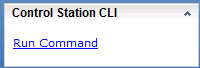
5. Kommandosiden åpnes, der du kan skrive inn kommandoer.

1. Logg på Unisphere.
2. Velg kategorien System .
3. Gå til Control Station CLI nederst i høyre rute.
4. Velg Kjør kommando rett under det.
5. Kommandosiden åpnes, der du kan skrive inn kommandoer.
Affected Products
VNX/VNXeProducts
VNX/VNXeArticle Properties
Article Number: 000022420
Article Type: How To
Last Modified: 24 Sep 2024
Version: 3
Find answers to your questions from other Dell users
Support Services
Check if your device is covered by Support Services.