VNX: Como acessar a interface de linha de comando (CLI) por meio da GUI do Unisphere Manager. (Corrigível pelo usuário)
Summary: Etapas sobre como acessar a CLI por meio do Unisphere.
This article applies to
This article does not apply to
This article is not tied to any specific product.
Not all product versions are identified in this article.
Instructions
Como chegar à CLI no Unisphere
1º. Faça log-in no Unisphere.
2. Selecione a guia System .
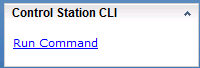
3º. Acesse Control Station CLI no painel inferior direito.
4º. Selecione Run Command logo abaixo.
5º. A página de comando é aberta para inserir comandos.

1º. Faça log-in no Unisphere.
2. Selecione a guia System .
3º. Acesse Control Station CLI no painel inferior direito.
4º. Selecione Run Command logo abaixo.
5º. A página de comando é aberta para inserir comandos.
Affected Products
VNX/VNXeProducts
VNX/VNXeArticle Properties
Article Number: 000022420
Article Type: How To
Last Modified: 24 Sep 2024
Version: 3
Find answers to your questions from other Dell users
Support Services
Check if your device is covered by Support Services.