Dell EMC Unity: How to identify the Primary Storage Processor (User Correctable)
Summary: Dell EMC Unity: How to identify the Primary Storage Processor (User Correctable)
This article applies to
This article does not apply to
This article is not tied to any specific product.
Not all product versions are identified in this article.
Instructions
The management software (ECOM) handles Unisphere, the management interface, and other services. This process runs on one Storage Processor at a time (primary).
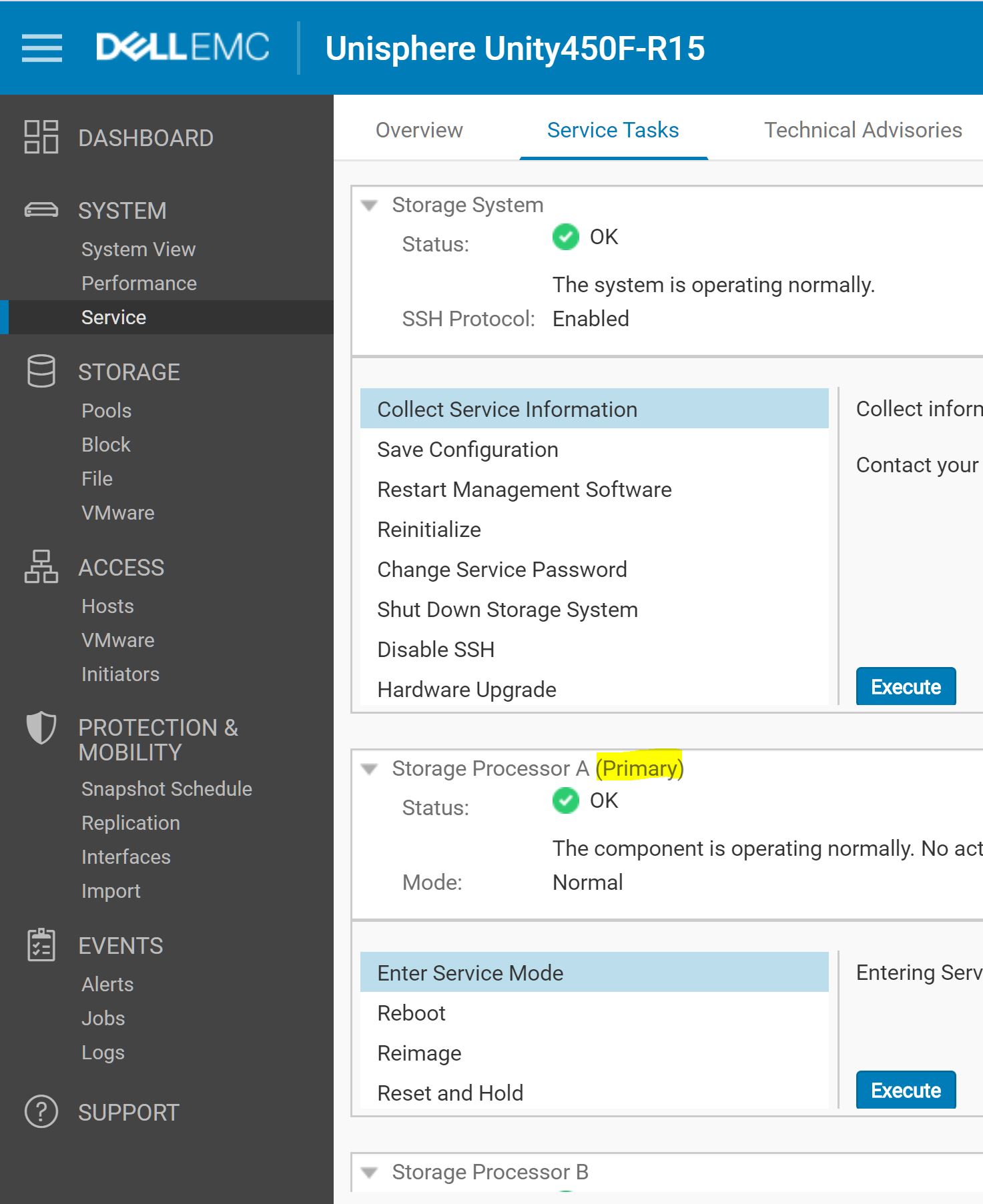
The SP that is running the management software is designated as the Primary SP in the Service page in Unisphere, as shown in the figure below:
How view using Unity GUI:
1.Log in to the unity GUI using the admin credentials
2.Click on the Service Dashboard Tab.
3.Go to the Service Task Tab.
How to view using SSH.
It is also possible to identify the Primary Storage Processor over SSH or Serial Over LAN (SOL) connection. The primary SP returns a PID (Process ID) for ECOM:
spa:~/user# pgrep ECOM

28771
The non-Primary SP does not run the ECOM service and command does not display any PID.
Additional Information
Unlike the legacy Dell EMC VNX and CLARiiON arrays where the management process (Management Server) was active on both Storage Processors, on Unity arrays, the choice was made to have only one active Storage Processor (Primary SP) to reduce the number of IP addresses required.
If the primary SP reboots, panics, or the management connection goes down, the management software automatically fails over to the peer SP. After a failover, it may take a few minutes for all the services to fully start. Users that are logged in to Unisphere during the failover may see a message indicating that the connection was lost. When the failover process completes, you can restore access to Unisphere by refreshing the browser.
Note that host access to storage data resources is not affected by this.
After the failover, the management software continues to run on the new SP, even if the other SP returns to a healthy state. This SP continues to run as the Primary SP, until it is rebooted or failed over.
This article is translated in 15 different languages:
https://downloads.dell.com/TranslatedPDF/ES_KB540082.pdf
https://downloads.dell.com/TranslatedPDF/ES-XL_KB540082.pdf
https://downloads.dell.com/TranslatedPDF/FR_KB540082.pdf
https://downloads.dell.com/TranslatedPDF/IT_KB540082.pdf
https://downloads.dell.com/TranslatedPDF/JA_KB540082.pdf
https://downloads.dell.com/TranslatedPDF/KO_KB540082.pdf
https://downloads.dell.com/TranslatedPDF/NL_KB540082.pdf
https://downloads.dell.com/TranslatedPDF/PT_KB540082.pdf
https://downloads.dell.com/TranslatedPDF/PT-BR_KB540082.pdf
https://downloads.dell.com/TranslatedPDF/RU_KB540082.pdf
https://downloads.dell.com/TranslatedPDF/SV_KB540082.pdf
https://downloads.dell.com/TranslatedPDF/ZH-CN_KB540082.pdf
https://downloads.dell.com/TranslatedPDF/ZH-TW_KB540082.pdf
https://downloads.dell.com/TranslatedPDF/AR_KB540082.pdf
https://downloads.dell.com/TranslatedPDF/DE_KB540082.pdf
Affected Products
Dell EMC Unity FamilyProducts
Dell EMC Unity 300F, Dell EMC Unity 350F, Dell EMC Unity XT 380, Dell EMC Unity XT 380F, Dell EMC Unity 400, Dell EMC Unity 400F, Dell EMC Unity 450F, Dell EMC Unity XT 480, Dell EMC Unity XT 480F, Dell EMC Unity 500, Dell EMC Unity 500F
, Dell EMC Unity 550F, Dell EMC Unity 600, Dell EMC Unity 600F, Dell EMC Unity 650F, Dell EMC Unity XT 680, Dell EMC Unity XT 680F, Dell EMC Unity XT 880, Dell EMC Unity XT 880F, Dell EMC Unity Family |Dell EMC Unity All Flash, Dell EMC Unity Family, Dell EMC Unity Hybrid
...
Article Properties
Article Number: 000022649
Article Type: How To
Last Modified: 17 Apr 2026
Version: 5
Find answers to your questions from other Dell users
Support Services
Check if your device is covered by Support Services.