Dell Unity: Backing Up Dell Unity Configuration Files
Summary: Dell recommends saving the Dell Unity system configuration file to a remote location after every significant configuration change.
This article applies to
This article does not apply to
This article is not tied to any specific product.
Not all product versions are identified in this article.
Instructions
Does Dell provide any recommendations or best practices for backing up Dell Unity configuration files?
Yes. Dell recommends saving the Unity system configuration file to a remote location after every significant configuration change. This practice helps ensure that you always maintain an up-to-date copy of the storage system's configuration settings, which can be valuable for system recovery, troubleshooting, or rebuilding the environment, if required.
Best Practice
- Save the configuration file after any major system modification, such as:
- Network configuration changes
- Storage pool modifications
- User or security configuration updates
- Replication or data protection configuration changes
- Hardware additions or replacements
How to Save the Configuration File in Unisphere
To create and download a backup of the Unity configuration file:
- Log in to Unisphere.
- Go to Service.
- Select Service Tasks.
- Click Save Configuration.
- Select Execute to generate and download the configuration file.
- Store the file in a secure remote location as part of your regular backup and recovery procedures.
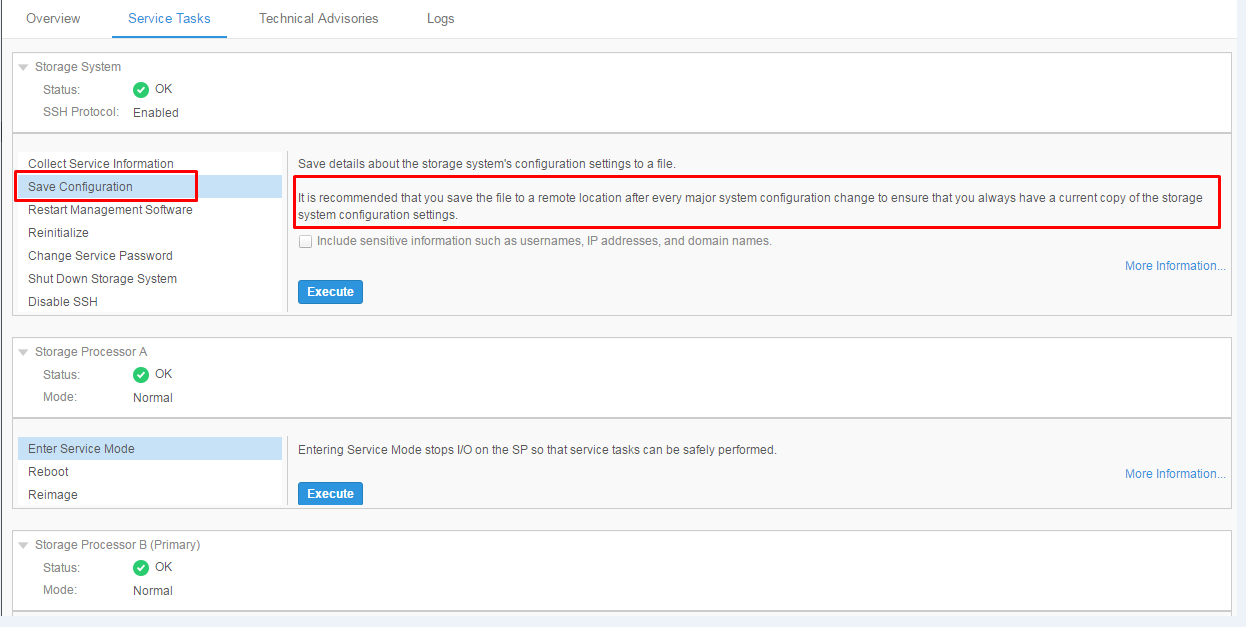
Maintaining current configuration backups ensures that critical system settings can be restored or referenced quickly in the event of a system issue or recovery operation.
Affected Products
Dell EMC Unity FamilyArticle Properties
Article Number: 000022810
Article Type: How To
Last Modified: 15 Jul 2026
Version: 6
Find answers to your questions from other Dell users
Support Services
Check if your device is covered by Support Services.