PowerScale: informazioni sulle impostazioni non predefinite di NFSv4
Summary: Informazioni sulle impostazioni non predefinite NFSv4 in un cluster PowerScale.
This article applies to
This article does not apply to
This article is not tied to any specific product.
Not all product versions are identified in this article.
Instructions
A volte, la configurazione predefinita di NFSv4 produce risultati imprevisti. I seguenti problemi possono verificarsi e possono essere regolati come indicato. La best practice consiglia di evitare impostazioni non predefinite perché spesso interrompono il supporto dell'ACL (Access Control List) NFSv4.
- Dominio NFSv4 non configurato:
- La proprietà root viene visualizzata come
nobody:nobody, mentre gli utenti non root visualizzanouser:groupcontesto. Senza informazioni sul dominio, il supporto ACL sul mount è improbabile. Per ulteriori informazioni, fare riferimento a PowerScale: NFSv4 clients cannot access resources cause owner/group is listed as nobody/nogroup.
- La proprietà root viene visualizzata come
- Il dominio NFSv4 è configurato:
- La proprietà root viene visualizzata come
root:wheelinvece diroot:root. Ciò si verifica perché NFSv4 restituisce nomi UID e GID dal server. In OneFS, UID 0 e GID 0 vengono mappati aroot:wheel. I sistemi Linux potrebbero non avere il gruppo wheel o assegnargli il GID 10. Una potenziale soluzione alternativa consiste nell'aggiungere root al gruppo wheel sul client Linux. Ciò richiederebbe modifiche a ogni client, ma eviterebbe modifiche alla configurazione lato server. Un'alternativa lato cluster potrebbe essere l'impostazionenfsv4-no-namesSì, ma questo ha delle avvertenze.
- La proprietà root viene visualizzata come
- NFSv4 No Names impostato su non-default YES:
- Questa impostazione invia UID/GID anziché
user@domain. La proprietà root viene visualizzata comeroot:root, ma il supporto ACL ha esito negativo perché il protocollo richiedeuser@domainsintassi per RFC. Questa impostazione non è consigliata come soluzione alternativa permanente perché interrompe la funzionalità ACL NFSv4.
- Questa impostazione invia UID/GID anziché
I dettagli tecnici per le impostazioni della zona NFS sono disponibili eseguendo il seguente comando:
# isi nfs settings zone modify -h
Description:
    Change the default NFS zone options.

Required Privileges:
    ISI_PRIV_NFS

Usage:
    isi nfs settings zone modify
        [--nfsv4-domain <string>]
        [--revert-nfsv4-domain]
        [--nfsv4-replace-domain <boolean>]
        [--revert-nfsv4-replace-domain]
        [--nfsv4-no-domain <boolean>]
        [--revert-nfsv4-no-domain]
        [--nfsv4-no-domain-uids <boolean>]
        [--revert-nfsv4-no-domain-uids]
        [--nfsv4-no-names <boolean>]
        [--revert-nfsv4-no-names]
        [--nfsv4-allow-numeric-ids <boolean>]
        [--revert-nfsv4-allow-numeric-ids]
        [--zone <string>]
        [{--verbose | -v}]
        [{--help | -h}]

Options:
    --nfsv4-domain <string>
        NFSv4 domain name.
    --revert-nfsv4-domain
        Set value to system default for --nfsv4-domain.
    --nfsv4-replace-domain <boolean>
        Replace owner/group domain with nfs domainname. (v4).
    --revert-nfsv4-replace-domain
        Set value to system default for --nfsv4-replace-domain.
    --nfsv4-no-domain <boolean>
        Send owners/groups without domainname (v4).
    --revert-nfsv4-no-domain
        Set value to system default for --nfsv4-no-domain.
    --nfsv4-no-domain-uids <boolean>
        Send UIDs/GIDs without domainname (v4).
    --revert-nfsv4-no-domain-uids
        Set value to system default for --nfsv4-no-domain-uids.
    --nfsv4-no-names <boolean>
        Always send owners/groups as UIDs/GIDs (v4).
    --revert-nfsv4-no-names
        Set value to system default for --nfsv4-no-names.
    --nfsv4-allow-numeric-ids <boolean>
        Send owners/groups as UIDs/GIDs when lookups fail or if no_names=1 (v4).
    --revert-nfsv4-allow-numeric-ids
        Set value to system default for --nfsv4-allow-numeric-ids.
    --zone <string>
        Access zone.

  Display Options:
    --verbose | -v
        Display more detailed information.
    --help | -h
        Display help for this command.
Impostazioni predefinite dall'interfaccia della riga di comando:
# isi nfs settings zone view
           NFSv4 Domain: localhost
   NFSv4 Replace Domain: Yes
        NFSv4 No Domain: No
   NFSv4 No Domain UIDs: Yes
         NFSv4 No Names: No
NFSv4 Allow Numeric IDs: Yes
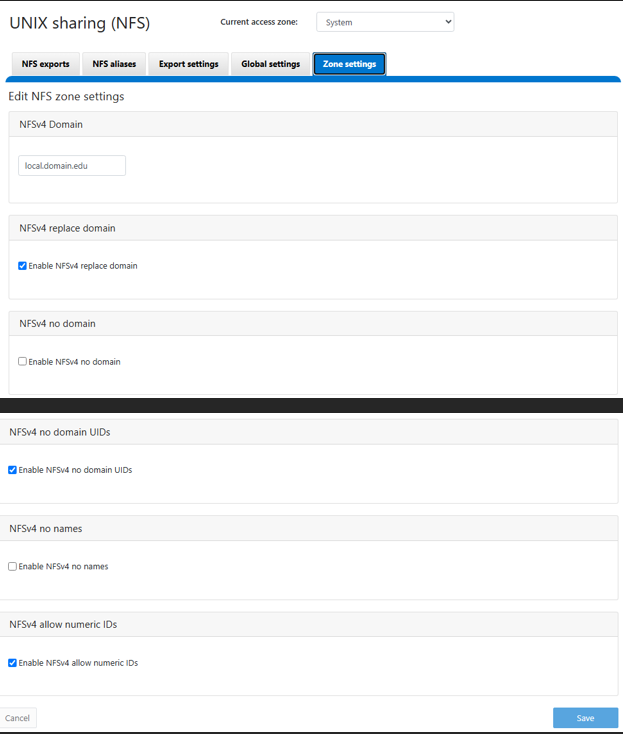
Impostazioni predefinite come mostrato in OneFS WebU, questa immagine proviene da una WebUI di OneFS 9.13, ma deve essere simile alle versioni precedenti:
Additional Information
Affected Products
PowerScale OneFSProducts
IsilonArticle Properties
Article Number: 000023023
Article Type: How To
Last Modified: 16 Sep 2026
Version: 5
Find answers to your questions from other Dell users
Support Services
Check if your device is covered by Support Services.