NetWorker: Source Capacity Licensing - How to calculate source capacity
Summary: This article explains how to calculate source capacity.
This article applies to
This article does not apply to
This article is not tied to any specific product.
Not all product versions are identified in this article.
Instructions
The latest versions of NetWorker allow for automatic estimation of the NetWorker capacity being backed up.
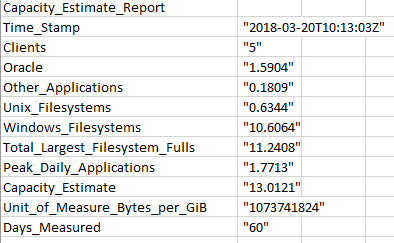
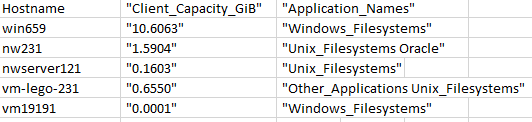
The command-line tool nsrcapinfo generates an estimate of the total data protected in a NetWorker datazone. The capacity estimate measures the maximum full backup for each application type and each client in the datazone, which is defined as the client's capacity. The sum of each individual client's capacity provides a capacity estimate for the entire datazone. Data is measured as the largest aggregate full or synthetic full backup (full plus incremental) performed for all protected data by NetWorker over 60 days. The quantity of pre-deduplicated data is in the calculation.
For more information, see the nsrcapinfo section of the NetWorker Command Reference, and NetWorker Licensing guides: https://www.dell.com/support/product-details/product/networker/docs
nsrcapinfo
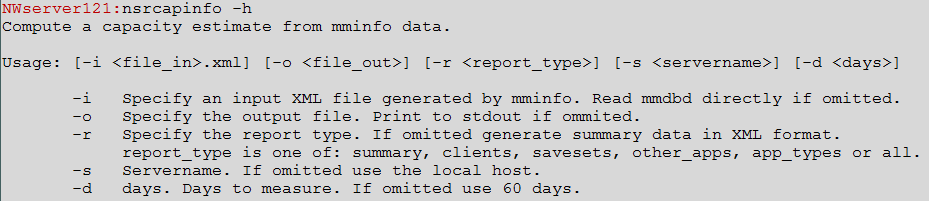
nsrcapinfo summary report example:

nsrcapinfo client report example:

Calculation example:
For one client:
Sunday - full backup - 0.9 TB
Monday - Incremental backup - 0.1 TB
Tuesday - Incremental backup - 0.1 TB
Wednesday - Incremental backup - 0.1 TB
Thursday - Incremental backup - 0.1 TB <- some data is removed from the client system on this day.
Friday - Incremental backup - 0.1 TB
Saturday - Incremental backup - 0.1 TB
Sunday - full backup - 0.8 TB
The total source capacity for this client is 0.9 TB, which is the largest full backup within 60 days. Add this figure for all clients in your datazone and you have the total source capacity for the datazone.
Additional Information
Affected Products
NetWorkerProducts
NetWorkerArticle Properties
Article Number: 000029555
Article Type: How To
Last Modified: 17 Apr 2026
Version: 7
Find answers to your questions from other Dell users
Support Services
Check if your device is covered by Support Services.