Data Domain: Faulty PERC Battery causes degraded performance
Summary: The DD3300 and DP4400 platforms use a PERC H730P Mini RAID controller with a battery-backed cache. If the battery becomes degraded or fails, the controller automatically switches its write policy from Write-Back to Write-Through, resulting in reduced system performance. ...
This article applies to
This article does not apply to
This article is not tied to any specific product.
Not all product versions are identified in this article.
Symptoms
Applies to:
- DD3300
- DP4400 (IDPA)
- Dell PowerEdge R740XD with PERC H730P Mini RAID Controller
- All DDOS Versions
Symptoms:
- Noticeable drop in system performance
- iDRAC logs report one or more of the following alerts:
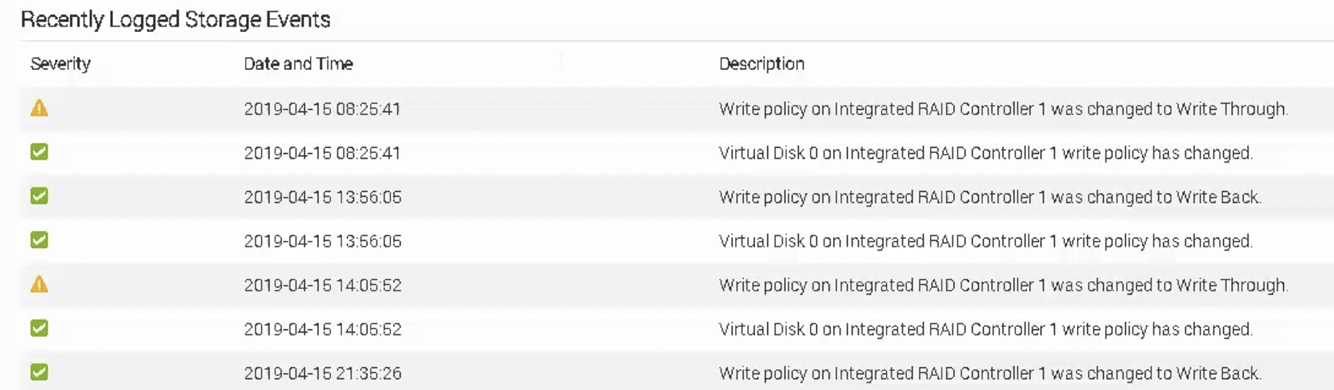
- "Write policy on Integrated RAID Controller 1 was changed to Write Through"
- "Virtual Disk 0 write policy has changed"
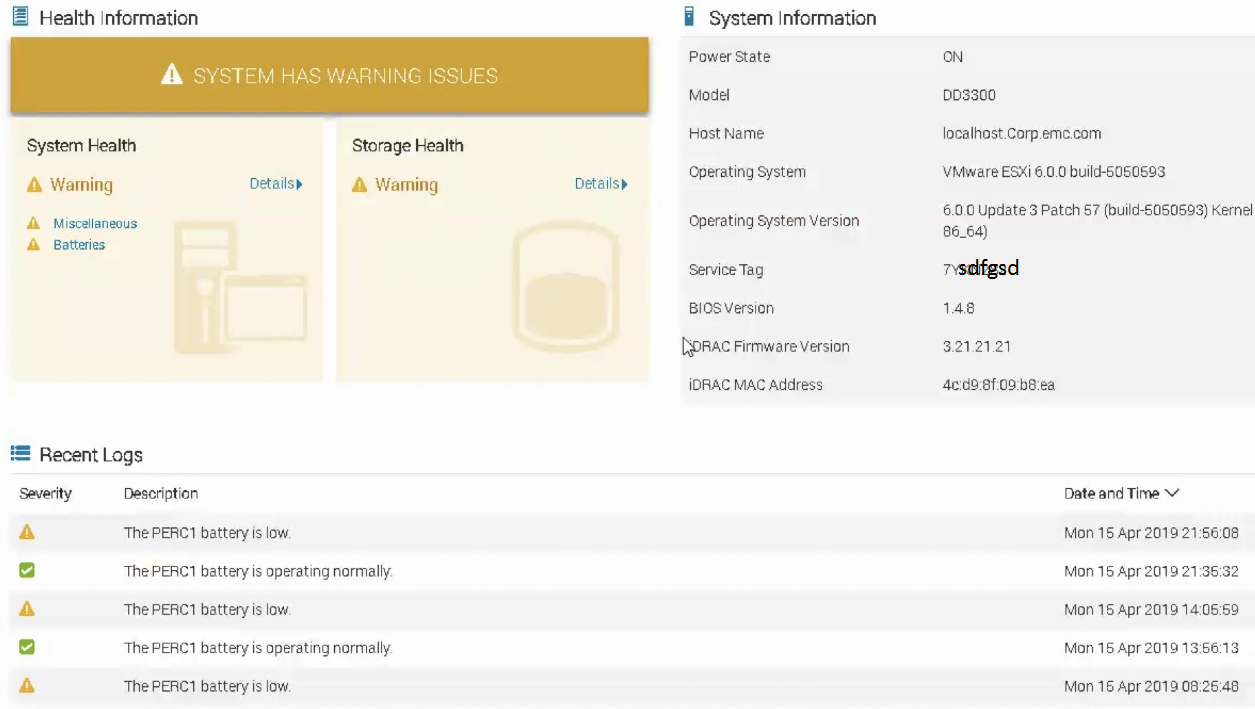
- "PERC battery is low"
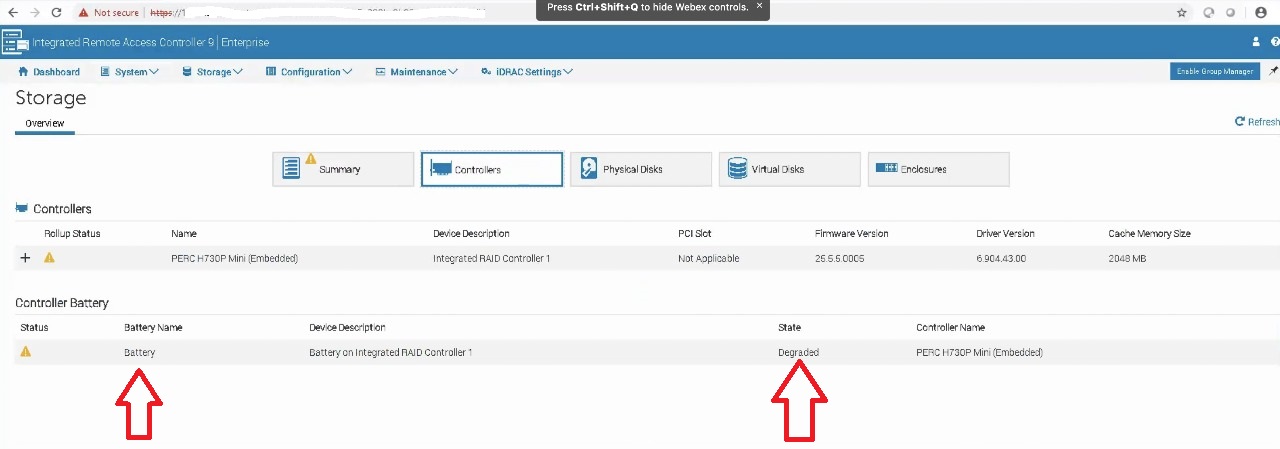
- "Battery on Integrated RAID Controller 1 is Degraded or Failed"
Example iDRAC Log Locations:
- Storage > Summary > Recently Logged Storage Events
- Dashboard > Health Information | Recent Logs
- Storage > Controllers > Controller Battery
- As captured in the images below:
- Storage > Summary > Recently Logged Storage Events
- iDRAC: Dashboard > Health Information | Recent Logs
- iDRAC: Storage > Controllers > Controller Battery
Cause
The PERC H730P Mini controller relies on a battery-backed cache to safely support the Write-Back policy. When the battery is degraded or faulty:
- The controller switches to Write-Through mode to protect data integrity.
- This change impacts write performance.
- Write-Back (WB): Writes complete once data is cached; faster but riskier without battery backup
- Write-Through (WT): Writes complete only after data is written to disk; safer but slower
Resolution
To restore optimal performance:
- Confirm the issue by reviewing iDRAC logs and verifying battery status.
- Review battery behavior during the Learn Cycle:
- If the battery cannot hold a 24-hour charge, a "Predicted failure" alert appears. This indicates that the battery is nearing the end-of-life and should be replaced.
- A "Battery failed" alert during the learn cycle is normal and can be safely ignored. The battery should return to a healthy state within minutes.
- A "Battery failed" alert outside the learn cycle indicates that the battery has failed and requires immediate replacement.
- Before replacing, verify that the battery is securely connected to the PERC controller.
- Request a replacement PERC H730P Mini card (includes integrated battery).
- Contact your Technical Support Provider to initiate a hardware replacement.
Affected Products
Data DomainProducts
Data Domain, DD3300 Appliance, Data Domain Deduplication Storage Systems, PowerProtect DP4400, Integrated Data Protection Appliance Family, PowerProtect Data Protection HardwareArticle Properties
Article Number: 000038067
Article Type: Solution
Last Modified: 06 Oct 2025
Version: 4
Find answers to your questions from other Dell users
Support Services
Check if your device is covered by Support Services.