NVP-vProxy:Windows VM FLR 失敗,並顯示「瀏覽時發生錯誤:200: 從 vProxy 收到的錯誤「無法取得目錄內容:」
Summary: 由於 VM 作業系統上的管理員核准模式 (或強化 UAC) 設定,透過 NetWorker VMware Protection (NVP) vProxy 裝置執行的 Microsoft Windows VM FLR 無法瀏覽目錄內容
This article applies to
This article does not apply to
This article is not tied to any specific product.
Not all product versions are identified in this article.
Symptoms
Microsoft Windows VM 的 vProxy 檔案層級復原 (FLR) 失敗,並出現下列錯誤:
Error while browsing: 200: Error received from vProxy "could not get directory contents: Unable to retrieve file list from 'host' (vm-moref) path 'path'"
Windows VM 不包含 Windows 分散式檔案系統 (DFS):NVP vProxy:虛擬機器 FLR 持續失敗,並顯示「無法取得目錄內容...」
Cause
如果在作業系統上啟用了管理員批准模式 (AAM),則會出現此錯誤。這可防止系統管理員使用者對終端使用者的設定檔執行 FLR。對於任何用戶帳戶控制 (UAC) 交互,管理員必須等待裝載操作完成,然後訪問目標電腦上的裝載點。
Resolution
提供三種選項:
選項 1:
從 NetWorker Web 使用者介面 (NWUI) 執行 FLR。FLR 程序中有一個名為「以提升權限執行」的選項。執行 FLR 時,請勾選此選項。此選項在 NetWorker Management Console (NMC) 內不可用。
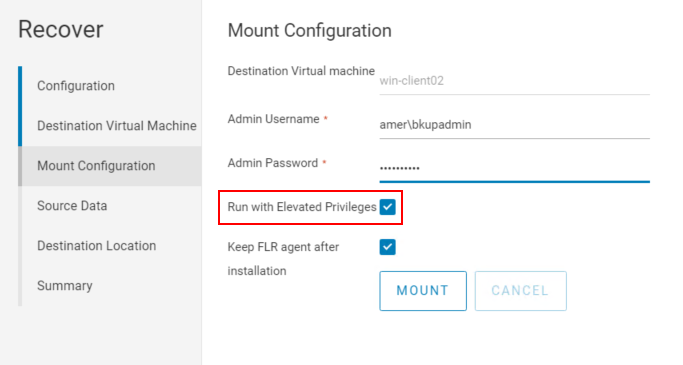
選項 2:
1.從 NetWorker Management Console (NMC) 啟動 FLR 掛接:
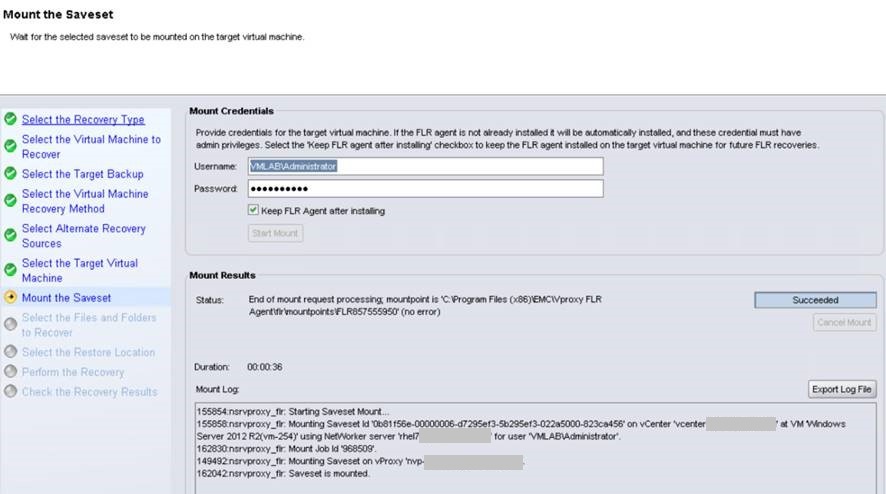
2.請勿繼續從 NMC 還原。登入目標還原虛擬機器,然後使用 Windows 檔案總管前往「C:\Program Files (x86)\EMC\vProxy FLR Agent\flr\mountpoints」。開啟從 NMC 啟動的掛接點,例如:
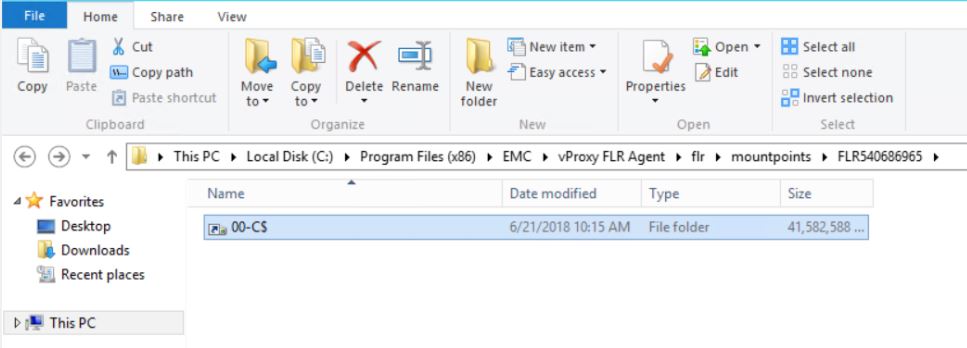
您可以瀏覽至所需的資料夾/檔案,並將其複製到虛擬機器。檔也可以使用 xcopy 複製: xcopy mountpoint_folder/file recover_destination /EH
3。完成後,請關閉 NMC 中的還原精靈,以拔下固定點。
複製: xcopy mountpoint_folder/file recover_destination /EH
3。完成後,請關閉 NMC 中的還原精靈,以拔下固定點。
選項 3:
即時存取還原也可作為 FLR 因應措施使用。此程序記錄在以下位置:
NVP vProxy:當 FLR 失敗或 VM 不支援時,如何執行檔案層級復原
Additional Information
Affected Products
NetWorkerProducts
NetWorkerArticle Properties
Article Number: 000044625
Article Type: Solution
Last Modified: 28 Jul 2026
Version: 7
Find answers to your questions from other Dell users
Support Services
Check if your device is covered by Support Services.