Avamar: En VM-målvärd kan inte nå proxyn på grund av att bryggtjänsten inte körs
Summary: Den här artikeln förklarar varför en återställning på filnivå för virtuella datorer (FLR) misslyckas när den virtuella måldatorn inte kan nå proxyn, vilket så småningom överskrider tidsgränsen efter långvarig körning. ...
This article applies to
This article does not apply to
This article is not tied to any specific product.
Not all product versions are identified in this article.
Symptoms
Under en FLR för en virtuell dator visas följande fönstermeddelande i Avamar-administrationskonsolen:
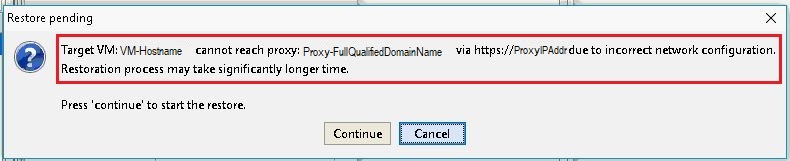
Felmeddelande:
Target VM: <VM-hostname> cannot reach proxy: <avamar-proxy-FQDN_or_IP_Address> via https://<proxy-hostname-IP-Address> due to incorrect network configuration.
Restoration may take significantly longer time Press "Continue" to start the restore
Cause
Tjänsten som ansvarar för att lyssna på port 443 på proxyn körs inte:
root@avamar-proxy:~/>: netstat -plnt |egrep "Proto|443"
Proto Recv-Q Send-Q Local Address Foreign Address State PID/Program name
root@avamar-proxy:~/>: service jetty status
Jetty Info: Jetty Service is not running.
Resolution
Utför följande åtgärder:
- Starta tjänsten innan du försöker FLR igen:
root@avamar-proxy:~/>: service jetty start
Shutting down vami-lighttpd:done.
Jetty Info: Jetty daemon started.
root@avamar-proxy:~/>: service jetty status
Jetty Info: Jetty Service is running.[13234]
root@avamar-proxy:~/>: netstat -plnt |egrep "Proto|443"
Proto Recv-Q Send-Q Local Address           Foreign Address         State       PID/Program name
tcp        0      0 :::443                  :::*                    LISTEN      13234/java
- Se till att tjänsten är konfigurerad för att starta automatiskt på körningsnivåer för flera användare:
root@avamar-proxy:~/>: chkconfig --list |grep jetty
jetty 0:off 1:off 2:on 3:on 4:on 5:on 6:off
- För att säkerställa att tjänsten startar automatiskt på de angivna körningsnivåerna uppdaterar du tjänstkonfigurationen med hjälp av kommandot nedan:
root@avamar-proxy:~/>: chkconfig --level 2345 jetty on
Om stegen ovan inte löser problemet utför du detta ytterligare steg:
-
Redigera
/usr/local/avamarclient/bin/config.xmlpå proxyn som används för FLR och ändra värdet för wget-parametern från 0 till 1:<enablewgetrestore>1</enablewgetrestore>
Affected Products
AvamarArticle Properties
Article Number: 000050308
Article Type: Solution
Last Modified: 17 Apr 2026
Version: 8
Find answers to your questions from other Dell users
Support Services
Check if your device is covered by Support Services.