Avamar: Bir Hedef VM Ana Bilgisayarı, Jetty Hizmeti çalışmadığı için Proxy'ye erişemiyor
Summary: Bu makalede, hedef VM proxy'ye ulaşamadığında Sanal Makine (VM) dosya düzeyi geri yüklemesinin (FLR) neden başarısız olduğu ve uzun süreli yürütmenin ardından zaman aşımına uğradığı açıklanmaktadır. ...
This article applies to
This article does not apply to
This article is not tied to any specific product.
Not all product versions are identified in this article.
Symptoms
Sanal Makine FLR işlemi sırasında Avamar Administration konsolunda aşağıdaki pencere mesajı görüntülenir:
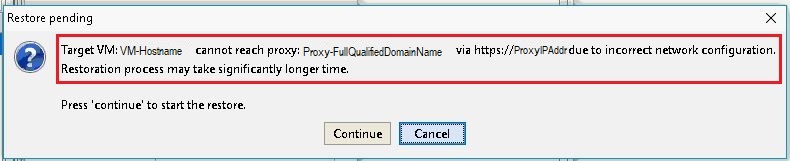
Hata mesajı:
Target VM: <VM-hostname> cannot reach proxy: <avamar-proxy-FQDN_or_IP_Address> via https://<proxy-hostname-IP-Address> due to incorrect network configuration.
Restoration may take significantly longer time Press "Continue" to start the restore
Cause
Proxy'deki 443 numaralı bağlantı noktasını dinlemekten sorumlu hizmet çalışmıyor:
root@avamar-proxy:~/>: netstat -plnt |egrep "Proto|443"
Proto Recv-Q Send-Q Local Address Foreign Address State PID/Program name
root@avamar-proxy:~/>: service jetty status
Jetty Info: Jetty Service is not running.
Resolution
Aşağıdaki işlemleri gerçekleştirin:
- FLR'yi yeniden denemeden önce hizmeti başlatın:
root@avamar-proxy:~/>: service jetty start
Shutting down vami-lighttpd:done.
Jetty Info: Jetty daemon started.
root@avamar-proxy:~/>: service jetty status
Jetty Info: Jetty Service is running.[13234]
root@avamar-proxy:~/>: netstat -plnt |egrep "Proto|443"
Proto Recv-Q Send-Q Local Address           Foreign Address         State       PID/Program name
tcp        0      0 :::443                  :::*                    LISTEN      13234/java
- Hizmetin çok kullanıcılı çalışma düzeylerinde otomatik olarak başlayacak şekilde yapılandırıldığından emin olun:
root@avamar-proxy:~/>: chkconfig --list |grep jetty
jetty 0:off 1:off 2:on 3:on 4:on 5:on 6:off
- Hizmetin belirtilen çalışma düzeylerinde otomatik olarak başlatıldığından emin olmak için aşağıdaki komutu kullanarak hizmet yapılandırmasını güncelleştirin:
root@avamar-proxy:~/>: chkconfig --level 2345 jetty on
Yukarıdaki adımlar sorunu çözmezse şu ek adımı gerçekleştirin:
-
Şunu düzenleyin:
/usr/local/avamarclient/bin/config.xmldosyasının ve 0 olan wget parametresinin değerini 0'dan 1'e değiştirin:<enablewgetrestore>1</enablewgetrestore>
Affected Products
AvamarArticle Properties
Article Number: 000050308
Article Type: Solution
Last Modified: 17 Apr 2026
Version: 8
Find answers to your questions from other Dell users
Support Services
Check if your device is covered by Support Services.