Network Configuration on Avamar ADS Gen4T
Summary: General Overview for Gen4T Network Configuration Including Bonding configuration
This article applies to
This article does not apply to
This article is not tied to any specific product.
Not all product versions are identified in this article.
Symptoms
Network settings on the Gen4T grid are incorrect and must be corrected.
Cause
Incorrect settings have been applied during the installation or hardware replacement.
Resolution
The network configuration on ADS Gen4T is different than on previous hardware generations. Each node comes with 2 SLICs - SLIC0 and SLIC1. It also comes with the Dedicated Management port and an onboard eth0 interface that can be configured as Shared Management port.
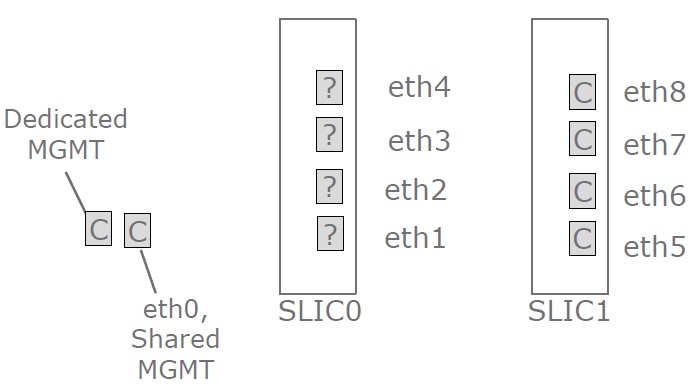
Remote Management Modules (RMM) Channel 4 = Dedicated
Remote Management Modules (RMM) Channel 1 = Shared
Remote Management Module (RMM) Port Configuration
ipmitool lan print 1
ipmitool lan print 4
The question marks (?) on the diagram for SLIC0 represent the option to either be copper or a fiber card.
SLIC1 is copper. Gen4T Network Interface Card (NIC) bonding requires two copper ports for the internal network. Therefore, eth7 and eth8 (bond1) are reserved for this purpose in a grid.
The default backup network, bond0 consists of eth1 and eth2, unless the shared Management port is used. The eth3 and eth4 (bond2) are reserved for optional replication networks, while eth5 and eth6 (bond3) are reserved for optional management networks.
There are two variants for configuring the backup network, depending on the configuration of the Management interface:
- Dedicated Management port (factory default) - bond0 (eth1/eth2)
- Shared Management port - bond0 (eth0/eth2)
Network Configuration:
The default bonding mode for both backup and internal networks is always set to active-backup (mode 1). Configuring dynamic link aggregation (802.3ad or mode 4) is supported on the backup network. It is not supported for the internal network.
The following files are being used to configure network interfaces on Avamar nodes:
- Dedicated Management port (factory default)
- /etc/sysconfig/network/ifcfg-eth0
- /etc/sysconfig/network/ifcfg-eth1
- /etc/sysconfig/network/ifcfg-eth2
- /etc/sysconfig/network/ifcfg-eth7
- /etc/sysconfig/network/ifcfg-eth8
- /etc/sysconfig/network/ifcfg-bond0 (backup network)
- /etc/sysconfig/network/ifcfg-bond1 (internal network)
- /etc/modprobe.conf.local
- Shared Management port
- /etc/sysconfig/network/ifcfg-eth0
- /etc/sysconfig/network/ifcfg-eth2
- /etc/sysconfig/network/ifcfg-eth7
- /etc/sysconfig/network/ifcfg-eth8
- /etc/sysconfig/network/ifcfg-bond0 (backup network)
- /etc/sysconfig/network/ifcfg-bond1 (internal network)
- /etc/modprobe.conf.local
- Additional files that can be populated if the optional replication and management networks are configured
- /etc/sysconfig/network/ifcfg-eth3
- /etc/sysconfig/network/ifcfg-eth4
- /etc/sysconfig/network/ifcfg-eth5
- /etc/sysconfig/network/ifcfg-eth6
- /etc/sysconfig/network/ifcfg-bond2 (optional replication network)
- /etc/sysconfig/network/ifcfg-bond3 (optional management network)
To verify and correct the configuration, review the configuration templates below.
Notes:
- For any configuration changes, the Avamar software must be cleanly shut down to avoid the data corruption or the data loss.
- The configuration of internal network should never be changed from the default settings (unless the specific class of IP addresses is used).
- Only Professional Services perform changes to the IP or hostname on the Avamar. Customers and Avamar Support must not perform this activity.
- It is unacceptable to copy network interface configuration files simply by adding a suffix (for example, ifcfg-eth0) as the network scripts attempt to bring all interfaces with the names starting with "ifcfg" up. The correct way to copy a configuration file is by adding a prefix and, optionally, a suffix. For example: X-ifcfg-eth0old
- Replace all example IPADDR=<IP_ADDRESS> and NETMASK=<NETMASK> entries in the templates below with the real IP addresses and netmask values.
- The miimon=100 setting is mandatory in SLES 12 and newer for every bond interface. If the setting is missing, the bond interface does not come up.
Configuration templates:
Internal network:
All Avamar Gen4T nodes (except single-node systems) must have identical ifcfg-eth7 and ifcfg-eth8 files, which configure the bond1 interfaces. The content of both files should be as follows:
STARTMODE=onboot
BOOTPROTO=none
USERCONTROL=no
ONBOOT=yes
MASTER=bond1
SLAVE=yes
The content of ifcfg-bond1 file is mostly the same across all nodes, except for the IPADDR field, since that field depends on the specific node. It should list both slave interfaces and the primary interface (always eth7)
STARTMODE=onboot
BOOTPROTO=static
IPADDR=<IP_ADDRESS>
NETMASK=<NETMASK>
BONDING_MASTER=yes
BONDING_SLAVE0=eth7
BONDING_SLAVE1=eth8
BONDING_MODULE_OPTS="primary=eth7 miimon=100 mode=1"
The last option (mode=1) is crucial as it defines the bonding mode. If the bonding mode is also defined in /etc/modprobe.conf.local, this is a redundant definition, however SuSE best practices mention that the bonding mode is defined in /etc/sysconfig/network/ifcfg-bondX files.
If the mode specified here is different than the mode from /etc/modprobe.conf.local, it overrides the setting from /etc/modprobe.conf.local.
Checking the bonding mode can be performed by listing the content of the /proc/net/bonding/bondX file and searching for the string "Bonding Mode".
For example, to check if the bonding mode is correct for bond1, the following command can be used:
grep "Bonding Mode" /proc/net/bonding/bond1
Sample output:
In the example above, the mode is correctly listed as active-backup. This command can be used to check every bond on the node.
root@avamar:~/#: grep "Bonding Mode" /proc/net/bonding/bond1
Bonding Mode: fault-tolerance (active-backup)
In the example above, the mode is correctly listed as active-backup. This command can be used to check every bond on the node.
Backup network:
In a default configuration where the Management port is set to dedicated, the content of ifcfg-eth1 and ifcfg-eth2 files should be identical and should look like on the example below:
In this configuration, the /etc/sysconfig/network/ifcfg-eth0 file should only contain a basic entry, however it must exist for the licensing purposes. The only line in the file should be as follows:
If the shared Management port is used, the ifcfg-eth0 file is used instead of ifcfg-eth1. The contents of the file is the same as ifcfg-eth2.
The ifcfg-bond0 should list both slave interfaces and the primary slave interface. Fields like IPADDR and NETMASK depend on the external network settings.
Example of the /etc/sysconfig/network/ifcfg-bond0 for shared Management interface:
Replication network (optional)
The replication network (if configured) should use the ifcfg-eth3, ifcfg-eth4 and ifcfg-bond2 files.
The ifcfg-eth3 and ifcfg-eth4 files should be identical with the following content:
The content of ifcfg-bond2 should contain unique IPADDR and NETMASK fields, depending on the external network and common definitions of slave interfaces.
Example below:
Management network (optional)
The replication network (if configured) should use the ifcfg-eth5, ifcfg-eth6 and ifcfg-bond3 files.
The ifcfg-eth5 and ifcfg-eth6 files should be identical with the following content:
The content of ifcfg-bond3 should contain unique IPADDR and NETMASK fields, depending on the external network and common definitions of slave interfaces.
Example below:
Correcting the configuration
The configuration changes are performed by editing the files mentioned above using vi.
If changes to the files in /etc/sysconfig/network/ directory have been made, the restart of the whole network service is not required. The modified interfaces can be restarted using
It is important to know which interface was used to connect to the system to not stop that interface. If changes to the interface used to connect to a node have been performed, the network service must be restarted (as root user) using the following command:
The alternative way of modifying network settings is to use Yet Another System Tool (YAST) as root. There is no need to restart interfaces if YAST was used as that is a part of the YAST scripts.
STARTMODE=onboot
BOOTPROTO=none
USERCONTROL=no
ONBOOT=yes
MASTER=bond0
SLAVE=yes
In this configuration, the /etc/sysconfig/network/ifcfg-eth0 file should only contain a basic entry, however it must exist for the licensing purposes. The only line in the file should be as follows:
STARTMODE=onboot
If the shared Management port is used, the ifcfg-eth0 file is used instead of ifcfg-eth1. The contents of the file is the same as ifcfg-eth2.
The ifcfg-bond0 should list both slave interfaces and the primary slave interface. Fields like IPADDR and NETMASK depend on the external network settings.
Example of the /etc/sysconfig/network/ifcfg-bond0 for dedicated Management interface (default configuration):
STARTMODE=onboot
BOOTPROTO=static
IPADDR=<IP_ADDRESS>
NETMASK=<NETMASK>
BONDING_MASTER=yes
BONDING_SLAVE0=eth1
BONDING_SLAVE1=eth2
BONDING_MODULE_OPTS="primary=eth1 miimon=100 mode=1"
Example of the /etc/sysconfig/network/ifcfg-bond0 for shared Management interface:
STARTMODE=onboot
BOOTPROTO=static
IPADDR=<IP_ADDRESS>
NETMASK=<NETMASK>
BONDING_MASTER=yes
BONDING_SLAVE0=eth0
BONDING_SLAVE1=eth2
BONDING_MODULE_OPTS="primary=eth0 miimon=100 mode=1"
The replication network (if configured) should use the ifcfg-eth3, ifcfg-eth4 and ifcfg-bond2 files.
The ifcfg-eth3 and ifcfg-eth4 files should be identical with the following content:
STARTMODE=onboot
BOOTPROTO=none
USERCONTROL=no
ONBOOT=yes
MASTER=bond2
SLAVE=yes
The content of ifcfg-bond2 should contain unique IPADDR and NETMASK fields, depending on the external network and common definitions of slave interfaces.
Example below:
STARTMODE=onboot
BOOTPROTO=static
IPADDR=<IP_ADDRESS>
NETMASK=<NETMASK>
BONDING_MASTER=yes
BONDING_SLAVE0=eth3
BONDING_SLAVE1=eth4
BONDING_MODULE_OPTS="primary=eth3 miimon=100 mode=1"
Management network (optional)
The replication network (if configured) should use the ifcfg-eth5, ifcfg-eth6 and ifcfg-bond3 files.
The ifcfg-eth5 and ifcfg-eth6 files should be identical with the following content:
STARTMODE=onboot
BOOTPROTO=none
USERCONTROL=no
ONBOOT=yes
MASTER=bond3
SLAVE=yes
The content of ifcfg-bond3 should contain unique IPADDR and NETMASK fields, depending on the external network and common definitions of slave interfaces.
Example below:
STARTMODE=onboot
BOOTPROTO=static
IPADDR=<IP_ADDRESS>
NETMASK=<NETMASK>
BONDING_MASTER=yes
BONDING_SLAVE0=eth5
BONDING_SLAVE1=eth6
BONDING_MODULE_OPTS="primary=eth5 miimon=100 mode=1"
Correcting the configuration
The configuration changes are performed by editing the files mentioned above using vi.
If changes to the files in /etc/sysconfig/network/ directory have been made, the restart of the whole network service is not required. The modified interfaces can be restarted using
ifdown <interface>
ifup <interface>
It is important to know which interface was used to connect to the system to not stop that interface. If changes to the interface used to connect to a node have been performed, the network service must be restarted (as root user) using the following command:
systemctl restart network.service
The alternative way of modifying network settings is to use Yet Another System Tool (YAST) as root. There is no need to restart interfaces if YAST was used as that is a part of the YAST scripts.
Affected Products
AvamarProducts
Avamar, Avamar Data Store Gen4TArticle Properties
Article Number: 000053372
Article Type: Solution
Last Modified: 30 Jun 2025
Version: 8
Find answers to your questions from other Dell users
Support Services
Check if your device is covered by Support Services.