Dell Unity: Another Reason for Error Code 0x6400b76 During Centralized ESRS Secure Remote Services Registration
Summary: Unity Secure Remote Services (ESRS) Registration can fail with Error Code 0x6400b76. (User Correctable)
This article applies to
This article does not apply to
This article is not tied to any specific product.
Not all product versions are identified in this article.
Symptoms
Customer has relocated the box. The site ID has been changed.
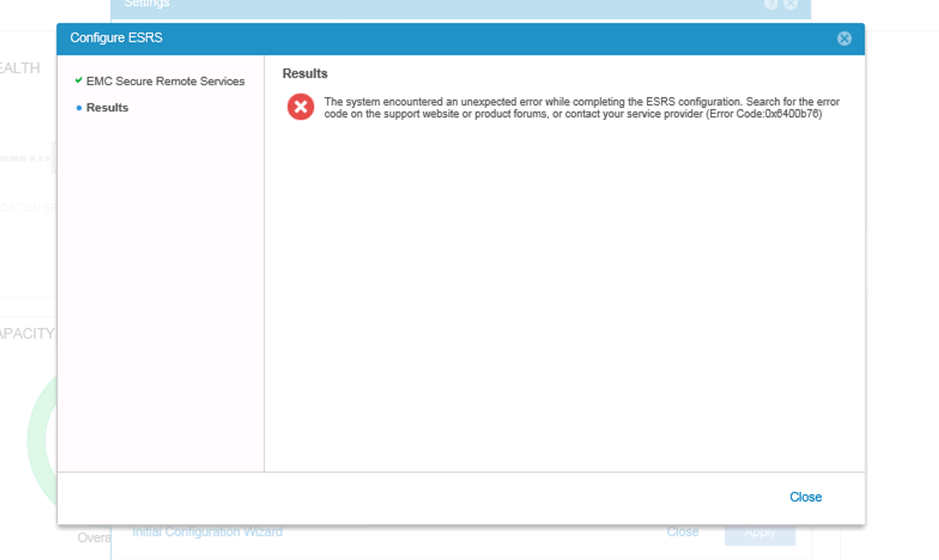
Configure the Centralized ESRS on Unity, it fails with the Error Code 0x6400b76:
From the Unity ESES log, we could found the ESRS gateway replied 500 error 'An error has occurred while adding device with SN CKMuuuuuuuuuuu Product Type UNITY',
Tue Jun 25 03:27:48 2019 ESRS_VE.pl:31458: REST client constructor host: https://g.g.g.g:9443/
Tue Jun 25 03:27:48 2019 ESRS_VE.pl:31458: About to enter pre action eVE state.
Tue Jun 25 03:27:48 2019 ESRS_VE.pl:31458: Skip the pre action state check since it's not a integrated only action.
Tue Jun 25 03:27:48 2019 ESRS_VE.pl:31458: Creating ESRS VE REST request for ACTION_ADD
Tue Jun 25 03:27:49 2019 ESRS_VE.pl:31458: Base url for ACTION_ADD is: esrs/v1/devices/UNITY/CKMuuuuuuuuuuu
Tue Jun 25 03:27:52 2019 ESRS_VE.pl:31458: Add/Modify Device Request: esrs/v1/devices/UNITY/CKMuuuuuuuuuuu
Tue Jun 25 03:27:52 2019 ESRS_VE.pl:31458: Headers: $VAR1 = {
'Accept-Charset' => 'UTF-8',
'Content-Type' => 'application/json',
'Accept' => 'application/json; charset=UTF-8',
'Authorization' => 'account@cccc.com:****************'
};

Tue Jun 25 03:27:52 2019 ESRS_VE.pl:31458: Content: { "ipAddress" : "u.u.u.u" }
Tue Jun 25 03:27:56 2019 ESRS_VE.pl:31458: Response code: $VAR1 = '201';

Tue Jun 25 03:27:56 2019 ESRS_VE.pl:31458: Response content: $VAR1 = '{"message":"An error has occurred while adding device with SN CKMuuuuuuuuuuu Product Type UNITY","serialNumber":"CKMuuuuuuuuuuu","gatewaySerialNumber":"ELMESRggggggRF","veType":"Connected","model":"UNITY","responseCode":500}';

Tue Jun 25 03:27:56 2019 ESRS_VE.pl:31458: Saving ADD metadata
Tue Jun 25 03:27:56 2019 ESRS_VE.pl:31458: Decoded response: $VAR1 = {
'veType' => 'Connected',
'responseCode' => 500,
'message' => 'An error has occurred while adding device with SN CKMuuuuuuuuuuu Product Type UNITY',
'model' => 'UNITY',
'gatewaySerialNumber' => 'ELMESRggggggRF',
'serialNumber' => 'CKMuuuuuuuuuuu'
};
See KB article Dell Unity: Centralized ESRS registration failure Error Code 0x6400b76 for the same Error Code 0x6400b76 (But for different issues). (Dell Support login may be required to view this article)
When trying to add the Unity using Servicelink website, it shows an error: "Error occurred while attempting to validate the site id." (Adding Unity on Servicelink is for test only).
Cause
This is due to the site ID setting issue.
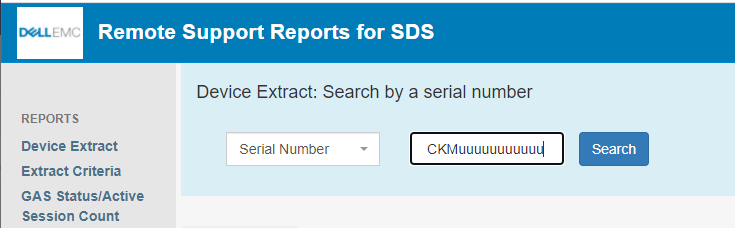
Check the ESRS site ID information per following link by the serial number "CKMuuuuuuuuuuu."
https://srssdsreports.cfcd.isus.emc.com/
| Party # | Serial # | Part # | Product Type | Model | Part Type | Service Duns | Status | Last Update | Create Date |
|---|---|---|---|---|---|---|---|---|---|
100nnnnnnn |
CKMuuuuuuuuuuu |
900-xxx-xxx |
UNITY |
T34xxxxxxxxxxxx |
SERIAL NUMBER TAG |
INSTALL - T&M |
xx/xx/xxxx |
xx/xx/xxxx |
|
85ooooo |
CKMuuuuuuuuuuu |
900-xxx-xxx |
UNITY |
T34xxxxxxxxxxxx |
SERIAL NUMBER TAG |
SHIPPED |
xx/xx/xxxx |
xx/xx/xxxx |
We have found there are two site IDs linked, and the status are NOT "INSTALL."
Resolution
We must engage the account team or Install Base team to correct it.
The requirement is to keep only one site ID which is linked to the Unity and the status should be "INSTALL."
Affected Products
Dell Unity 300, Dell EMC Unity 300F, Dell EMC Unity 350F, Dell EMC Unity 400, Dell EMC Unity 450F, Dell EMC Unity 500, Dell EMC Unity 500F, Dell EMC Unity 550F, Dell EMC Unity 600, Dell EMC Unity 600F, Dell EMC Unity 650FProducts
Dell EMC Unity 650F, Dell EMC Unity FamilyArticle Properties
Article Number: 000056148
Article Type: Solution
Last Modified: 30 Jun 2026
Version: 5
Find answers to your questions from other Dell users
Support Services
Check if your device is covered by Support Services.