RecoverPoint für virtuelle Maschinen: Prozessabstürze auf vRPAs, die Auswirkungen auf die Replikation haben
Summary: Konsistenzgruppen (CGs) mit Fehlerstatus als RecoverPoint Appliances (RPAs) können nicht auf Repository- (KVOL) und Journal-Volumes (JVOL) zugreifen.
This article applies to
This article does not apply to
This article is not tied to any specific product.
Not all product versions are identified in this article.
Symptoms
In RecoverPoint for VMs (RP4VMs)-Umgebungen können Konsistenzgruppen (Consistency Groups, CGs) in einen Fehlerstatus versetzt werden, da die RPAs nicht auf das Repository und die Journal-Volumes zugreifen können.
Fehler in der Dashboard- oder Systemstatusausgabe:
ERROR: Journal volume [Copy, PROD, IOFilter_JVOL_00044] cannot be accessed by: RPA 2
Mögliche Fehler in Kontroll-/Replikationsprotokollen:
2020/02/12 23:40:02.275 - #0 - 13659/13550 - MultiPath: errno=0 PathImporter::importFinished: got MPI error: SanDiscoveryBoxMgrProxy connection lost (maybe storage process died?) a_res.error = 1
2020/02/12 23:40:02.275 - #2 - 13631/13550 - MultiPath: MPVolumeConnectingState::handleImportedPaths: requesting non-optimized:  a_volume = 0x483a04edc455f87e (StorageType=RP_VSTORAGE, revision=
2020/02/12 23:40:02.275 - #0 - 13631/13550 - MultiPath: errno=0 PathImporter::importFinished: got MPI error: SanDiscoveryBoxMgrProxy connection lost (maybe storage process died?) a_res.error = 1
2020/02/12 23:40:02.275 - #2 - 13631/13550 - MultiPath: MPVolumeConnectingState::handleImportedPaths: requesting all:  a_volume = 0x483a04edc455f87e (StorageType=RP_VSTORAGE, revision=
2020/02/12 23:40:02.275 - #0 - 13631/13550 - MultiPath: errno=0 PathImporter::importFinished: got MPI error: SanDiscoveryBoxMgrProxy connection lost (maybe storage process died?) a_res.error = 1
2020/02/12 23:40:02.275 - #2 - 13631/13550 - MultiPath: MultiIOSender::finish: IO error m_volume.getGuid() = 0x483a04edc455f87e &m_io = 0x7f5ef4887950 this = 0x7f5ef4887940 a_status = general error MPVolumeConnectingState
Das Speicherprotokoll zeigt an, dass die Protokollierung vor der aktuellen Zeit beendet wurde (Prozess wird nicht ausgeführt).
Ein weiteres Symptom kann sein, dass der Replikationsprozess neu gestartet wird.
Das RPA-Kernel-Protokoll (extrahiert "*/files/var/log/kern.log") zeigt "Out of memory killing" des Replikationsprozesses an:
Nov 26 13:36:40 localhost kernel: [4545420.314953] Out of memory: Kill process 4842 (replication) score 530 or sacrifice child
Nov 26 13:36:40 localhost kernel: [4545420.354484] Out of memory: Kill process 4842 (replication) score 530 or sacrifice child
Cause
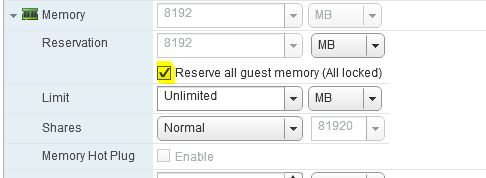
Die RPA-Prozesse stürzen aufgrund von unzureichendem Arbeitsspeicher ab. Auf RPA-VMs war nicht der gesamte Arbeitsspeicher reserviert.
Resolution
Problemumgehung:
Starten Sie die RPAs neu.
Auflösung:
Überprüfen Sie, ob auf allen RPAs der gesamte Gastspeicher reserviert ist.
Klicken Sie unter vSphere mit der rechten Maustaste auf die vRPA-VM > Einstellungen bearbeiten ... > Erweitern Sie den Abschnitt >Arbeitsspeicher, wählen Sie Alle Gastspeicher reservieren (Alle gesperrt)> und klicken Sie auf OK.
Affected Products
RecoverPointProducts
RecoverPoint, RecoverPoint for Virtual MachinesArticle Properties
Article Number: 000071407
Article Type: Solution
Last Modified: 01 May 2026
Version: 7
Find answers to your questions from other Dell users
Support Services
Check if your device is covered by Support Services.