RecoverPoint for Virtual Machines:vRPA 上的进程崩溃导致复制影响
Summary: 处于错误状态的一致性组 (CG) 无法访问 RecoverPoint Appliance (RPA) 的存储库 (KVOL) 和日志 (JVOL) 卷。
This article applies to
This article does not apply to
This article is not tied to any specific product.
Not all product versions are identified in this article.
Symptoms
在 RecoverPoint for VMs (RP4VMs) 环境中,一致性组 (CG) 可能会进入错误状态,因为 RPA 无法访问存储库和日志卷。
仪表板或系统状态输出中的错误:
ERROR: Journal volume [Copy, PROD, IOFilter_JVOL_00044] cannot be accessed by: RPA 2
控制/复制日志中可能出现的错误:
2020/02/12 23:40:02.275 - #0 - 13659/13550 - MultiPath: errno=0 PathImporter::importFinished: got MPI error: SanDiscoveryBoxMgrProxy connection lost (maybe storage process died?) a_res.error = 1
2020/02/12 23:40:02.275 - #2 - 13631/13550 - MultiPath: MPVolumeConnectingState::handleImportedPaths: requesting non-optimized:  a_volume = 0x483a04edc455f87e (StorageType=RP_VSTORAGE, revision=
2020/02/12 23:40:02.275 - #0 - 13631/13550 - MultiPath: errno=0 PathImporter::importFinished: got MPI error: SanDiscoveryBoxMgrProxy connection lost (maybe storage process died?) a_res.error = 1
2020/02/12 23:40:02.275 - #2 - 13631/13550 - MultiPath: MPVolumeConnectingState::handleImportedPaths: requesting all:  a_volume = 0x483a04edc455f87e (StorageType=RP_VSTORAGE, revision=
2020/02/12 23:40:02.275 - #0 - 13631/13550 - MultiPath: errno=0 PathImporter::importFinished: got MPI error: SanDiscoveryBoxMgrProxy connection lost (maybe storage process died?) a_res.error = 1
2020/02/12 23:40:02.275 - #2 - 13631/13550 - MultiPath: MultiIOSender::finish: IO error m_volume.getGuid() = 0x483a04edc455f87e &m_io = 0x7f5ef4887950 this = 0x7f5ef4887940 a_status = general error MPVolumeConnectingState
存储日志显示日志记录在当前时间之前停止(进程未运行)。
另一个症状可能是复制过程重新启动。
RPA 内核日志(提取的“*/files/var/log/kern.log”)显示复制过程的“内存不足终止”:
Nov 26 13:36:40 localhost kernel: [4545420.314953] Out of memory: Kill process 4842 (replication) score 530 or sacrifice child
Nov 26 13:36:40 localhost kernel: [4545420.354484] Out of memory: Kill process 4842 (replication) score 530 or sacrifice child
Cause
由于内存不足,RPA 进程崩溃。RPA 虚拟机没有保留所有内存。
Resolution
解决 方案:
重新启动 RPA。
分辨率:
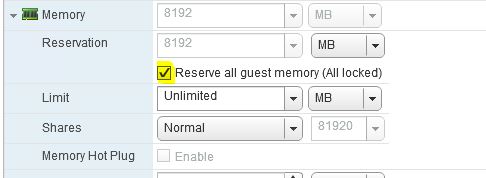
验证所有 RPA 是否都预留了所有来宾内存。
在 vSphere 下,右键单击 vRPA VM > Edit settings... >展开内存部分>,选择保留所有来宾内存(全部锁定),>然后单击确定。
Affected Products
RecoverPointProducts
RecoverPoint, RecoverPoint for Virtual MachinesArticle Properties
Article Number: 000071407
Article Type: Solution
Last Modified: 01 May 2026
Version: 7
Find answers to your questions from other Dell users
Support Services
Check if your device is covered by Support Services.