NetWorker: Hyper-V Fortinet VM backups fail during checkpoint creation
Summary: Fortinet Virtual Machines (VM) like fail to backup using NMM Hyper-V module with the error "Could not create backup checkpoint for virtual machine 'FortiAnalyzer': Unspecified error (0x80004005)." ...
This article applies to
This article does not apply to
This article is not tied to any specific product.
Not all product versions are identified in this article.
Symptoms
The FortiAnalyzer or Forti-Manager VM backups fail with below errors.
On nsrnmmsv.raw:
nsrnmmsv NSR critical Skipping component Online\Forti-Manager from backup in MICROSOFT_HYPERV manager.Unable to create snapshot for component. Error: Could not create backup checkpoint for virtual machine 'Forti-Manager': Unspecified error (0x80004005).
nsrnmmsv NSR critical Skipping component Online\FortiAnalyzer from backup in MICROSOFT_HYPERV manager.Unable to create snapshot for component. Error: .
Hyper-V VMMS logs report:
Could not create backup checkpoint for virtual machine 'FortiAnalyzer': Unspecified error (0x80004005). (Virtual machine ID ...
Checkpoint operation for 'FortiAnalyzer' failed. (Virtual machine ID ...
Checkpoint operation for 'FortiAnalyzer' was cancelled. (Virtual machine ID ...
Cause
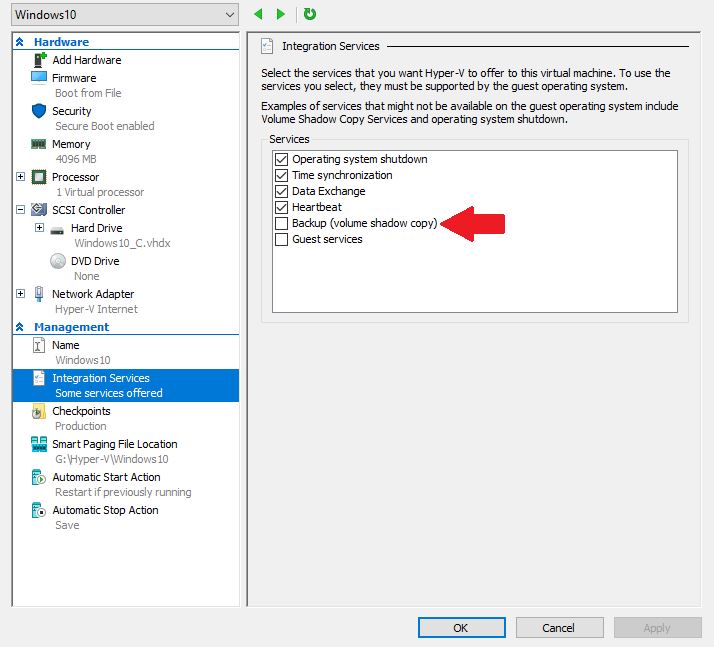
The VM has "Backup (volume shadow copy)" option checked.
FortiManager and FortiAnalyzer virtual appliances do NOT support VSS.
Resolution
Perform a saved state backup.
- Go to the Failover Cluster Manager.
- Go to VM setting.
- Go to Integration Services Tab.
- Clear "Backup (volume checkpoint)"
Additional Information
Saved State method- With a crash consistent backup, the VM is offline or does not have the IC installed or the VM does not support the VSS framework. In this case, the VM is paused before shadow copy creation and resumed after the shadow is created.
The Hyper-V writer in the management operating system determines if the backup image is application consistent or crash consistent. You do not need to select the backup type when you perform on-demand or scheduled backups.
With image-level saved state or offline backups, the backup operation puts the VM into a saved state during the processing of the PrepareForSnapshot event. The backup process takes snapshots of the appropriate volumes and then returns the VM to the previous state during the processing of the Post-Snapshot event.
Use image‑level saved state backups when Integration Components cannot be installed on Windows clients. Use this method also when the guest operating system, such as Linux, does not support VSS. These backups do not communicate with the Hyper-V VSS writer in the VM. As a result, they ensure crash consistency, not application consistency, of the writers running in the VM.
During the saved state method, the VM does not respond to ping. Most applications and databases continue to operate because the guest VM is unaware of the backup process.
For more information about saved state backups:
https://docs.microsoft.com/en-us/previous-versions/windows/desktop/virtual/backing-up-and-restoring-virtual-machines?redirectedfrom=MSDN#backing-up-the-virtual-machines
https://docs.microsoft.com/en-us/system-center/dpm/back-up-hyper-v-virtual-machines?view=sc-dpm-2019#online-and-offline-backup
Affected Products
NetWorker, NetWorker Module for MicrosoftProducts
NetWorker Module, NetWorker Module for MicrosoftArticle Properties
Article Number: 000079482
Article Type: Solution
Last Modified: 18 Apr 2026
Version: 5
Find answers to your questions from other Dell users
Support Services
Check if your device is covered by Support Services.