EqualLogic:如何更换 48 磁盘 EQL PS65x0 阵列上的硬盘
Summary: 本指南介绍如何访问 Dell EqualLogic PS65x0 阵列中的磁盘盘位。
This article applies to
This article does not apply to
This article is not tied to any specific product.
Not all product versions are identified in this article.
Instructions
PS6500 是一个包含 48 个磁盘驱动器的平台。将机箱小心地从机架中拉出后,将从顶部插入磁盘。
除非在维修阵列时,否则不应卸下顶盖。如果长时间关闭护盖,则会干扰机箱内的气流一致性。
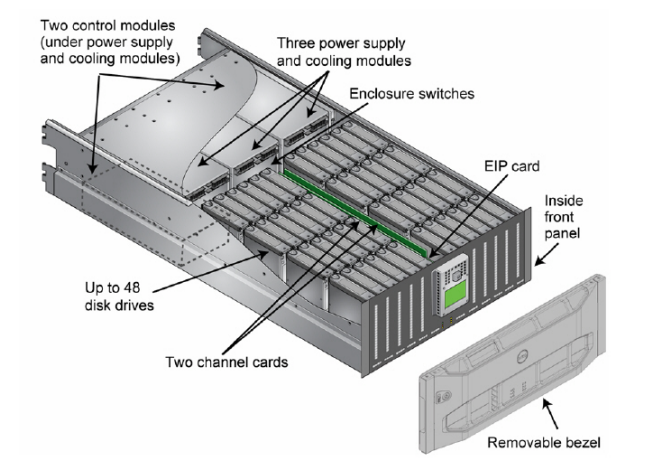
通过插入挡板钥匙解锁挡板,可以卸下挡板。然后推动挡板免工具闩锁,以从机箱上松开挡板。这随后会显示前面板。
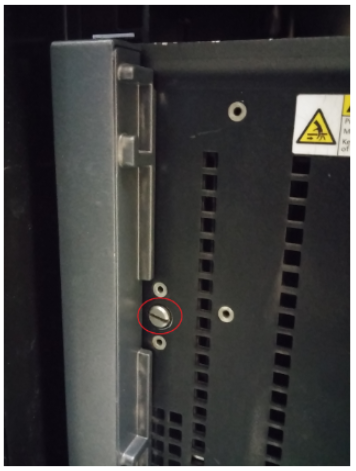 拧下每一侧的螺钉后,拉动前面板以便能够访问磁盘。
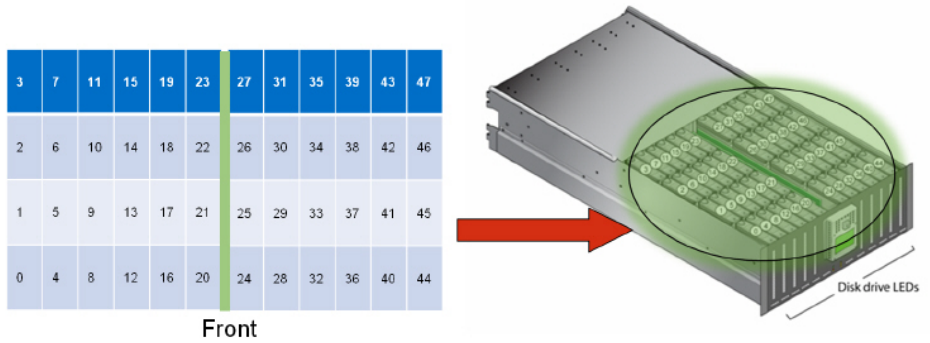 磁盘驱动器编号 磁盘编号为 0-47。磁盘驱动器分为两个 24 个部分,通道卡在磁盘驱动器部分之间。
左侧部分是磁盘驱动器 0-23,磁盘 0 位于左下角的前行。
右侧部分是磁盘驱动器 24-47。磁盘 47 位于最右上方。
除非在维修阵列时,否则不应卸下顶盖。如果长时间关闭护盖,则会干扰机箱内的气流一致性。
通过插入挡板钥匙解锁挡板,可以卸下挡板。然后推动挡板免工具闩锁,以从机箱上松开挡板。这随后会显示前面板。
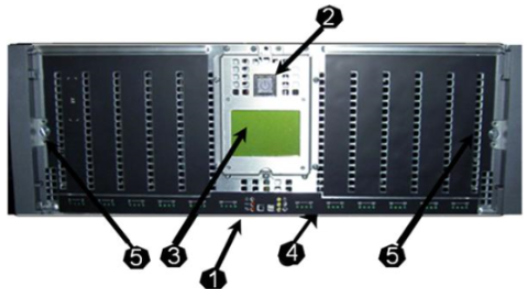
- 阵列硬件状态 LED
- 六个 LED
- 位于电源开关的每一侧
- 电源按钮
- 亮起时为蓝色
- LCD 面板
- 识别硬件故障
- 磁盘驱动器 LED
- 绿色表示磁盘已存在且已通电
- 闪烁表示有活动
- 凸轮螺钉
- 固定前面板
左侧部分是磁盘驱动器 0-23,磁盘 0 位于左下角的前行。
右侧部分是磁盘驱动器 24-47。磁盘 47 位于最右上方。
Affected Products
Equallogic PS6500, Equallogic PS6500e, EqualLogic PS6500ES, EqualLogic PS6500X, Equallogic PS6510, Equallogic PS6510e, EqualLogic PS6510XArticle Properties
Article Number: 000105242
Article Type: How To
Last Modified: 31 Jul 2026
Version: 5
Find answers to your questions from other Dell users
Support Services
Check if your device is covered by Support Services.