Dell Endpoint Security Suite Enterprise Advanced Threat Prevention "Can’t find DLL entry point GETUSERDEFAULTCID in kernel32"
Summary: This article discusses an issue where Dell Endpoint Security Suite Enterprise Advanced Threat Prevention causes an error in Microsoft Excel or Microsoft Access.
This article applies to
This article does not apply to
This article is not tied to any specific product.
Not all product versions are identified in this article.
Symptoms
Note:
- As of May 2022, Dell Endpoint Security Suite Enterprise has reached End of Maintenance. This article is no longer updated by Dell. For more information, reference Product Life Cycle (End of Support / End of Life) Policy for Dell Data Security. If you have any questions on alternative articles, either reach out to your sales team or contact endpointsecurity@dell.com.
- Reference Endpoint Security for additional information about current products.
Affected Products:
Dell Endpoint Security Suite Enterprise
When Advanced Threat Prevention is installed, the error Can’t find DLL entry point GETUSERDEFAULTCID in kernel32 may appear when attempting to import Excel spreadsheet data into an Access database or Export data from an Access database to an Excel spreadsheet.
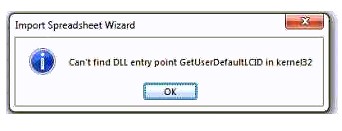
Figure 1: (English Only) Import Spreadsheet wizard error
Cause
The Memory Protection module of Advanced Threat Prevention injects into both Microsoft Excel and Microsoft Access, which causes this function to fail.
Resolution
To resolve this issue, configure exclusions in Memory Protection for both Access and Excel.
\Program Files (x86)\Microsoft Office\Root\Office16\EXCEL.EXE
\Program Files (x86)\Microsoft Office\Root\Office16\MSACCESS.EXE
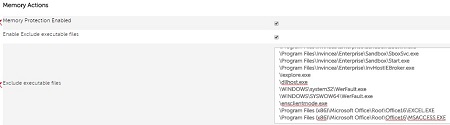
Figure 2: (English Only) Memory Actions
Note: These are only example exclusions and vary based on the version of Office installed.
To contact support, reference Dell Data Security International Support Phone Numbers.
Go to TechDirect to generate a technical support request online.
For additional insights and resources, join the Dell Security Community Forum.
Additional Information
Videos
Affected Products
Dell Threat DefenseArticle Properties
Article Number: 000124101
Article Type: Solution
Last Modified: 19 Apr 2026
Version: 9
Find answers to your questions from other Dell users
Support Services
Check if your device is covered by Support Services.