如何使用以前的密钥重新安装 Dell Encryption
Summary: 本文介绍如何重新安装 Dell Encryption(以前称为 Dell Data Protection |Encryption)。
This article applies to
This article does not apply to
This article is not tied to any specific product.
Not all product versions are identified in this article.
Instructions
受影响的产品:
- Dell Encryption
- Dell Data Protection | Encryption
Dell Encryption 为每个设备和用户利用特定的密钥集。在卸载 Dell Encryption 期间,无论是 远程 还是 本地 管理,我们都可以在没有解密代理的情况下卸载。这可防止数据被解密,并使 Dell Encryption 驱动程序保留并处于活动状态。
远程管理:
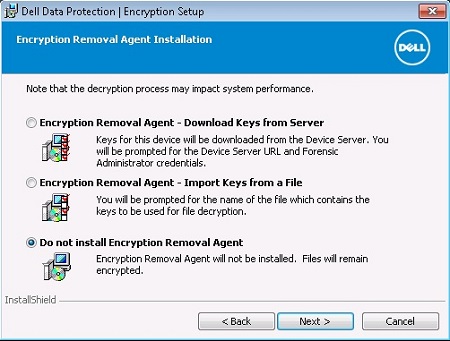
本地管理:
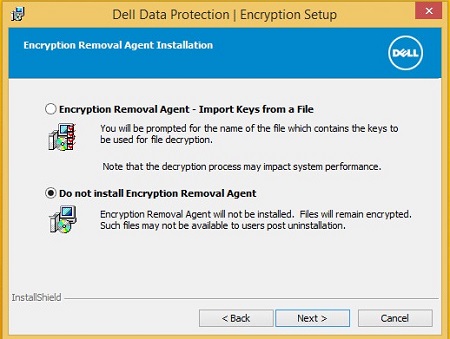
要重新安装并利用以前使用的密钥,我们必须再次运行安装。对于远程和本地管理,这是一个不同的过程。
远程管理:
Dell Encryption 端点利用名为 DCID 的标识符。这存储在注册表中。如果我们在不进行解密的情况下进行卸载,则此密钥应该就位。
此密钥的位置:
HKLM\Software\Microsoft\Windows NT\CurrentVersion\Winlogon\CMGshield
REG_SZ: DCID
Value: <8 character DCID>
此值在重新安装期间发送到服务器,并且特定于此设备的关键材料,并从服务器下载用户组合。
本地管理:
本地管理的 Dell Encryption 端点也利用 DCID。在激活向导期间,此项将被修改。
为了保留以前的密钥,并重新访问使用此密钥集加密的文件,我们必须找到并运行该文件。
重新运行安装程序并看到 Dell Encryption Personal(以前称为 Dell Data Protection |个人版),我们要运行 LSARecovery 文件,然后选择第二个选项。
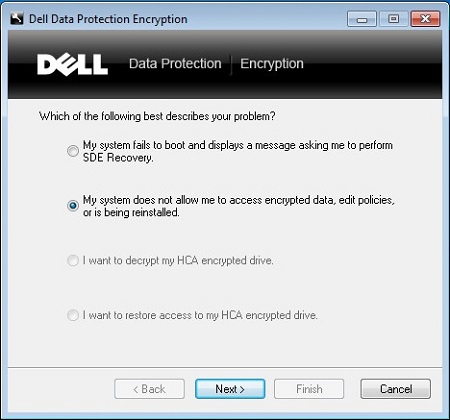
这会提示我们重新启动。
计算机重新启动后,将绕过配置向导,并从以前配置的设置中提取策略。
要联系支持部门,请参阅 Dell Data Security 国际支持电话号码。
转至 TechDirect,在线生成技术支持请求。
要获得更多见解和资源,请加入戴尔安全社区论坛。
Affected Products
Dell EncryptionArticle Properties
Article Number: 000125049
Article Type: How To
Last Modified: 19 Apr 2026
Version: 12
Find answers to your questions from other Dell users
Support Services
Check if your device is covered by Support Services.