如何建立 VMware Carbon Black Cloud Endpoint 感應器群組
Summary: 依照下列指示,瞭解為 VMware Carbon Black Cloud Endpoint 設定感應器群組的逐步指示。
This article applies to
This article does not apply to
This article is not tied to any specific product.
Not all product versions are identified in this article.
Instructions
本文說明如何在 VMware Carbon Black Cloud 中建立 VMware Carbon Black Cloud Endpoint 感應器群組。
受影響的產品:
- VMware Carbon Black Cloud Endpoint
受影響的作業系統:
- Windows
- Mac
- Linux
VMware Carbon Black 導入第 3 部份:原則與群組
03:37
隱藏式輔助字幕:提供多種語言版本
- 在網頁瀏覽器中,前往 [REGION].conferdeploy.net。
[REGION] = 租戶的地區。
- 登入 VMware Carbon Black Cloud。

- 在左窗格中,按一下端點。
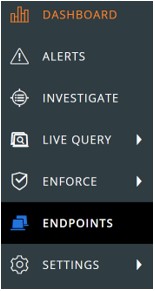 範例中的配置可能會與您的環境稍有不同。
 - 在右上角中,按一下新增群組。

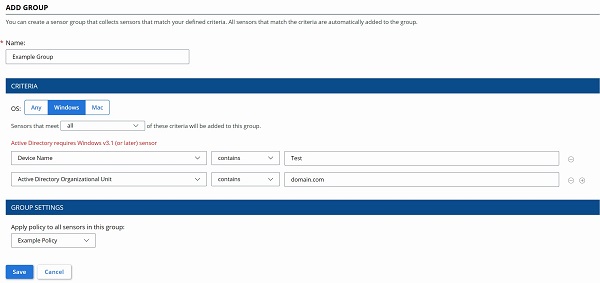
- 在新增群組功能表中:
- 填入群組名稱。
- 按一下適當的裝置作業系統。
- 為裝置選取準則。
- 選取要新增的裝置是否必須符合所有準則或任何準則。
- 套用原則至感應器群組。
- 按一下儲存。
 註:
註:- 符合準則的裝置會在兩分鐘後自動填入。
- 修改其準則以與感應器群組相符的裝置,將會在下次簽入時填入。
- 或者,按一下重新排序群組以變更感應器群組的優先順序。
 註:
註:- 頂部感應器群組的優先順序最高。
- 符合多個感應器群組準則的裝置會加入優先順序最高的群組。
- 不再符合準則的裝置會指派至標準原則。

Additional Information
Videos
Affected Products
VMware Carbon BlackArticle Properties
Article Number: 000125907
Article Type: How To
Last Modified: 10 Aug 2026
Version: 15
Find answers to your questions from other Dell users
Support Services
Check if your device is covered by Support Services.