BAD_SYSTEM_CONFIG_INFO or SESSION3_INITIALIZATION_FAILURE Error on a Dell Encryption Endpoints
Summary: Dell Encryption Enterprise and Dell Encryption Personal BAD_SYSTEM_CONFIG_INFO and SESSION3_INITIALIZATION_FAILURE errors can be resolved by following these instructions.
This article applies to
This article does not apply to
This article is not tied to any specific product.
Not all product versions are identified in this article.
Symptoms
Affected Products:
- Dell Encryption Enterprise
- Dell Data Protection | Enterprise Edition
- Dell Data Protection | Server Edition
- Dell Encryption Personal
- Dell Data Protection | Personal Edition
An endpoint protected with Dell Encryption Enterprise (formerly Dell Data Protection | Enterprise Edition) or Dell Encryption Enterprise Personal (formerly Dell Data Protection | Personal Edition) may display an error of:
BAD_SYSTEM_CONFIG_INFO (stop code 0x00000074)after modification or tampering of system32 files or hardware checksumsSESSION3_INITIALIZATION_FAILURE (stop code 0x0000006f)after modification or tampering of the Windows registry
Cause
These errors are a byproduct of Dell Encryption Enterprise or Dell Encryption Personal protecting the endpoint from unauthorized tampering.
Resolution
BAD_SYSTEM_CONFIG_INFO or SESSION3_INITIALIZATION_FAILURE occur during boot as either a:

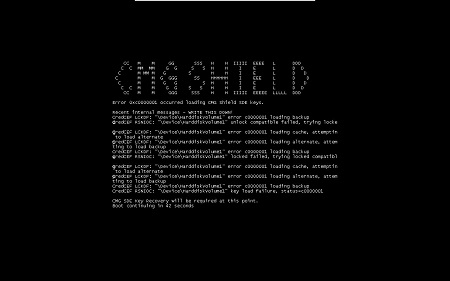
Note: The error may look slightly different on your endpoint.
If the checksums or registry modifications were intentional, then a local security administrator (LSA) recovery can be performed to resolve the blue or black screen. For more information about the recovery process, reference How to Run The Dell Encryption Enterprise / Dell Encryption Personal Recovery Bundle.
Affected Products
Dell EncryptionArticle Properties
Article Number: 000126735
Article Type: Solution
Last Modified: 30 Jul 2026
Version: 12
Find answers to your questions from other Dell users
Support Services
Check if your device is covered by Support Services.