Finding Dell system information at the Microsoft Account website
Summary: How to find your Dell system information using your registered Microsoft Account.
This article applies to
This article does not apply to
This article is not tied to any specific product.
Not all product versions are identified in this article.
Symptoms
You can find information, including service tag (serial number), on Dell systems registered with Microsoft at the Microsoft Account website following the steps provided below.
Dell system information available at Microsoft Account
For Dell systems registered with Microsoft, you can find system information (including service tag) when you log in to your Microsoft Account page following the steps below:
- Access your account at the following website: Microsoft Account

- Login to your account using your Microsoft account username and password
- Click Devices from the menu at the top of the page, or from the More drop-down menu
- Click the Show details link under each specific device that appears
- Click the Device info & support link to access system details (Figure 1):
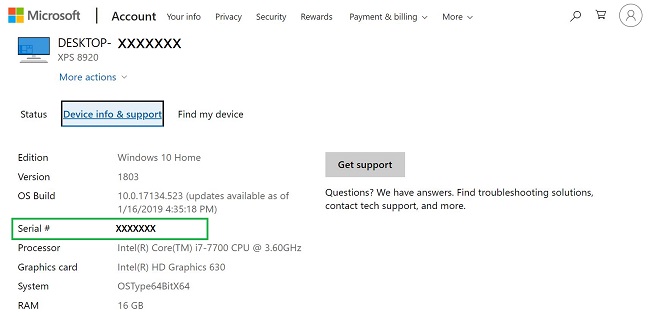
Figure 1: Device information from registered devices at the Microsoft Account website
Cause
none
Resolution
refer to the symptoms above
Article Properties
Article Number: 000128924
Article Type: Solution
Last Modified: 19 Apr 2026
Version: 5
Find answers to your questions from other Dell users
Support Services
Check if your device is covered by Support Services.