Dell Data Security-skærmtilstande
Summary: Denne artikel beskriver Dell Data Security-skjoldtilstandene (tidligere Dell Data Protection).
This article applies to
This article does not apply to
This article is not tied to any specific product.
Not all product versions are identified in this article.
Symptoms
Berørte produkter:
- Credant Mobile Guardian
- Dell Encryption Enterprise
- Dell Data Protection | Enterprise Edition
- Dell Encryption External Media
- Dell Data Protection | External Media Edition
- Dell Encryption Personal
- Dell Data Protection | Personal Edition
- Dell Data Protection | Security Tools
- Dell Encryption Enterprise til Server
- Dell Data Protection | Server Edition
Berørte platforme:
- Windows
Politikbaseret Dell Data Security-software (tidligere Dell Data Protection) bruger en skjoldtilstandsidentifikator til produktklassificering.
Cause
Advarsel:
- Afskærmningstilstanden bestemmes på tidspunktet for produktinstallationen og kan ikke ændres manuelt.
- Afskærmningstilstand bruges kun til fejlfinding af produkttype eller -status.
Resolution
Afskærmningstilstandene for Dell Data Security-produkter er:
| Id | Tilstand | Produkt |
|---|---|---|
| 0 | Ukendt/ikke-initialiseret | Ikke initialiseret/ikke-klargjort1 |
| 1 | Virksomhedstilstand | Dell Encryption Enterprise \ Dell Data Protection Enterprise Edition Shield |
| 2 | Selvstændig tilstand | Credant Mobile Guardian |
| 3 | Kun Enterprise EME-tilstand | Dell Encryption External Media \ Dell Data Protection | Udgave af eksterne medier |
| 4 | Lokalt administreret tilstand | Dell Encryption Personal \ Dell Data Protection | Personlig udgave |
| 5 | Essentials-tilstand | Dell-databeskyttelse | Sikkerhedsværktøjer2 |
| 6 | Serverkrypteringstilstand | Dell Encryption Enterprise til server \ Dell Data Protection | Serverkryptering |
| 7 | Saas-tilstand | Dell Encryption Enterprise Shield |
1Alle Dell Data Protection-produkter forbliver ikke-klargjort, indtil de aktiveres.
2Essential-tilstand forekommer kun ved installationer af Dell Data Protection | Sikkerhedsværktøjer.
Sådan finder du afskærmningstilstanden:
Advarsel: Fører dig ind i Windows-registreringsdatabasen:
- Redigering af registreringsdatabasen kan medføre, at computeren ikke svarer ved næste genstart.
- Kontakt telefonnumre til Dell Data Security International Support for at få hjælp, hvis du er betænkelig ved at udføre dette trin.
- Højreklik på startmenuen i Windows, og vælg herefter Kør.
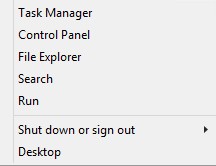
Figur 1: (Kun på engelsk) Køre
- Skriv regedit i brugergrænsefladen Kør i brugergrænsefladen, og tryk derefter på OK.
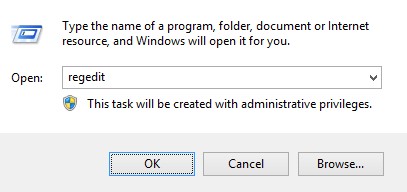
Figur 2: (Kun på engelsk) Skriv regedit
- Gå til HKEY_LOCAL_MACHINE\SOFTWARE\Credant\CMGShield.
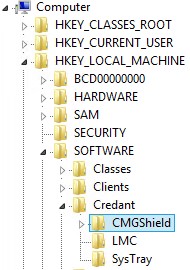
Figur 3: (Kun på engelsk) CMGShield
- Find DWORD-nøgle SM.
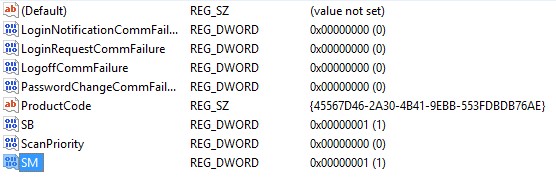
Figur 4: (Kun på engelsk) SM
Bemærk: I eksemplet er SM-nøglen indstillet til 1. Dette identificerer Enterprise-udgaven med afskærmningstilstand.
For at kontakte support kan du bruge internationale supporttelefonnumre til Dell Data Security.
Gå til TechDirect for at oprette en anmodning om teknisk support online.
Hvis du vil have yderligere indsigt og ressourcer, skal du tilmelde dig Dell Security Community-forummet.
Additional Information
Videos
Affected Products
Dell EncryptionArticle Properties
Article Number: 000132837
Article Type: Solution
Last Modified: 19 Apr 2026
Version: 11
Find answers to your questions from other Dell users
Support Services
Check if your device is covered by Support Services.