Dell Data Security Shieldのモード
Summary: この記事では、Dell Data Security(旧Dell Data Protection)シールド モードについて説明します。
This article applies to
This article does not apply to
This article is not tied to any specific product.
Not all product versions are identified in this article.
Symptoms
対象製品:
- Credant Mobile Guardian
- Dell Encryption Enterprise
- Dell Data Protection | Enterprise Edition
- Dell Encryption External Media
- Dell Data Protection | External Media Edition
- Dell Encryption Personal
- Dell Data Protection | Personal Edition
- Dell Data Protection | Security Tools
- Dell Encryption Enterprise for Server
- Dell Data Protection | Server Edition
影響を受けるプラットフォーム:
- Windows
ポリシーベースのDell Data Security(旧Dell Data Protection)ソフトウェアでは、製品分類にシールド モード識別子を使用します。
Cause
Warning:
- シールド モードは製品のインストール時に決定され、手動で変更することはできません。
- シールドモードは、製品タイプまたはステータスのトラブルシューティングにのみ使用されます。
Resolution
Dell Data Security製品のシールド モードは次のとおりです。
| ID | モード | 製品 |
|---|---|---|
| 0 | 不明/初期化されていない | 初期化されていない/プロビジョニングされていない1 |
| 1 | エンタープライズ モード | Dell Encryption Enterprise/Dell Data Protection Enterprise Edition Shield |
| 2 | スタンド アロン モード | Credant Mobile Guardian |
| 3 | エンタープライズEME専用モード | Dell Encryption External Media\Dell Data Protection |外付けメディア エディション |
| 4 | ローカル管理モード | Dell Encryption Personal\Dell Data Protection |パーソナルエディション |
| 5 | エッセンシャル モード | デルのデータ保護 |セキュリティ ツール2 |
| 6 | サーバー暗号化モード | Dell Encryption Enterprise for Server\Dell Data Protection |サーバー暗号化 |
| 7 | SaaSモード | Dell Encryption Enterprise Shield |
1台すべてのDell Data Protection製品は、アクティブ化されるまでプロビジョニングされないままになります。
2台エッセンシャル モードは、Dell Data Protection |セキュリティ ツール。
シールド モードを見つけるには、次の手順を実行します。
Warning: Windowsレジストリーに移動します。
- レジストリーを編集すると、次回の再起動時にコンピューターが応答しなくなる可能性があります。
- この手順の実行について懸念がある場合は、「デル データ セキュリティのインターナショナル サポート電話番号」にお問い合わせください。
- Windowsの「Start(スタート)」メニューを右クリックして、「Run(ファイル名を指定して実行)」を選択します。
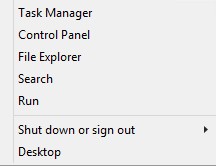
図1: (英語のみ)[ファイル名を指定して実行]
- [ファイル名を指定して実行]ユーザー インターフェイス(UI)で、「 regedit 」と入力して [OK]を押します。
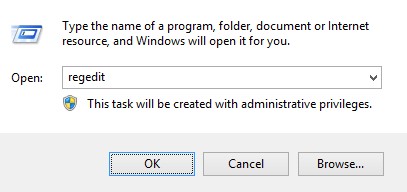
図2:(英語のみ)「regedit」と入力します
- HKEY_LOCAL_MACHINE\SOFTWARE\Credant\CMGShieldに移動します。
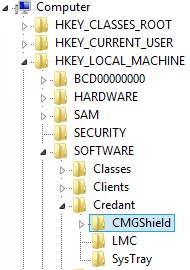
図3:(英語のみ)を参照してください。 CMGShield
- DWORD キーSMを見つけます。
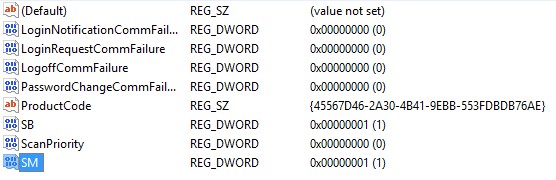
図4:(英語のみ)Sm
注:この例では、SMキーは1に設定されています。これは、シールド モードのエンタープライズ エディションを示します。
サポートに問い合わせるには、「Dell Data Securityのインターナショナル サポート電話番号」を参照してください。
TechDirectにアクセスして、テクニカル サポート リクエストをオンラインで生成します。
さらに詳しい情報やリソースについては、「デル セキュリティ コミュニティー フォーラム」に参加してください。
Additional Information
Videos
Affected Products
Dell EncryptionArticle Properties
Article Number: 000132837
Article Type: Solution
Last Modified: 19 Apr 2026
Version: 11
Find answers to your questions from other Dell users
Support Services
Check if your device is covered by Support Services.