Microsoft SQL Server: Asennus ja aktivointi ilman OEM-levyä
Summary: Tässä artikkelissa kerrotaan, miten OEM SQL Server asennetaan uudelleen, jos asennustietoväline on kadonnut.
This article applies to
This article does not apply to
This article is not tied to any specific product.
Not all product versions are identified in this article.
Instructions
Jos Microsoft SQL Server on ostettu Dell-palvelimen kanssa ja se on asennettava myöhemmin, alkuperäistä SQL Server -levyä ei tarvita. Tämä pätee riippumatta siitä, onko SQL Server asennettu palvelimeen tehtaalla alun perin. SQL Server -tuoteavain on kuitenkin pakollinen. Tämä avain on aitoustodistustarrassa (Certificate of Authenticity, COA), joka toimitettiin palvelimen mukana toimitetussa pakkauksessa. Tarra muistuttaa alla olevaa kuvaa.
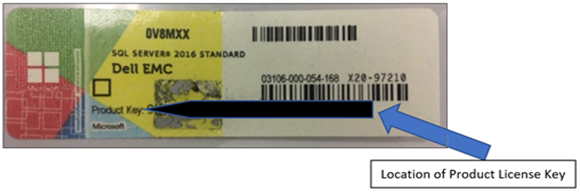
Kuva 1: SQL Server COA -tarra
Voit asentaa SQL Serverin ilman OEM-asennusvälinettä tai asentaa sen uudelleen seuraavasti.
1. Lataa SQL Serverin arviointikopio, joka on identtinen palvelimen mukana hankitun OEM SQL Server -version kanssa. Tämän voi ladata osoitteesta https://www.microsoft.com/en-us/evalcenter

2. Ladattu tiedosto on pieni suoritettava asennusohjelma.
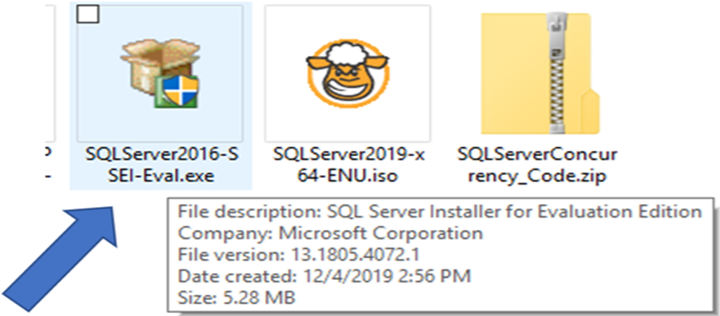
Kuva 2: SQL Serverin suoritettava asennusohjelma
3. Asennusohjelman suorittaminen tarjoaa kolme vaihtoehtoa:
- Perustiedot: Asenna SQL-tietokantamoduuli oletuskokoonpanolla.
- Mukautettu: Suorita SQL Serverin yksityiskohtainen asennus, jonka avulla voit määrittää erilaisia asetuksia.
- Lataa media: Lataa SQL Server -asennustietoväline kokonaisuudessaan ISO- tai CAB-muodossa, mutta älä aloita asennusta.
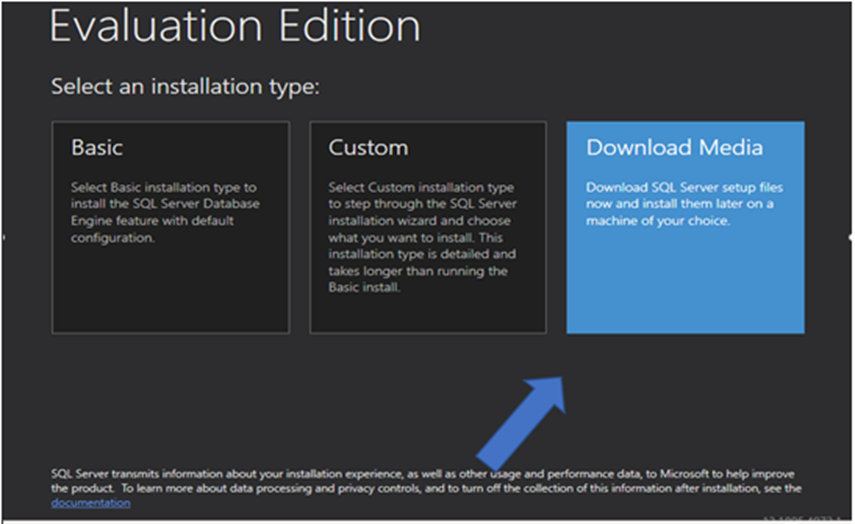
Kuva 3: SQL Server -asennusohjelman esittämät vaihtoehdot
4. Onnistuneen SQL Server -asennuksen jälkeen tuoteavain voidaan ottaa käyttöön suorittamalla setup.exe SQL Server -arviointitietovälineestä.
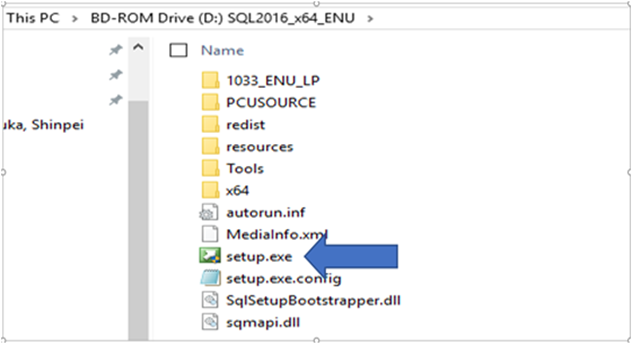
Kuva 4: pikanäppäimellä setup.exe tiedosto SQL Serverin arviointikuvassa
5. Valitse SQL Server Installation Centerin vasemmalta puolelta Maintenance ja valitse sitten Edition Upgrade.
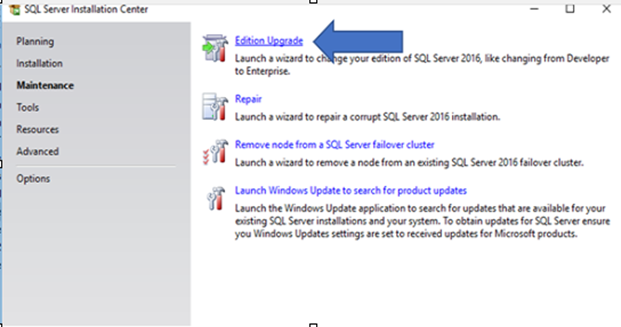
Kuva 5: SQL Server Maintenance Center, jossa Ylläpito valittuna vasemmalla
6. Valitse Anna tuoteavain ja kirjoita avain aitoustodistustarrasta kenttään.

Kuva 6: Kirjoita tuoteavain sille varattuun kenttään.
7. Käynnistä päivitys\aktivointiprosessi valitsemalla Next. Jatka prosessia, kunnes se on valmis.
Affected Products
Dell Quickstart Data Warehouse Appliance, Microsoft Windows Server 2016, Microsoft Windows Server 2019, Microsoft Windows Server 2022, Microsoft Windows Server 2025, Prosupport for Microsoft SoftwareProducts
PowerEdge FC640, PowerEdge M640, PowerEdge M640 (for PE VRTX), PowerEdge MX5016s, PowerEdge MX740C, PowerEdge MX750c, PowerEdge MX760c, PowerEdge MX840C, PowerEdge R240, PowerEdge R250, PowerEdge R260, PowerEdge R340, PowerEdge R350, PowerEdge R360
, PowerEdge R440, PowerEdge R450, PowerEdge R540, PowerEdge R550, PowerEdge R640, PowerEdge R6415, PowerEdge R650, PowerEdge R650xs, PowerEdge R6515, PowerEdge R6525, PowerEdge R660, PowerEdge R660xs, PowerEdge R6615, PowerEdge R6625, PowerEdge R740, PowerEdge R740XD, PowerEdge R740XD2, PowerEdge R7415, PowerEdge R7425, PowerEdge R750, PowerEdge R750XA, PowerEdge R750xs, PowerEdge R7515, PowerEdge R7525, PowerEdge R760, PowerEdge R760XA, PowerEdge R760xd2, PowerEdge R760xs, PowerEdge R7615, PowerEdge R7625, PowerEdge R840, PowerEdge R860, PowerEdge R940, PowerEdge R940xa, PowerEdge R960, PowerEdge T140, PowerEdge T150, PowerEdge T160, PowerEdge T340, PowerEdge T350, PowerEdge T360, PowerEdge T440, PowerEdge T550, PowerEdge T560, PowerEdge T640
...
Article Properties
Article Number: 000133149
Article Type: How To
Last Modified: 19 Apr 2026
Version: 6
Find answers to your questions from other Dell users
Support Services
Check if your device is covered by Support Services.